∙
Cooper
∙
Reading time:
15 min

Repetitive questions waste time and frustrate teams. IT, HR, and operations often spend hours answering the same queries, interrupting workflows and slowing productivity. Slack bots solve this by automating internal questions, connecting directly to verified documentation, and enabling self-service support - all without leaving Slack.
Key Benefits:
Automates repetitive tasks: Handles FAQs like password resets or PTO policies.
Centralizes knowledge: Pulls accurate answers from tools like Notion, Confluence, and Google Drive.
Empowers self-service: Employees find answers instantly, reducing reliance on colleagues.
For enterprises, tools like Question Base go beyond Slack’s built-in AI by sourcing verified, up-to-date information, ensuring accuracy and trust. This approach saves time, reduces interruptions, and boosts efficiency across teams.
Internal Support Challenges in Large Enterprises
Repetitive Questions Drain Support Teams
In big organizations, IT, HR, and operations teams often find themselves bogged down by repetitive questions, consuming 20–40% of their workday. Instead of focusing on strategic initiatives, these teams are stuck explaining the same things over and over - like how to reset passwords, navigate PTO policies, or get expense approvals. Each @mention or direct message interrupts their workflow, and regaining focus can take anywhere from 10 to 20 minutes.
The problem gets worse when critical knowledge isn’t documented but instead lives in the heads of a few key experts. If a senior engineer or HR leader - who holds the answers - takes time off, the entire team can feel the strain. Junior team members often struggle to step up, leading to bottlenecks and delays. This reliance on "tribal knowledge" creates a perfect storm of inefficiency and slow response times.
Knowledge Scattered Across Too Many Tools
Another major hurdle? Information is spread across too many platforms, making knowledge retrieval a constant struggle. Employees lose 20–30% of their week searching for answers buried in tools like Notion, Confluence, Google Drive, or Zendesk. Imagine trying to find a simple remote work policy - it might be in a Google Doc, a Confluence page, or an outdated Slack thread. Instead of having a clear source of truth, teams are forced to play detective.
Slack’s built-in search often adds to the frustration. It pulls up old conversations, irrelevant chatter, or incomplete answers rather than verified resources. This scattered approach not only slows things down but also chips away at employees’ trust in the system. The result? More interruptions and more delays, creating a domino effect that impacts overall productivity.
Delays and Inaccuracies Derail Productivity
When employees can’t get quick, accurate answers, it slows everything down. An engineer waiting on security approval might have to pause a project. A sales rep unsure about pricing could miss closing a deal. A new hire confused about benefits enrollment might waste hours trying to figure things out. Research shows employees spend about 33% of their day on low-value tasks [2], much of which comes from waiting for responses or searching for information.
For a company with 1,000 employees, the cost of these inefficiencies - context switching between Slack and other tools, repeated interruptions, and wasted time - can exceed $2 million annually in lost productivity. This highlights the urgent need for smarter, automated solutions like Slack bots that can fill the gaps in documentation and speed up support processes.
Build a Slack AI Agent That Answers Questions (Step-by-Step Tutorial)
How Slack Bots Improve Internal Support
Slack bots address key internal support challenges by automating repetitive tasks, streamlining knowledge access, and enabling self-service solutions. Instead of requiring employees to switch between tools or wait for human responses, these bots provide immediate, reliable answers directly within Slack. This approach shifts internal support from being a reactive process to a proactive system that grows alongside your organization. Let’s explore how automation, integration, and self-service reshape support workflows.
Automating Answers to Common Questions
Repetitive inquiries can bog down support teams, turning simple tasks into time-consuming distractions. Slack bots step in by handling these routine questions - like password resets, PTO policies, expense approvals, and onboarding procedures - so your team doesn’t have to. For instance, if an employee asks about travel expenses in Slack, Question Base quickly retrieves the answer from connected platforms like Notion, Confluence, or Google Drive. This eliminates the need for IT or HR to respond manually, allowing them to focus on higher-priority work.
The benefits extend beyond saving time. By automating these frequent queries, bots help reduce interruptions for support teams. Instead of being pulled away by constant @mentions, experts can stay focused on their tasks while employees still get the help they need. Take Plative, a global tech consulting firm, as an example. After implementing custom AI agents in Slack, their sales team experienced a 50% reduction in sales call preparation time and a 50% increase in upsell bookings. This demonstrates how automation can lead to faster resolutions, better results, and less burnout for teams [3].
Connecting to Your Documentation Systems
Unlike Slack’s built-in search, which often digs up outdated or incomplete information from old threads, Question Base connects directly to verified knowledge sources. These integrations include tools like Notion, Confluence, Google Drive, and Salesforce. When employees ask a question, the bot pulls the most accurate, up-to-date answer directly from official documentation.
This seamless access eliminates the need for employees to jump between multiple systems. For example, a new hire wondering about remote work policies doesn’t have to sift through scattered resources - they can simply ask the bot and get the verified policy in seconds. By ensuring everyone works from the same trusted information, these bots reduce the frustration of outdated threads and create a single source of truth. Beyond simplifying access, this centralized approach empowers employees to get what they need without delays.
Letting Employees Find Answers Themselves
The real game-changer with Slack bots is their ability to enable self-service support. When employees can independently find verified answers, they no longer have to wait for someone to respond. Whether it’s an engineer needing security approval details late at night or a sales rep clarifying pricing during a call, bots provide instant, round-the-clock access to critical knowledge.
This capability builds confidence across teams. Junior employees, for example, don’t have to feel stuck when senior colleagues are unavailable - they can rely on the bot to guide them forward. Over time, this reduces dependence on "tribal knowledge" and fosters a more agile, self-reliant workforce. By making it easy for employees to solve problems on their own, Slack bots help create a more efficient and empowered organization.
Question Base vs Slack AI: Built for Different Purposes
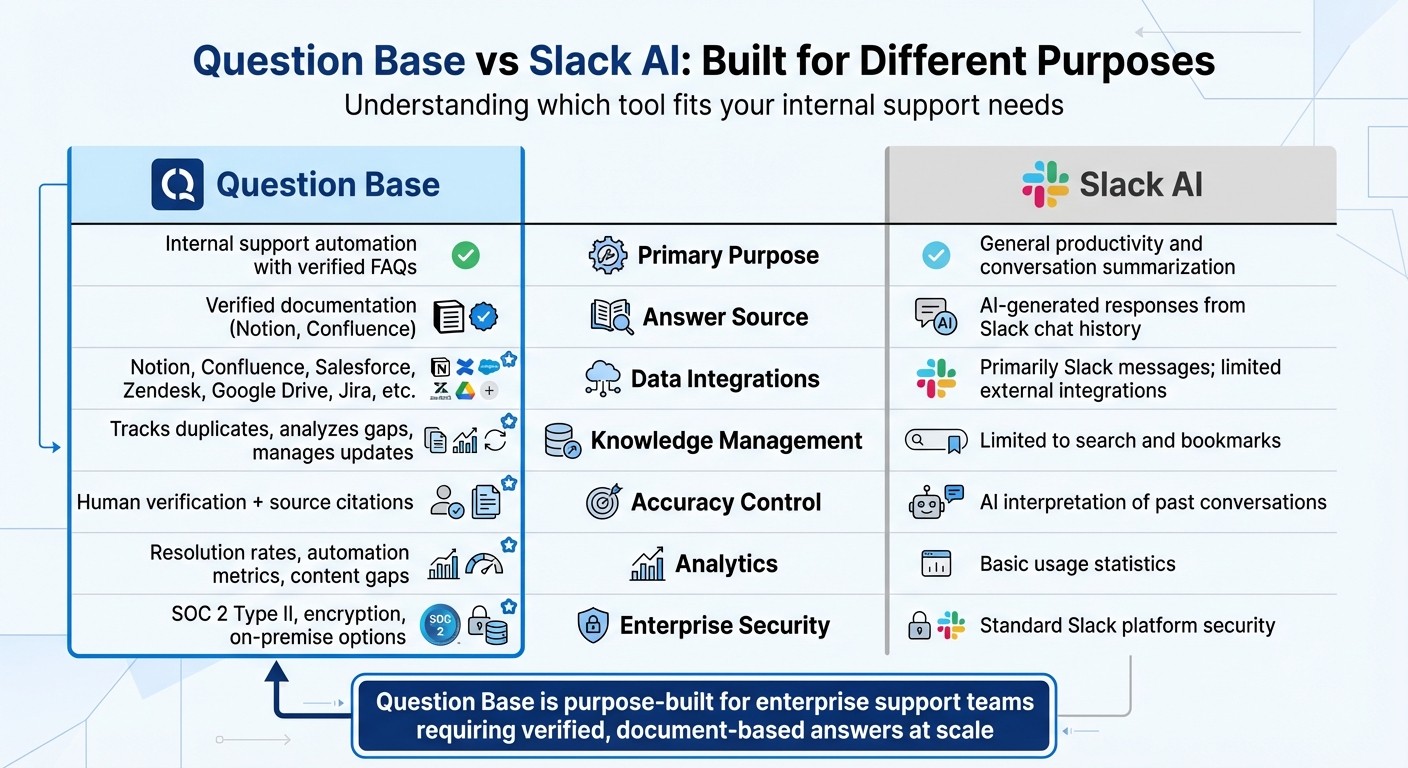
Question Base vs Slack AI Feature Comparison for Internal Support
When tackling internal support challenges, it's crucial to understand that not all AI tools are created for the same tasks. Slack AI focuses on improving productivity by summarizing conversations and searching through chat history. On the other hand, when accuracy and verified knowledge are priorities - like in internal support - these tools take entirely different approaches. Slack AI pulls responses from past conversations, while Question Base delivers verified answers sourced directly from official documentation. This shift represents how AI is transforming internal support within the enterprise Slack environment.
This difference becomes especially important for teams handling HR policies, IT troubleshooting, or operational workflows. For example, if an employee asks about a company policy, Slack AI might surface outdated or irrelevant information based on older chats. In contrast, Question Base pulls the latest version of the policy document, complete with a link to the source. This ensures employees always receive accurate, up-to-date information rather than an AI's interpretation of past discussions. Let’s break down their capabilities side by side to highlight these distinctions.
Feature Comparison: Question Base vs Slack AI
The key differences between Question Base and Slack AI become clear when you compare their features:
Feature | Question Base | Slack AI |
|---|---|---|
Primary Purpose | Internal support automation with verified FAQs | General productivity and conversation summarization |
Answer Source | Verified documentation (e.g., Notion, Confluence) | AI-generated responses from Slack chat history |
Data Integrations | Supports tools like Notion, Confluence, Salesforce, Zendesk, Google Drive, Jira, etc. | Primarily Slack messages; limited external integrations on higher tiers |
Knowledge Management | Tracks duplicates, analyzes gaps, and manages updates | Limited to search and bookmarks |
Accuracy Control | Includes human verification and source citations | Relies on AI interpretation of past conversations |
Analytics | Tracks resolution rates, automation metrics, and content gaps | Provides basic usage statistics |
Enterprise Security | Offers SOC 2 Type II compliance, encryption, and on-premise options | Standard Slack platform security features |
Why Question Base Excels in Internal Support
Question Base is purpose-built for enterprise support teams, offering the tools and controls needed for accurate and reliable internal support. One standout feature is its ability to link every answer to its original source document, which is especially critical for regulated industries like healthcare and finance. This ensures a clear audit trail and compliance with strict standards. Additionally, admins can fine-tune the AI’s tone, set escalation rules, and manage bot access to sensitive documentation.
Beyond accuracy, Question Base’s Case Tracker identifies unanswered questions and flags duplicate inquiries, helping support leaders pinpoint knowledge gaps and prioritize documentation updates. These capabilities go hand-in-hand with automating internal support tasks, making it easier for teams to stay aligned and efficient.
While Slack AI is designed to boost individual productivity, Question Base focuses on empowering entire support teams. It offers the structure, security, and customization required to scale internal support effectively, ensuring employees always have access to reliable, expert-verified knowledge. And the best part? It doesn’t require engineering resources to build or maintain custom solutions. For organizations managing complex internal support needs, Question Base delivers the tools to keep teams unblocked and on the same page.
Measuring How Slack Bots Improve Support Performance
Launching a Slack bot is just the beginning - tracking its performance is where the real value comes to light. By focusing on key metrics, you can gauge how well the bot handles queries, pinpoint documentation weaknesses, and understand how employees perceive the support experience. These insights not only validate your automation efforts but also guide meaningful updates to your internal support processes.
Tracking Answer Success and Identifying Documentation Gaps
A crucial metric to monitor is the automation rate - how many questions the bot resolves without human help. Dashboards that display resolution rates and highlight unanswered queries are invaluable for this. Consider the example of Intuit QuickBooks: their custom AI Slack integration led to 36% faster case resolutions and improved Net Promoter Scores (NPS) [1].
Unanswered queries are a goldmine for improvement. They reveal where your documentation might be lacking. Tools like Question Base's Case Tracker are designed for this purpose, logging unresolved questions and spotlighting frequently asked topics. If the same questions keep popping up, it’s a clear sign your documentation needs an update. This creates a continuous feedback loop, ensuring your resources stay relevant and aligned with your team’s evolving needs.
Monitoring Employee Satisfaction and Efficiency
Metrics like employee satisfaction and time savings offer additional layers of insight into your bot's performance. Simple user feedback in Slack, such as thumbs-up/thumbs-down buttons or satisfaction prompts, provides real-time data on how well the bot is meeting expectations [1]. A dip in satisfaction scores can signal the need to refine bot responses or update the associated documentation.
Time saved by the bot directly translates to increased productivity. Studies indicate that Slack’s AI features can save employees up to 100 minutes per week and cut onboarding times by 50% [1]. Faster answers mean less time wasted searching for information, allowing employees to focus on tasks that matter. Additionally, while 47% of employees abandon poorly organized knowledge bases, conversational AI bots overcome this hurdle by interpreting user intent, making it easier to find relevant information without relying on exact keyword matches [1].
How to Deploy Slack Bots at Enterprise Scale
Rolling out a Slack bot enterprise-wide is about more than just installation - it's about weaving it seamlessly into your team's workflows, customizing it to fit your organization's needs, and ensuring it stays accurate over time. A well-deployed bot becomes a go-to resource for employees, not just a passing novelty. By doing this right, you extend the benefits of faster response times and streamlined support across your entire organization.
Setting Up and Connecting Your Tools
Getting started with Question Base is straightforward. First, install it from the Slack App Marketplace and invite it to key support channels using /invite @questionbase. During setup, connect your existing documentation systems - whether you use Notion, Confluence, Google Drive, Zendesk, Intercom, Salesforce, or Dropbox. This integration ensures the bot can pull answers directly from these sources, delivering accurate information without requiring employees to leave Slack.
Start by deploying the bot in high-traffic support channels, such as IT help desks, HR onboarding spaces, or operations hubs. This approach addresses the most immediate needs first. As employees experience its value, you can gradually expand its presence to other channels. And because Question Base doesn’t require any engineering effort, your IT team can focus on more strategic initiatives instead of spending time on custom integrations.
Customizing Bots for Your Organization
After setup, tailoring the bot to fit your organization's workflows is essential to get the most out of it. Every company has a unique way of working, and your bot should reflect that. With Question Base, you can adjust the bot's tone and behavior to align with your company culture - whether it’s formal and professional or casual and friendly. Additionally, you can configure escalation rules to ensure complex questions are routed to human experts when the bot can’t provide a confident response.
Channel-specific customization is another powerful feature. For example, HR teams can access benefits documentation, while engineering teams can pull from technical wikis. This ensures employees receive relevant answers without being overwhelmed by unrelated information. Plus, feedback buttons allow employees to rate responses, helping the bot improve over time [1].
Keeping Your Knowledge Base Current
The effectiveness of your bot depends on the quality of the information it provides. As company policies, products, or workflows evolve, it’s important to keep your documentation up to date. Use the bot's Case Tracker to identify unanswered questions or recurring topics. If the same question keeps surfacing without a solid answer, that’s a clear sign your knowledge base needs updating.
Question Base also makes it easy to turn useful Slack conversations into structured documentation. For instance, when a team member shares a helpful answer in Slack, you can quickly add it to your knowledge base with a single click. This transforms fleeting chats into a living, searchable FAQ that grows and adapts as new questions arise. With this approach, your bot remains accurate and relevant without requiring constant manual updates.
Conclusion: Elevate Internal Support with Slack Bots
Slack bots are transforming internal support by automating routine FAQs and consolidating knowledge into self-service hubs. This approach lightens the load on support teams, speeds up responses, and keeps employees focused on their work. Quick access to reliable information boosts productivity across the board.
For organizations prioritizing enterprise-level internal support, Question Base provides a tailored solution that stands apart from Slack FAQ bots and traditional knowledge base tools. While Slack AI focuses on overall productivity, Question Base is purpose-built for HR, IT, and operations teams, delivering verified, document-based answers at scale. By sourcing responses directly from your trusted documentation, it ensures employees get accurate, dependable information - not just AI summaries of past conversations. This precision makes it a perfect fit for enterprise environments.
With SOC 2 Type II compliance and extensive customization options, Question Base meets the highest security standards. Its analytics dashboard offers insights into resolution rates, automation performance, and knowledge gaps, giving leaders the tools they need to optimize support systems effectively.
FAQs
How can Slack bots help internal support teams respond faster?
Slack bots simplify internal support by delivering quick, accurate answers right inside Slack. By automating as much as 40% of repetitive inquiries, they cut response times by nearly 28%, enabling teams to address issues in seconds instead of minutes. This approach not only removes bottlenecks but also frees up valuable resources, ensuring employees receive the assistance they need without unnecessary delays.
How does Question Base compare to Slack AI for internal support?
Question Base is designed specifically for internal support, delivering precise, verified answers by integrating directly with trusted enterprise platforms like Notion, Confluence, Salesforce, and Zendesk. Unlike Slack AI, which generates responses based on Slack chat history, Question Base ensures that every piece of information is expert-reviewed and fully traceable.
On top of that, Question Base offers advanced knowledge management tools such as case tracking, duplicate detection, and analytics to monitor resolution rates and pinpoint content gaps. These features are particularly valuable for HR, IT, and operations teams that require dependable and scalable internal support. While Slack AI excels at summarizing conversations and enhancing individual productivity, it lacks the governance and compliance tools necessary for enterprise-level operations.
Ultimately, Slack AI is a strong choice for improving general productivity, but Question Base stands out by keeping teams aligned with documented answers, enterprise-level security, and actionable insights.
How do Slack bots help reduce reliance on informal, undocumented knowledge?
Slack bots, such as Question Base, are game-changers when it comes to managing knowledge within your team. They take the informal, experience-based insights often buried in chat threads and turn them into a well-organized, searchable resource. By integrating seamlessly with tools like Notion, Confluence, Google Drive, or Salesforce, these bots deliver verified answers directly inside Slack, cutting out the hassle of relying on coworkers’ memory or sifting through endless message threads.
What’s more, these bots automatically build a living, evolving FAQ by capturing questions and answers as they happen. This not only preserves valuable expertise that might otherwise get lost in the chat history but also highlights areas where additional documentation is needed. The payoff? Quicker onboarding, fewer repeated questions, and consistent, dependable answers that grow alongside your organization.