∙
Cooper
∙
Reading time:
17 min

API errors can derail workflows fast - but smart handling keeps your Slack integration steady. Whether it's rate limits, bad requests, or server hiccups, knowing how to respond (and when to retry) is key. Here's what you need to know:
4xx errors (like
400 Bad Requestor401 Unauthorized) often mean fixing your request - retrying won’t help unless it's a429 Too Many Requests.5xx errors are Slack’s issue, not yours. Use exponential backoff with jitter to retry without overloading servers.
For rate limits, Slack’s
Retry-Afterheader tells you exactly when to try again.Clear, user-friendly error messages and robust logging make troubleshooting faster and reduce downtime.
High-pressure teams can’t afford unreliable bots. Learn how to build retry logic, monitor failures, and keep your workflows moving smoothly - even when Slack’s API hits a snag.
429 Too Many Requests - Slack - Make.com
Common Slack API Error Types
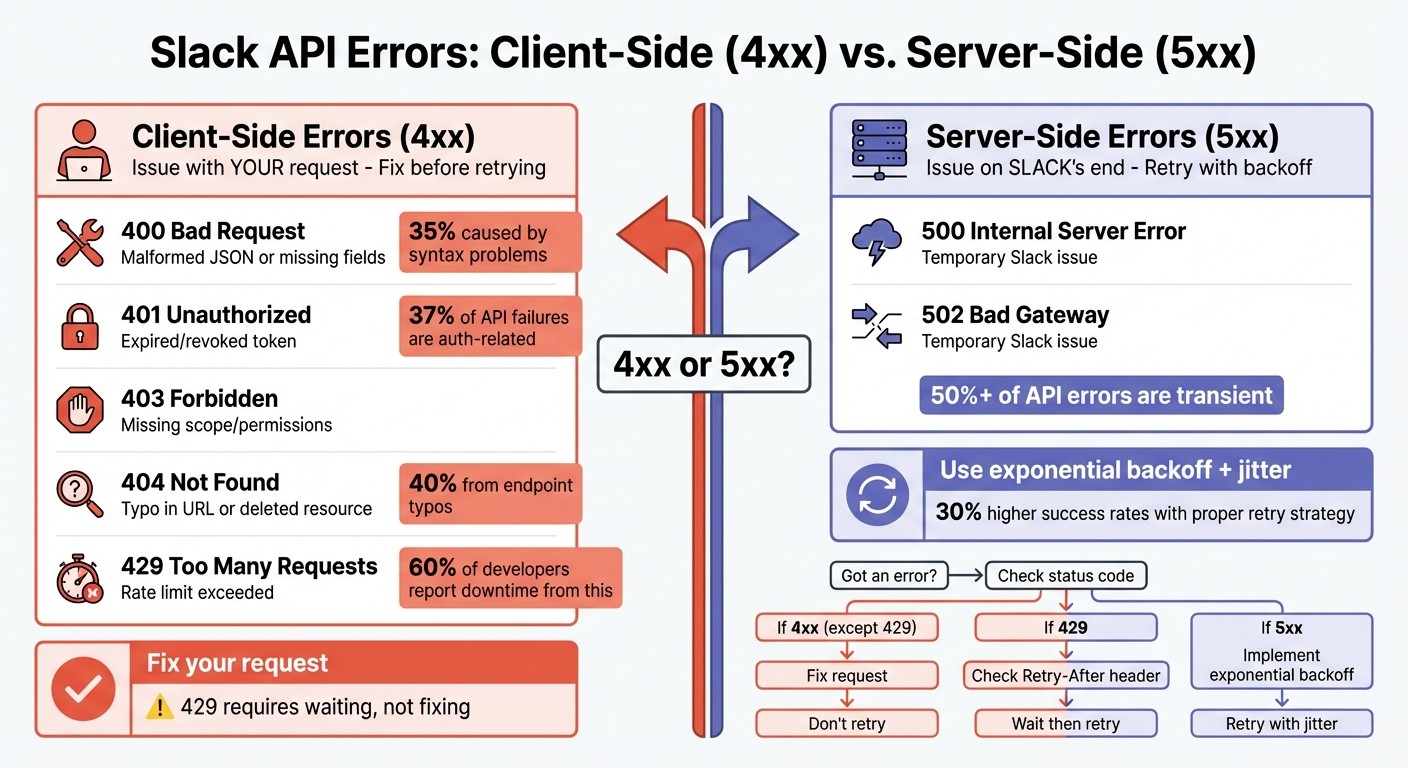
Slack API Error Types: 4xx vs 5xx Response Codes Quick Reference Guide
When your Slack integration makes an API call, the response code reveals whether the operation was successful or not. Errors generally fall into two categories: client-side (4xx) and server-side (5xx). Knowing the difference is crucial - it helps you decide whether to fix your code, adjust your configuration, or simply retry the request.
Client-Side Errors (4xx)
Client-side errors occur when there’s an issue with the request itself. These are often caused by configuration problems, authentication failures, or hitting rate limits. Retrying a 4xx error without making changes is usually ineffective - except for 429 Too Many Requests, which requires waiting before retrying.
400 Bad Request is a frequent issue. This happens when the JSON payload is malformed, required fields are missing, or the data types don’t match Slack’s expectations. Studies show that 35% of "Bad Request" errors in RESTful services are caused by syntax problems [10]. To avoid this, validate your payloads using a JSON linter and set the Content-Type header to application/json.
401 Unauthorized and 403 Forbidden errors signal authentication or permission issues. A 401 error often means your token is expired, revoked, or incorrect, while a 403 usually indicates a missing_scope problem - your token lacks the required permissions for the endpoint. Authentication-related issues account for about 37% of API failures [10]. Use the auth.test method to confirm your token’s validity and check its granted scopes.
404 Not Found errors typically result from typos in the endpoint URL or attempts to access a deleted resource, such as a channel or user. Roughly 40% of 404 errors stem from endpoint typos [10]. If the URL appears correct, verify that the resource ID is still valid and your token has the necessary scopes.
429 Too Many Requests occurs when you exceed Slack’s rate limits, such as the 1-message-per-second cap for chat.postMessage. This is a common constraint when using webhooks to automate Slack notifications. When this happens, check the Retry-After header, which specifies how long you should wait before retrying. 60% of developers report downtime due to rate limits [1].
Error Code | Slack Error String | Common Cause | Recommended Fix |
|---|---|---|---|
400 |
| Malformed JSON or missing fields | Validate payload with a JSON linter; check method specs |
401/403 |
| Expired/revoked token or IP restrictions | Regenerate token; review API token usage settings |
403 |
| Insufficient token permissions | Add required scopes in app settings and reauthorize |
404 |
| Typo in URL or deleted resource | Double-check endpoint path; confirm resource ID validity |
429 |
| Exceeded rate limits | Use exponential backoff and monitor the |
Addressing these errors often involves fixing the request itself, but server-side errors require a different approach.
Server-Side Errors (5xx)
Server-side errors indicate issues on Slack’s end, not yours. Common examples include 500 Internal Server Error and 502 Bad Gateway. These errors are often temporary, meaning the same request might succeed if retried after a short delay. Over 50% of API errors are transient and can be resolved with proper retry strategies [1].
To handle 5xx errors, implement a retry strategy using exponential backoff, which gradually increases the wait time between retries (e.g., 1 second, 2 seconds, 4 seconds). Adding jitter - a small random delay - helps prevent multiple clients from retrying at the exact same time. Systems using exponential backoff report 30% higher success rates during peak traffic [1].
If 5xx errors persist, check status.slack.com to see if Slack is experiencing a service disruption. You can also test connectivity by sending a request to the api.test endpoint. For critical integrations, consider using Slack’s Events API, which includes built-in retry mechanisms to handle transient issues.
"A 5xx status indicates server issues, warranting a retry, while a 4xx status suggests a client error, often requiring no retry." - MoldStud Research Team [1]
How to Handle Errors Properly
Managing errors effectively means interpreting Slack's responses accurately, providing users with clear guidance, and resetting app states to avoid processes getting stuck.
Reading Error Responses
Slack's Web API provides a JSON object with an ok boolean. When ok is false, the error field includes a short, machine-readable string (e.g., invalid_auth or channel_not_found) that identifies the issue. Combine this with the HTTP status code to quickly diagnose problems: 4xx errors typically indicate issues with your request, while 5xx errors suggest temporary issues on Slack's end.
To validate your setup, use diagnostic tools like the api.test endpoint, which checks Web API accessibility, and auth.test, which confirms token validity and scopes. If you're using Bolt for JavaScript, enabling extendedErrorHandler: true provides access to the request body and context (e.g., teamId), helping pinpoint failures. Bolt for Python, on the other hand, differentiates between BoltError (app-level problems) and SlackApiError (API-specific issues) [2][7].
For a 429 Too Many Requests error, refer to Slack's Retry-After header for guidance on when to retry.
Once you’ve identified the issue, focus on delivering clear, user-friendly error messages.
Clear Error Messages for Users
Avoid showing users raw error codes or technical jargon. Instead, provide clear, actionable messages that explain the situation and suggest next steps. For instance, if your app hits a rate limit, display:
"I'm experiencing high demand right now. Please try again in a few moments."
This is far more user-friendly than showing "Error 429: rate_limited."
Use Slack's chat.postEphemeral method to display error messages privately to the user who triggered the issue, keeping shared channels tidy. To assist with troubleshooting, include correlation IDs in your logs. Slack emphasizes:
"Never expose tokens (or other customer secrets) to the end user, especially in error messages or by echoing them back to the UI" [4].
Here’s a quick reference for common scenarios and responses:
Scenario | Response Message | Recommended Action |
|---|---|---|
User-specific Rate Limit | "You have exceeded the per-user limit." | Wait for the reset (typically one hour). |
Team Workspace Limit | "You have exceeded the rate limit for your team." | Reduce request frequency; split batch calls. |
App Rate Limit | "Your app has exceeded the allowed rate limit." | Use exponential backoff; check |
Service Downtime (5xx) | "Service is temporarily unavailable." | Monitor Slack status and retry after a delay. |
Clear documentation and error messages can cut support inquiries by as much as 50% [1]. This is especially effective when you automate internal questions in Slack to handle common developer or user queries.
Once users are informed, focus on resetting app states to keep workflows running smoothly.
Resetting App States
After identifying and communicating errors, ensure your app resets its state to prevent lingering disruptions. Always acknowledge Slack requests with a 200 OK, even if your app encounters an error. Failing to do so can cause Slack to retry the event, leading to duplicate processing or workflows stuck in a "pending" state [8]. As Slack Bolt documentation advises:
"It is imperative that any custom Error Handlers defined in your app respond to the underlying Slack request that led to the error... to send a proper response to Slack" [8].
Keep handlers stateless to allow safe retries. If a failure occurs, clear temporary "processing" statuses to avoid locking workflows [3]. Reset retry counters to zero after a successful API call to prevent delays affecting unrelated requests [1]. For custom workflows, use functions.completeError to mark failures and provide clear feedback to users, ensuring workflows don’t remain stuck [11].
Consider implementing a circuit breaker pattern for extended outages. For example, after three consecutive failures, temporarily pause requests to give the system time to recover [1]. Systems that use exponential backoff strategies during high traffic periods have shown a 30% increase in success rates [1]. By prioritizing robust error handling, you can ensure your Slack API integration stays reliable, even under challenging conditions.
Retry Logic for Failed Requests
Building on error handling and state-reset strategies, retry logic is crucial for keeping Slack workflows stable. When a Slack API request fails, retrying often resolves over half of these errors, especially transient ones [1]. The key is to strike a balance - retrying enough to recover but not so aggressively that it strains Slack's servers. This is where exponential backoff comes into play, a method that spaces out retries progressively to give servers time to recover.
Exponential Backoff
Exponential backoff gradually increases the wait time between retries. Start with a base delay, such as 100 milliseconds to 1 second, and double it with each failed attempt (e.g., 100ms, 200ms, 400ms, 800ms) [1][13]. The formula is simple: delay = base_delay * (2 ^ attempt), with a maximum cap of 30 seconds. This approach is especially useful for handling rate limits (HTTP 429) or server errors (5xx), as it prevents overwhelming Slack's infrastructure.
Using exponential backoff can improve success rates by up to 30% during high-traffic periods [1]. For HTTP 429 errors, always respect the Retry-After header provided by Slack [13][3]. However, avoid retrying client-side errors (4xx) like invalid_auth, which indicate issues that need fixing in the request itself [3].
Adding Jitter to Retries
To further improve retry behavior, add jitter - a random variation in delay times. Without jitter, multiple clients might retry at the same intervals, creating traffic spikes and worsening server congestion [6].
Jitter works by adding a random value (typically 0 to 50% of the current delay) to the retry interval [13]. For instance, if your calculated delay is 200ms, adding jitter might result in a delay between 200ms and 300ms. This randomness smooths out retry patterns, reducing load spikes and preventing cascading failures. In fact, applications using jitter have reported a 30% drop in server congestion during peak hours [10]. Many Slack SDKs, including @slack/web-api for Node.js and the Python SDK, already incorporate jitter by default [5][9].
Maximum Retry Attempts
To avoid endless loops, set a limit on retry attempts. Best practices suggest 3 to 5 retries as an ideal range [13]. Most transient errors resolve within this window, and exceeding five retries increases the risk of hitting rate limits by as much as 50% [13].
Slack's SDK defaults to 10 retries over about 30 minutes, which is generally appropriate for background tasks [6]. Once the maximum retry count is reached, log the error details and alert your development team instead of continuing to retry [1][10]. This approach ensures resources are used efficiently while maintaining robust Slack API integrations.
Monitoring and Logging Errors
After establishing solid error handling and retry strategies, the next step is monitoring and logging errors to ensure your integration remains reliable. Tracking failures allows you to detect patterns, address recurring issues, and fine-tune your system over time. Effective logging plays a key role in maintaining long-term stability.
Error Logging and Analysis
To diagnose issues effectively, log the full context of each failed request. This includes URLs, headers, payloads, timestamps, and any Slack error codes, such as invalid_auth or rate_limited [10]. Using correlation IDs can help you link multiple retry attempts back to the original Slack event, making it easier to trace the request's entire lifecycle [3].
For structured logging, tools like the ELK Stack (Elasticsearch, Logstash, Kibana) can aggregate logs, support advanced queries, and display trends across large datasets [1]. If you're working with Bolt-based applications, enabling extendedErrorHandler: true provides access to the logger, context, and request body within the error handler, offering deeper insights for debugging [2]. Detailed timeout logging can speed up issue resolution by as much as 40% [10].
Real-Time Alerts
Real-time alerts allow your team to address critical errors as they happen. Platforms like Prometheus and Grafana can visualize request metrics and notify you when error rates spike or failure rates exceed 1% [1]. For instance, if your integration repeatedly encounters rate limits (HTTP 429), an alert can help your team take immediate action, such as throttling requests or queuing them dynamically to avoid extended downtime [10]. Companies using API analytics and monitoring tools report a 25% reduction in rate-limit-related issues [1]. Logging the Retry-After value also enables automated cooldown periods [10][5].
Regular Error Reviews
Periodic log reviews can uncover patterns in common issues like authentication errors or rate limits. Around 42% of authentication problems stem from token mismanagement or scope misalignment, and regular audits can help catch these issues early [10].
Post-mortem reviews are another valuable practice. By analyzing audit logs, you can correlate API failures with system factors, such as high CPU usage or memory spikes [10]. Teams that refine their retry logic based on logged data have reported up to a 20% improvement in system uptime [1]. Additionally, simulation tools like /test-resilience can verify that your logging and retry mechanisms are functioning as intended [3].
Best Practices for Reliable Integrations
When building a Slack integration, it's not just about implementing retry logic. To ensure long-term stability and security, you need to focus on secure token management, thorough testing, and a modular architecture. Integrating automated testing into your CI/CD pipeline can significantly reduce production bugs - by as much as 80% - and keep your workflows running smoothly over time[1].
Secure Token and Data Management
Managing tokens securely is critical. Avoid hardcoding tokens at all costs. During development, use a .env file, and in production, rely on tools like AWS Secrets Manager or HashiCorp Vault[4]. A 2025 developer security survey revealed that 42% of authentication issues stem from token mismanagement or scope misalignment[10]. Instead of using outdated tokens, verify requests with Slack's signing secret[12][4].
To minimize risks, store tokens in your database, linking them to specific workspace and user IDs. This approach prevents cross-user exposure. Always transmit credentials using POST requests with TLS encryption - never include them in query strings in GET requests[4]. Add an extra layer of security by implementing IP address whitelisting, restricting token usage to defined CIDR ranges, and rotating tokens regularly to limit exposure time[4].
During development, use Slack's auth.test method to confirm token validity and associated IDs[10]. Assign permissions based on the principle of least privilege, categorizing scopes by risk level. High-risk permissions - like admin or channels:history - should undergo manual review before deployment[4]. These practices establish a strong security framework, setting the stage for effective testing and a modular design.
Testing and Validation
Thorough testing is essential to catch potential issues before they impact users. Test edge cases such as authentication failures, malformed requests, and rate limits. This allows you to differentiate between transient errors, which can be retried, and permanent client errors, which should fail immediately[3]. Tools like Postman and JMeter can simulate rate limits, helping you ensure your app respects the Retry-After header[1][3].
It’s also helpful to simulate various failure scenarios - consistent, intermittent, and successful - to observe how your backoff strategy performs under stress[1]. Employ correlation IDs for each request to track operations across multiple retry attempts, which simplifies debugging. Systems using retry strategies with exponential backoff can see success rates improve by 30% during peak loads[1].
Integrate automated tests into your CI/CD pipeline to ensure your error-handling logic evolves alongside your codebase. Validate response headers like X-RateLimit-Reset to accurately schedule retries[1]. This level of testing ensures your integration is prepared for real-world challenges.
Modular Workflow Design
A modular design simplifies updates and debugging while enhancing flexibility. Modern SDKs often use modular classes for retry handlers, interval calculators, and jitter logic. This allows you to tweak strategies without altering the core application logic[5]. For example, define specific error handlers for different stages - dispatching, event processing, and authorization - instead of relying on a single global handler[2][8].
In Bolt.js, handlers like dispatchErrorHandler and processEventErrorHandler let you address different failure states effectively[2]. Stateless handlers are particularly useful, as they ensure retries are idempotent and avoid conflicts[3]. Using the Slack CLI to create apps from pre-built templates can also streamline development. These templates often adhere to organizational security and permission standards, making them easier to audit and maintain[4].
For AI-powered apps, consider implementing model fallback chains, such as switching from GPT-4 to GPT-3.5 when the primary model fails. This approach keeps your bot functional even during disruptions[3]. Beyond error handling, AI improves Slack team communication by organizing these automated interactions into actionable insights. A modular architecture aligns seamlessly with earlier recommendations on monitoring and retry logic, reinforcing the overall resilience of your integration.
Conclusion
A dependable Slack integration must be prepared to handle failures effectively. The strategies outlined - such as distinguishing between error types, using exponential backoff with jitter, monitoring rate limits, and designing modular workflows - combine to create a system that can recover quickly and operate smoothly under pressure.
For example, exponential backoff with jitter paired with detailed logging can lead to up to a 40% improvement in recovery times while also cutting down on support tickets[1]. Systems that adopt these techniques have reported up to a 70% increase in successful interactions in certain scenarios[1]. Additionally, secure token management, thorough testing, and modular workflow design contribute to boosting overall system uptime by as much as 20%[1]. Together, these practices ensure a more robust and efficient Slack integration.
FAQs
When should I retry a Slack API request?
When a Slack API request fails due to a temporary issue - like connection problems or hitting rate limits - it's a good practice to retry the request. To handle this effectively, use an exponential backoff strategy. This means gradually increasing the wait time between retries, up to a defined maximum limit. This approach prevents overwhelming Slack's servers while improving the reliability of your requests, aligning with Slack's API usage guidelines.
How do I correctly implement backoff with jitter?
To apply backoff with jitter, begin with an exponential backoff approach, where the delay between retries increases exponentially (e.g., 1 second, 2 seconds, 4 seconds) until it reaches a defined maximum. Introduce jitter by randomizing the delay times, which helps prevent retries from overlapping and causing further issues. Start with a minimal initial delay, limit the number of retries (e.g., 5 attempts), and consider using tools like the Slack SDK's BackoffRetryIntervalCalculator to compute jittered intervals. This method enhances reliability when dealing with temporary errors.
How can I prevent duplicate event processing on retries?
To avoid processing the same event multiple times, incorporate an idempotency mechanism. This could involve using unique request IDs or timestamps to distinguish each event. Keep a record of processed events so they aren’t handled more than once. Additionally, use exponential backoff with capped delays when managing retries. This approach helps prevent duplicate processing by spacing out repeated requests and reducing the likelihood of rapid reprocessing.