∙
Cooper
∙
Reading time:
12 min

Repetitive questions in Slack waste time and drain productivity. Integrating ChatGPT into Slack solves this by automating answers, summarizing threads, and enhancing search - all within the same platform. For larger teams, tools like Question Base go further by using knowledge management integrations to connect directly to trusted documentation (e.g., Notion, Salesforce) to deliver verified, accurate responses at scale.
Key takeaways:
40% of internal queries in large organizations are repetitive, costing millions annually in lost productivity.
ChatGPT in Slack provides instant answers (avg. 3.2 seconds) to common questions like PTO policies or password resets.
For enterprise-grade accuracy, tools like Question Base integrate with external systems to ensure responses are reliable and auditable.
Pricing: Question Base starts at $8/user/month, compared to Slack AI at $18/user/month.
How to Build a Custom ChatGPT Slack Assistant (Step-by-Step Guide)
How to Set Up ChatGPT in Slack
To get started with ChatGPT in Slack, you'll need both a paid ChatGPT account (such as Plus, Pro, Business, Enterprise, or Edu) and a paid Slack plan. Before diving in, check your workspace's "Apps" section to see if ChatGPT is already installed.
For Enterprise or Edu workspaces, admins must enable the ChatGPT connector in the admin settings and use RBAC (Role-Based Access Control) to manage access. It's also crucial to enable MFA (Multi-Factor Authentication) on admin accounts for added security.
Important Note: The ChatGPT connector is currently unavailable for Plus and Pro users in the European Economic Area (EEA), Great Britain (GB), and Switzerland (CH). However, Business and Enterprise accounts in these regions can still access it. Additionally, ensure that your organization's data policies align with Slack's privacy and data-residency terms, as data shared through Slack falls under Slack's governance, not just OpenAI's.
Once you've confirmed your eligibility and reviewed the prerequisites, follow these steps to install the official ChatGPT app.
Installing the Official ChatGPT App
You can find the official ChatGPT app by searching for "ChatGPT" in the Slack Marketplace or using the direct installation link. After locating it, sign in and carefully review the permissions it requests, such as access to channels:history, groups:history, and search:read. Complete the OAuth process, which may require approval from a Slack admin, depending on your workspace's setup.
Once authorized, head to the ChatGPT settings, select Slack, and click Connect. The app respects your existing Slack permissions, meaning it will only access content you are already authorized to view. However, keep in mind that heavy use of features like Deep Research or Agent Mode can hit per-user Slack API limits, even if the workspace-wide limits remain unaffected.
Custom Integration Options
If the official app doesn't meet your needs, you can explore custom integration options for more flexibility. OpenAI APIs or no-code platforms like Zapier allow you to create tailored solutions that give you greater control over functionality and data management.
For teams seeking verified, expert-backed answers instead of AI-generated interpretations of past chats, tools like Question Base may be a better fit. Question Base connects directly to trusted documentation platforms like Notion, Confluence, Salesforce, and Google Drive. Unlike the standard ChatGPT app, which primarily searches Slack message history, Question Base offers advanced features such as case tracking, duplicate detection, and analytics on resolution rates. This makes it an excellent choice for organizations prioritizing accuracy, audit trails, and ownership of knowledge.
Enterprise Use Cases for ChatGPT in Slack
Automating Repetitive Questions
Internal experts often spend 6 hours each week addressing the same recurring questions [1]. In large organizations, 40% of internal questions are repetitive [1], covering topics like PTO policies, password resets, expense reimbursements, or tool access. For a company with 1,000 employees, this inefficiency can lead to productivity losses exceeding $2 million annually [1].
By integrating ChatGPT into Slack, these repetitive queries can be resolved almost instantly, with response times averaging just 3.2 seconds [1]. HR teams can automate responses about benefits deadlines, IT departments can streamline troubleshooting for common issues, and operations teams can quickly share vendor contact details or procurement steps. Companies using AI answer agents have reported automating 35% to over 90% of frequently asked questions [1][2].
"Since we started using QB we haven't used our Google support docs. And if I go on vacation or sick leave, I feel comfortable that QB will just take over." – Linn Stokke, Online Events & Marketing Specialist, Ticketbutler [1]
This kind of automation not only saves time but also lays the groundwork for creating a robust, searchable knowledge base.
Building a Searchable Knowledge Base
Employees can spend up to 30% of their week searching for information, and 80% prefer chat tools over static wikis for quick answers [1]. A well-organized, verified knowledge base is essential to address this challenge. ChatGPT can capture team knowledge directly from Slack conversations and organize them for future use, but its accuracy depends heavily on the quality of prior conversations.
Unlike ChatGPT, platforms like Question Base take a more direct approach by pulling data from verified sources such as Notion, Confluence, Salesforce, and Google Drive. This ensures that answers come from a single source of truth rather than relying solely on interpretations of past chat history. Question Base also identifies knowledge gaps, eliminates duplicate questions, and captures new information with simple, one-click workflows. This transforms Slack into a dynamic knowledge hub that evolves alongside your team’s needs.
Improving Support Workflows
AI-driven workflows enhance support operations by combining automated responses with centralized knowledge. For customer-facing teams, this means faster response times and greater efficiency. Sales reps can access real-time data from Salesforce, support agents can retrieve help center articles from Zendesk or Intercom, and product teams can reference Jira tickets - all without leaving Slack.
In regulated industries like finance or healthcare, AI-powered answer agents provide an auditable trail of approved responses, helping to minimize legal and operational risks [2]. Additionally, advanced escalation workflows ensure unresolved queries are routed to the right experts, maintaining a balance between speed and accuracy while keeping Slack as the central hub for support.
Question Base vs Slack AI: Feature Comparison

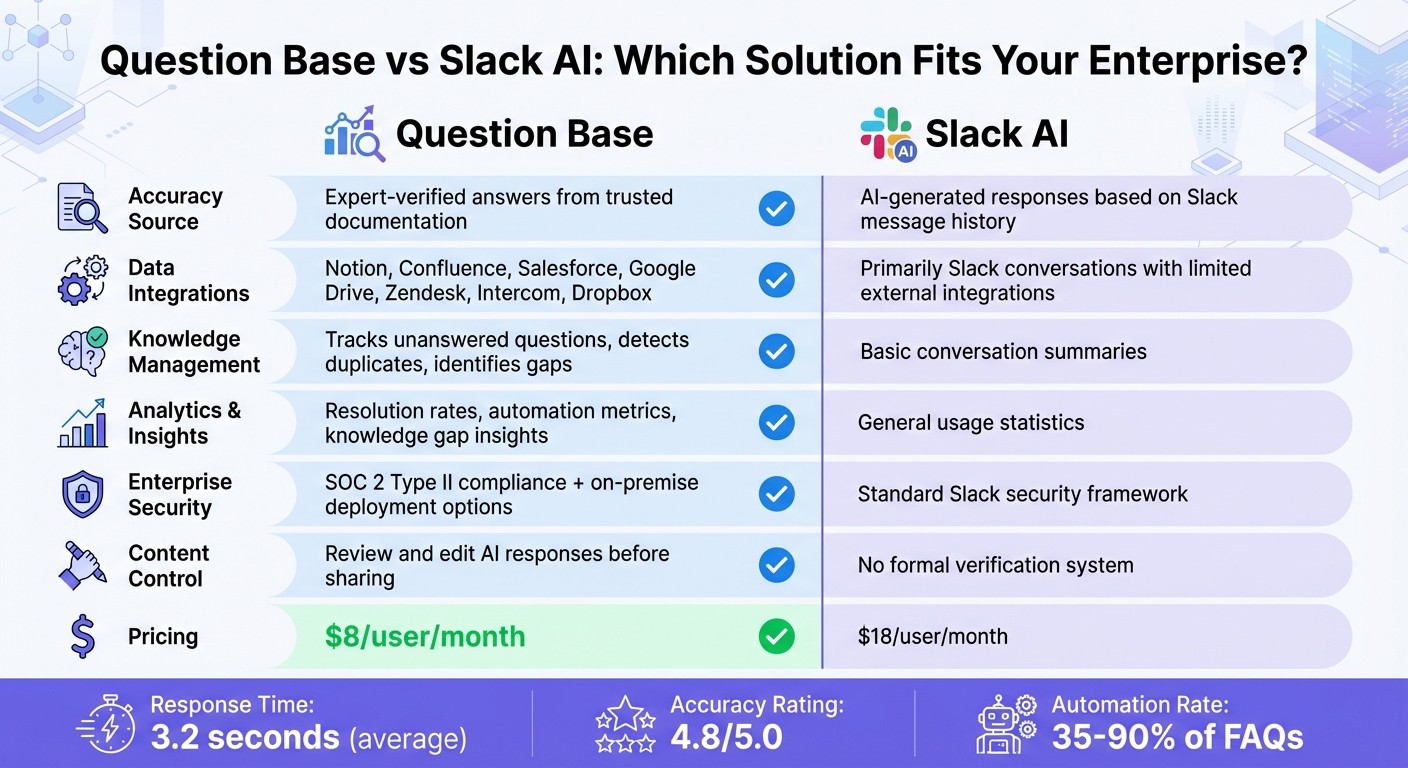
Question Base vs Slack AI Feature Comparison
Feature Comparison Table
Slack AI shines when it comes to summarizing conversations, searching message history, and improving individual productivity. On the other hand, Question Base is built for teams that need reliable answers and a solid system for managing knowledge.
Feature | Question Base | Slack AI |
|---|---|---|
Accuracy Source | Expert-verified answers from trusted documentation | AI-generated responses based on Slack message history |
Data Integrations | Integrates with Notion, Confluence, Salesforce, Google Drive, Zendesk, Intercom, Dropbox | Primarily relies on Slack conversations with limited external integrations |
Knowledge Management | Tracks unanswered questions, detects duplicates, and identifies gaps in knowledge | Provides basic conversation summaries |
Analytics & Insights | Offers resolution rates, automation metrics, and insights into knowledge gaps | Focuses on general usage statistics |
Enterprise Security | SOC 2 Type II compliance with options for on-premise deployment | Standard Slack security framework |
Content Control | Enables review and editing of AI responses before they are shared | Lacks a formal system for verifying content |
Pricing |
Question Base stands out with an average response time of 3.2 seconds and an impressive 4.8 accuracy rating [1]. Its ability to connect directly to trusted documentation sources ensures reliability, setting it apart from Slack AI.
This comparison highlights the key differences, helping you determine which solution aligns best with your enterprise needs.
When to Choose Question Base Over Slack AI
If your team prioritizes precision and verified answers, Question Base is the clear choice. Designed for enterprise teams in HR, IT, operations, and support, it ensures accuracy, compliance, and control over knowledge. While Slack AI supports individual productivity by summarizing conversations, Question Base focuses on keeping teams aligned with dependable, verified information.
For organizations looking to automate between 35% and over 90% of repetitive questions [1][2], Question Base offers unmatched control over shared content. Its human-in-the-loop verification process is particularly valuable for industries with strict compliance requirements.
Take Monica Limanto, CEO of Petsy, for example:
"We implemented Question Base to eliminate repetitive questions and to collate answers and information in one place for a growing team. Question Base has exceeded our expectations - it's easy to use, intuitive and a massive time saver." [1]
While Slack AI is limited to search and summarization, Question Base goes further by creating an answer layer that keeps experts involved while scaling knowledge access across your organization.
Advanced Features and Security Considerations
Role-Based Controls and Customization
Enterprise teams often need precise control over how AI interacts within their workflows. Question Base addresses this by offering per-channel customization, allowing departments to shape AI behavior based on their unique requirements. For example, HR teams can configure AI to focus on policy documents, while IT teams can direct it toward technical wikis and incident logs. This level of customization ensures that responses align with the specific needs of each department.
To maintain accuracy and compliance, Question Base includes a human-in-the-loop verification workflow. This ensures that internal experts review responses before they are added to the official knowledge base, preserving both the accuracy and tone of the content. This meticulous process has enabled organizations to automate over 90% of responses to frequently asked questions[2].
Additionally, Question Base integrates Single Sign-On (SSO) through Slack, centralizing user authentication and seamlessly aligning with existing security protocols[2][3]. These features not only enhance control but also lay a strong foundation for the robust security measures described next.
Enterprise-Grade Security and SOC 2 Compliance
When it comes to security, Question Base adheres to SOC 2 Type II compliance standards and offers optional on-premise deployment for businesses with stringent data residency requirements. All data is encrypted both at rest and in transit, ensuring the highest levels of protection. With 99.9% uptime, it’s built to support the demands of large-scale teams.
Hosted on AWS Bedrock (Claude Sonnet 3.5) with data residency in the US-East-1 region, Question Base meets enterprise-grade data management standards. Importantly, input prompts and generated outputs are not stored persistently by the language model provider. For compliance purposes, data is retained for 35 days following account closure before being permanently deleted[3].
For organizations where inefficiencies in retrieving information can cost more than $2 million annually[1], these security protocols and advanced controls provide the confidence needed to scale AI solutions. By integrating seamlessly into Slack, Question Base transforms it from a basic communication tool into a secure, auditable knowledge hub - without sacrificing the speed and ease of use that today’s teams rely on.
Conclusion
Adding ChatGPT to Slack redefines how internal support and knowledge management operate. By using AI to provide quick, chat-based answers, businesses can greatly reduce the productivity losses caused by repetitive questions.
For organizations looking to take these benefits further, specialized tools can enhance the Slack experience by delivering verified answers on a larger scale. While Slack AI is helpful for summarizing discussions and catching up on threads, enterprises that rely on accurate, scalable responses often need tools designed specifically for knowledge management. Question Base bridges this gap by connecting directly to trusted platforms like Notion, Confluence, and Salesforce, ensuring expert-verified responses. Companies using Question Base report automating over 90% of frequently asked questions[2], saving internal experts hours of repetitive work every week.
At $8 per user per month[1][2], Question Base is a cost-effective alternative to Slack AI, which is priced at $18[1][2]. With features like SOC 2 Type II security, human-in-the-loop verification, and per-channel customization, Question Base transforms Slack into more than just a communication tool - it becomes a secure, auditable, and scalable knowledge hub tailored to your organization’s needs. These benefits - efficiency, accuracy, and enterprise-level security - make Question Base a game-changer for teams working inside Slack.
FAQs
How can integrating ChatGPT with Slack enhance team productivity?
Integrating ChatGPT with Slack boosts team productivity by embedding conversational AI directly into the workspace your team already uses. This integration allows users to search messages, threads, and channels effortlessly, pulling up relevant information without ever leaving Slack. It can also summarize long conversations, pinpoint key decisions, and craft concise meeting briefs, keeping everyone aligned and on track.
With features like drafting responses, generating ideas, and solving problems within Slack, the integration minimizes app-switching, saving time and streamlining workflows. By automating repetitive tasks, it frees up teams to focus on more meaningful work, fostering better collaboration and efficiency.
How is Question Base different from Slack AI?
Question Base and Slack AI cater to distinct needs within Slack workflows. Slack AI is tailored to boost individual productivity by summarizing chats, drafting responses, and searching through Slack's conversation history. On the other hand, Question Base focuses on delivering expert-verified answers drawn from trusted enterprise tools like Notion, Confluence, and Salesforce, ensuring both accuracy and dependability.
While Slack AI relies heavily on chat history, Question Base goes a step further with advanced knowledge management capabilities, including case tracking, duplicate detection, and gap analysis. It also offers enterprise-level analytics - such as resolution rates and automation metrics - and adheres to SOC 2 Type II compliance. These features make it particularly well-suited for HR, IT, and operations teams that depend on regulated, document-backed information.
In short, Slack AI is excellent for general productivity tasks, whereas Question Base is designed for teams that need precise, auditable, and scalable knowledge solutions.
What security measures should I consider when using ChatGPT in Slack?
When bringing ChatGPT into Slack, prioritizing data security, access control, and compliance is key to safeguarding your organization’s information.
Data protection: Both Slack and ChatGPT Enterprise use encryption for data in transit and at rest. ChatGPT Enterprise ensures that your inputs and outputs remain private and are not utilized to train AI models. Additionally, Slack offers optional Enterprise Key Management (EKM) for greater visibility and control.
Access control: Keep OAuth token permissions limited to only what’s necessary, such as read-only access to specific channels. Regularly rotating secrets further minimizes potential risks.
Compliance: If you’re in a regulated industry, ensure the integration aligns with standards like SOC 2, ISO 27001, or GDPR. While ChatGPT Enterprise and Slack provide compliance features, tools like Question Base offer enhanced control over your knowledge sources, making audit processes more seamless.
By emphasizing encrypted communication, carefully scoped permissions, and adherence to compliance standards, you can confidently use ChatGPT within Slack to meet enterprise-level security and operational needs.