∙
Cooper
∙
Reading time:
20 min

Repetitive questions in Slack waste time and money - up to $2 million annually for a 1,000-person company. A Slack knowledge base bot solves this by delivering instant, verified answers from your internal resources like Notion, Confluence, or Google Drive, cutting search time and freeing up experts for higher-priority work.
These bots integrate directly into Slack, automating up to 90% of FAQs in Slack, with response times averaging just 3.2 seconds. They ensure accuracy by pulling from approved documentation, not informal Slack threads, and provide analytics to identify knowledge gaps. For enterprises, tools like Question Base stand out with features like expert-verified answers, compliance controls, and detailed dashboards.
If your team struggles with repetitive questions or scattered resources, a Slack knowledge base bot can transform Slack into a trusted hub for internal support.
How Slack Knowledge Base Bots Work
Main Components of Knowledge Base Bots
A Slack knowledge base bot operates through three interconnected layers, working together to deliver answers directly within your workspace.
The first layer is the Slack app integration, which manages authentication and keeps an eye on relevant Slack events. Anytime someone asks a question or mentions the bot, Slack sends that message to the bot's backend for further processing.
The second layer connects to major documentation platforms like Confluence, Notion, and Google Drive. These integrations sync content into a searchable index, capturing metadata such as the author, last-modified date, and access permissions. Admins have the flexibility to decide which spaces or folders to sync and how often to refresh the data, ensuring that the answers provided are always current.
The third layer is the AI and answering engine. This component uses natural language processing (NLP) and semantic search to understand the intent behind a question, locate relevant documents, rank results by factors like quality and recency, and generate a concise response. It also cites the source material and ensures that users only access documents they are authorized to view. Together, these layers turn Slack into more than just a chat tool - it becomes a centralized hub for retrieving accurate, verified information in seconds.
How Bots Process Questions and Generate Answers
When an employee asks a question in Slack - whether by mentioning the bot, using a slash command, or posting in a monitored channel - the bot kicks into action. It analyzes the text, identifies the user’s intent through semantic search, queries its indexed sources while respecting user permissions, and produces a clear, conversational answer. This response often includes links to the original sources and feedback options like "Was this helpful?" to refine future answers.
If the bot cannot confidently answer a question, it automatically escalates the query to a human expert or a designated support channel, ensuring no question is left unresolved. The entire process, from question to answer, typically takes just 3.2 seconds on average[2], delivering accurate information without requiring employees to leave Slack or juggle multiple platforms.
Slack Message History vs. External Documentation
To understand how knowledge base bots perform, it’s crucial to distinguish between Slack message history and curated external documentation.
Some bots, such as Slack AI, rely on Slack message history. They index channel messages, threads, and file attachments, using AI to summarize unstructured conversational data. This approach captures informal, "tribal knowledge" that might not exist in official documentation. For example, it’s useful for answering context-heavy questions like, "What was decided in last week's incident review?" However, this method can lead to outdated, conflicting, or low-quality information, as it draws from informal discussions rather than verified sources.
On the other hand, bots like Question Base emphasize curated external documentation. They pull from vetted, version-controlled content stored in wikis, runbooks, or standard operating procedures, which are reviewed by subject-matter experts. This makes them ideal for high-frequency questions about policies, compliance, or onboarding in Slack. For instance, if an employee asks about the 2025 parental leave policy, the bot retrieves the official HR document from Notion or SharePoint, linking directly to the most current version instead of summarizing an outdated Slack thread.
These two approaches highlight a key difference: message-history-based systems process vast amounts of informal, unstructured text, while documentation-focused systems rely on smaller, structured databases with clear ownership and lifecycle management. Many enterprise teams prefer curated documentation as their foundation for policies and procedures, while using message history to provide additional context for unique or edge-case scenarios.
"Slack is where documentation goes to die, brought up once in passing, and never to be found again." – Brigitte Lyons, Consultant
Benefits for Enterprises
Faster Internal Support
For HR, IT, and operations teams dealing with hundreds of repetitive questions each week, knowledge base bots can transform how support is delivered. Instead of experts spending over six hours weekly responding to the same inquiries - like how to enroll in benefits, reset passwords, or navigate expense policies - a bot can step in and handle these tasks automatically. It delivers verified answers in an impressive average time of just 3.2 seconds[2].
The beauty of these bots lies in their integration with tools employees already use, like Slack. They can automate up to 90% of FAQ responses[1], saving employees from wasting time searching through endless channels. By simply tagging the bot, users receive an accurate response along with a direct link to the source material. What once involved hours of waiting and navigating multiple communication threads now takes mere seconds. Maria Jensen, UX Lead at Ticketbutler, shared her experience:
"Before, we could easily spend 5–10 minutes searching... Now, QB finds the relevant answers in a few seconds."[2]
This shift doesn’t just save time; it allows internal experts to focus on more complex, higher-priority work. By streamlining support, organizations ensure their teams have consistent, reliable access to the information they need, as explored in the next section.
More Accurate and Consistent Answers
Speed is important, but accuracy is non-negotiable. Relying on Slack message threads or informal "tribal knowledge" often leads to conflicting answers, as team members may interpret policies differently. Bots solve this problem by pulling directly from curated, expert-verified sources like Confluence, Notion, or SharePoint. This ensures every response is consistent and reliable.
Accuracy becomes even more critical in regulated industries such as healthcare and finance, where mistakes in compliance or data handling can lead to serious consequences. Enterprise-grade bots incorporate a human-in-the-loop process, where subject matter experts review and approve AI-generated responses before they’re shared. This approach has resulted in accuracy rates as high as 99.99%[3]. Monica Limanto, CEO of Petsy, emphasized the impact:
"Question Base transformed our internal knowledge access, ensuring every answer is accurate and instantly-accessible. It's become an indispensable tool for our knowledge experts."[2]
By connecting to a single, up-to-date source of truth - like an HR policy wiki or an IT runbook - bots ensure consistency across the organization. For instance, if a company updates its parental leave policy in Notion, the bot reflects the change immediately, eliminating outdated information from Slack threads. This ensures that everyone, from the CEO to a newly onboarded intern, gets the same verified answers.
Analytics for Knowledge Gaps
In addition to speeding up support and ensuring consistent answers, bots offer valuable insights through analytics. A standout feature of these tools is their ability to track unanswered questions, helping teams identify knowledge gaps through AI vs. manual knowledge gap analysis. Dashboards reveal patterns in escalations and highlight areas where documentation needs improvement. For example, if employees frequently ask about remote work expense limits and those questions escalate, it signals the need for a formal policy.
Enterprise bots provide detailed dashboards that showcase automation rates, resolution times, and trends in unanswered queries. This data allows teams to prioritize updates based on actual needs rather than assumptions. Over time, this feedback loop ensures the bot evolves alongside the organization. For US-based companies, analytics can also uncover localization gaps - like differences in state-specific leave policies or federal holiday schedules - allowing answers to be tailored to local requirements. For instance, bots can ensure dates are formatted as MM/DD/YYYY and currency is displayed in USD[5][7].
Build a Slack AI Agent That Answers Questions (Step-by-Step Tutorial)
Choosing the Right Slack Knowledge Base Bot
Selecting the best bot for your Slack knowledge base requires a close look at where your company stores its information and how effectively that information can be accessed when needed.
Data Sources and Coverage
Start by identifying where your organization’s knowledge is housed. For many companies, this information is spread across platforms like Notion, Confluence, Google Drive, Salesforce, and SharePoint. A bot that only searches Slack message history won’t cut it - you need one that connects directly to these tools, pulling verified and up-to-date documentation.
Question Base stands out by integrating with a broad range of platforms, including Notion, Confluence, Google Drive, Salesforce, Zendesk, Intercom, Dropbox, Freshdesk, HubSpot, OneDrive, Jira, and SharePoint. For example, if an employee asks about the parental leave policy or how to submit an expense report, the bot pulls the answer from your official HR handbook in Notion - not from a random Slack thread where someone might have guessed the answer. The ability to scale is key here: the bot should handle thousands of pages across multiple platforms without lagging.
Once you’ve ensured the bot can access all your key data sources, the next priority is maintaining the quality and reliability of the answers it provides.
Answer Quality and Verification
Having access to data isn’t enough - accuracy is critical. Bots that rely solely on Slack chat history risk providing unverified or even incorrect responses, which can lead to serious issues, especially in regulated industries like healthcare or finance. The distinction between a general-purpose AI tool and an enterprise-ready knowledge bot lies in quality control.
Question Base employs a unique expert-in-the-loop system where subject matter experts review and approve AI-generated answers before they’re made available. This model has resulted in an impressive 99.99% accuracy rate[3]. Whether it’s a question about HIPAA compliance, 401(k) enrollment deadlines (formatted as MM/DD/YYYY for U.S. teams), or security protocols, every answer is tied back to its original source document. Additionally, teams can track when content was last updated, ensuring transparency and reliability. Without this level of verification, a bot might be fine for casual use but won’t meet the rigorous demands of HR, IT, or legal teams.
Security, Compliance, and Enterprise Features
For organizations that need enterprise-level functionality, robust security measures and compliance capabilities are essential. Look for features like SOC 2 Type II compliance, encryption both at rest and in transit, and role-based access controls that align with your Slack permissions and OAuth scopes. If your company uses Slack Enterprise Grid with multiple workspaces, the bot should seamlessly support multi-workspace setups without requiring separate configurations.
Question Base delivers enterprise-grade features, including on-premise deployment options, white-labeling, and audit logs that track every query and response - critical tools for compliance teams that need to demonstrate accountability. Security is further enhanced with environment variables to protect credentials during setup[4]. For companies with strict data residency requirements, some bots also allow manual Q&A imports from Slack instead of continuously indexing message history, offering a more secure option for IT teams[6]. If a bot lacks these robust security and compliance features, it’s not ready for enterprise use.
Implementing a Slack Knowledge Base Bot
Setting up a knowledge base bot for your enterprise takes careful planning, seamless integration, and thoughtful workflow design. Here’s how you can effectively implement one within Slack.
Planning and Scoping
Start by pinpointing where your team spends time answering repetitive questions. Review activity in your busiest Slack channels - like #ask-it, #ask-hr, or #general - and identify recurring themes. In large organizations, repetitive questions can account for up to 40% of internal queries[2]. For big teams, this can translate into millions in lost productivity every year.
Focus on channels with a high volume of repeated questions and establish measurable goals. For example, aim for a 35% auto-response rate within the first 30 days. Many Question Base users track key metrics during pilot programs, such as automation rates, average response times, and expert time saved. Enterprises often report 35% of repetitive questions auto-answered in just 3.2 seconds[2]. However, it’s important to set realistic expectations - complex or sensitive questions that require human judgment should remain routed to experts.
Connecting Documentation Sources
Once you’ve scoped your needs, connect the bot to your organization’s trusted information sources. Prioritize linking verified, up-to-date content. Question Base integrates seamlessly with tools like Notion, Confluence, Google Drive, Salesforce, Zendesk, Intercom, and Dropbox, pulling answers directly from the resources your team already relies on.
To get started, install the app from the Slack App Marketplace, authenticate your documentation tools via OAuth, and select the specific pages, folders, or knowledge bases the bot should access. For instance, you might connect your HR handbook in Notion, IT troubleshooting guides in Confluence, and customer support FAQs in Zendesk. The bot syncs with these sources automatically, ensuring that updates - like changes to the parental leave policy - are reflected instantly without requiring manual adjustments.
"Since we started using Question Base, we don’t spend time searching through support manuals. Before, it could take 5–10 minutes to find what we needed. Now, QB delivers the right answers in seconds." – Maria Jensen, UX Lead & Scrum Master, Ticketbutler[2]
This is where a bot that simply searches Slack history falls short compared to one that connects to your organization’s single source of truth.
Setting Up Channels and Workflows
With your documentation linked, it’s time to configure channel-specific settings and escalation workflows. Tailor the bot’s behavior to fit the unique needs of different teams. For example, in a channel like #ask-it, automatic responses might be ideal, while a channel like #leadership-questions might require the bot to wait for explicit mentions before stepping in. Question Base supports per-channel customization, allowing you to define rules like "auto-respond in #ask-hr" but "mention-only in #exec-team."
Establish escalation workflows to handle unverified or complex queries. These workflows can route questions to a designated Slack user, a support channel, or an external tool like Zendesk. This human-in-the-loop process ensures no query is overlooked.
"Question Base has become our single source of truth. The expert verification process ensures every answer meets compliance standards." – Monica Limanto, CEO, Petsy[1][2]
Roll out the bot in stages. Start with one or two high-traffic channels, collect feedback, and fine-tune its behavior before expanding across the organization. Train the AI to understand your internal acronyms and terminology (e.g., OKRs, PTO, HRIS). Keep an eye on unanswered queries to identify knowledge gaps and update content as needed. On average, implementing a knowledge base bot can save internal experts over 6 hours per week[1][2], but maintaining its effectiveness requires ongoing refinement based on real-world usage.
Question Base vs. Slack AI and Other Tools

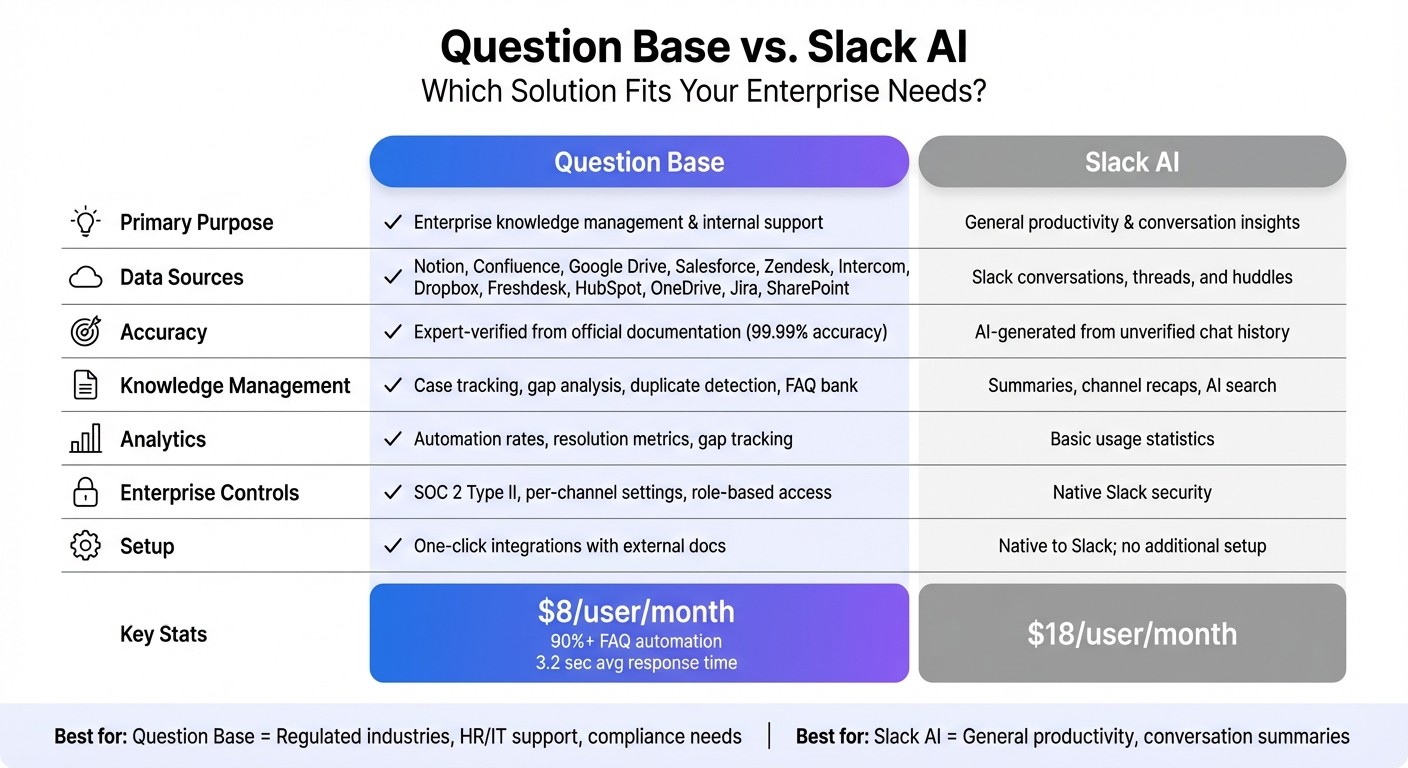
Question Base vs Slack AI: Enterprise Knowledge Management Feature Comparison
Expanding on the earlier discussion of benefits, let’s look at how Slack AI and Question Base cater to different organizational needs.
Slack AI: Streamlining General Productivity
Slack AI is a handy tool for boosting general productivity and extracting insights from conversations. Its strengths lie in summarizing discussions, recapping missed channel activity, and quickly searching through Slack’s message history. For example, engineering teams reviewing incident discussions or product teams analyzing customer feedback can use Slack AI to minimize context switching and maintain momentum in their workflows. Since it's directly integrated into Slack, it’s perfect for everyday collaboration. However, its focus on speed sometimes comes at the expense of verified accuracy.
Question Base: Designed for Enterprise Knowledge Management
Question Base, on the other hand, takes a more specialized approach. Tailored for HR, IT, and operations teams, it delivers expert-verified answers sourced directly from trusted documentation - not informal or outdated chat records. Unlike Slack AI, which searches conversations, Question Base integrates with your organization’s official knowledge repositories such as Notion, Confluence, Google Drive, Salesforce, Zendesk, and more. This ensures employees receive answers rooted in official handbooks, compliance documents, and support guides.
What sets Question Base apart are its advanced features like case tracking, knowledge gap analysis, and duplicate detection - capabilities that Slack AI doesn’t offer. When the AI encounters a question it can’t answer, it escalates it to the right expert and logs it for future updates. This strategic approach transforms Slack into a hub for reliable, enterprise-grade support. Teams using Question Base report achieving a 90%+ automation rate on FAQs[1], with an average response time of just 3.2 seconds[2]. By pulling from verified documentation rather than chat history, Question Base ensures accuracy and reliability.
"Since we started using QB we haven't used our Google support docs. And if I go on vacation or sick leave, I feel comfortable that QB will just take over." – Linn Stokke, Online Events & Marketing Specialist, Ticketbutler[2]
Feature Comparison Table
Feature | Question Base | Slack AI |
|---|---|---|
Primary Purpose | Enterprise knowledge management & internal support | General productivity & conversation insights |
Data Sources | Notion, Confluence, Google Drive, Salesforce, Zendesk, Intercom, Dropbox, Freshdesk, HubSpot, OneDrive, Jira, SharePoint | Slack conversations, threads, and huddles |
Accuracy | Expert-verified from official documentation | AI-generated from unverified chat history |
Knowledge Management | Case tracking, gap analysis, duplicate detection, FAQ bank | Summaries, channel recaps, AI search |
Analytics | Automation rates, resolution metrics, gap tracking | Basic usage statistics |
Enterprise Controls | SOC 2 Type II, per-channel settings, role-based access | Native Slack security |
Setup | One-click integrations with external docs | Native to Slack; no additional setup |
For teams that require accurate, verified knowledge at scale - especially in industries with strict regulations or compliance needs - Question Base offers the governance, auditability, and knowledge ownership that Slack AI simply doesn’t provide. While Slack AI is great for helping individuals work faster, Question Base ensures entire teams stay aligned, informed, and unblocked.
These key differences highlight the importance of selecting a solution that matches your enterprise’s need for dependable, actionable knowledge.
Conclusion
How Knowledge Base Bots Transform Slack
Knowledge base bots are reshaping how organizations manage internal information with AI by transforming Slack into a central hub for verified answers. With these bots, employees can get accurate responses instantly, without disrupting their workflow. Companies using these tools have reported impressive results, including automation rates exceeding 90% for FAQs, saving over six hours per week for internal experts, and achieving an average response time of just 3.2 seconds[2]. For a company with 1,000 employees, reducing time spent searching for information could save more than $2 million annually in productivity losses[2].
These bots ensure high-quality answers by pulling information directly from trusted sources like Notion, Confluence, and Google Drive, instead of relying on informal or outdated chat threads. This approach guarantees that employees receive accurate and policy-compliant guidance. Additionally, analytics dashboards highlight unanswered questions, enabling leaders to proactively address knowledge gaps rather than repeatedly fielding the same queries.
Why Question Base is Built for Enterprises
Question Base takes these productivity enhancements a step further, offering features designed specifically for large-scale teams. While Slack AI is great for summarizing conversations and recapping channels, Question Base focuses on enterprise-level knowledge management and internal support. It delivers expert-approved answers sourced from official documentation, ensuring 99.99% accuracy through a human-in-the-loop system that allows subject matter experts to review and validate AI-generated responses[3].
With enterprise-grade security and compliance - including SOC 2 Type II certification, SSO integration, role-based access controls, and even on-premise deployment options - Question Base meets the rigorous standards of large organizations. At just $8 per user per month, it’s a cost-effective alternative to Slack AI’s $18 per user per month add-on, while offering deeper integrations with tools like Salesforce, Zendesk, Intercom, and SharePoint. Features such as case tracking, duplicate detection, and knowledge gap analysis provide the oversight and tools leaders need to optimize knowledge operations continuously.
For US-based enterprises seeking precise, auditable, and scalable knowledge management, Question Base elevates Slack from a simple communication platform to a powerful knowledge management system.
FAQs
How do Slack knowledge base bots ensure their answers are accurate?
Slack-native knowledge base bots stand out by ensuring accuracy through direct access to trusted, expert-approved sources, rather than simply relying on past chat interactions. Take Question Base as an example - it integrates seamlessly with enterprise tools like Notion, Confluence, Salesforce, OneDrive, and Google Drive to provide precise and up-to-date information.
Every response goes through a review and verification process by designated knowledge experts. This extra step ensures that answers align with internal policies and maintain a high standard of accuracy. Plus, all responses are fully auditable, giving teams confidence in their reliability. On top of that, these bots use analytics to track unhelpful or repetitive responses, offering insights that help refine and improve the knowledge base over time.
By combining integration with trusted sources, expert verification, and continuous quality monitoring, tools like Question Base deliver answers that meet the specific demands of enterprise environments.
What makes Question Base better suited for enterprise knowledge management compared to Slack AI?
Question Base is specifically designed for enterprise teams that require precise and traceable knowledge management, setting it apart from Slack AI, which focuses more on general productivity tasks and summarizing conversations.
While Slack AI relies heavily on chat history to provide insights, Question Base takes a different approach by connecting directly to trusted platforms like Notion, Confluence, and Salesforce. This ensures that responses are not only expert-verified but also traceable, eliminating the risks associated with outdated or incomplete chat-based data. Additionally, it comes equipped with enterprise-level tools such as case tracking, duplicate detection, and gap analysis to help teams refine and enhance their knowledge bases over time.
For organizations operating in regulated industries, Question Base provides peace of mind with features like SOC 2 Type II compliance, robust encryption, and granular permission settings. Its tailored capabilities, including fast responses within Slack and seamless escalation for unresolved questions, make it a go-to solution for HR, IT, and operations teams handling large volumes of internal support requests.
How do Slack knowledge base bots help identify and address knowledge gaps within a team?
Slack-native knowledge base bots work by monitoring the questions asked in channels and cross-referencing them with verified answers stored in connected platforms like Notion, Confluence, or Salesforce. When the bot doesn’t find a match, it flags the question as unanswered and alerts knowledge managers to review it. This process ensures that gaps in the knowledge base are identified. These flagged instances are also logged in an analytics dashboard, allowing teams to track unresolved issues and prioritize areas that need better documentation.
To address these gaps, experts either create new documents or update existing ones with accurate answers. Once updated, the bot indexes the information automatically, making it accessible for future queries. Over time, this approach not only reduces the number of repetitive questions but also improves the accuracy of responses. The result? Teams gain faster access to trustworthy information, while the knowledge base evolves and becomes more refined with each interaction.