∙
Cooper
∙
Reading time:
12 min

Repetitive questions and scattered knowledge drain productivity in Slack. If your team struggles with lost information and redundant queries, AI tools like Slack AI (also called "Slack GPT") and Question Base aim to solve these issues. While both enhance workflows, they serve different purposes:
Slack AI focuses on summarizing conversations, providing recaps, and extracting action items directly from Slack chats. It’s built for general productivity but relies heavily on Slack messages for context.
Question Base is tailored for internal support teams, pulling answers from trusted documentation systems like Notion and Google Drive. It delivers 99.99% accurate responses in 3.2 seconds, tracks unanswered questions, and identifies knowledge gaps.
For teams needing quick Slack-based insights, Slack AI is a fit. For organizations managing high volumes of employee inquiries with a focus on accuracy, Question Base offers better integration, analytics, and cost-efficiency at $8 per user/month compared to Slack AI’s $18 add-on pricing.
Quick Comparison:
Feature | Slack AI | Question Base |
|---|---|---|
Automation | Summarizes Slack chats | Resolves 35% of repeated queries |
Knowledge Source | Slack chat history | Trusted external docs |
Accuracy | Slack-based insights | 99.99% with expert verification |
Pricing | $18 per user/month add-on | $8 per user/month |
Integrations | Limited external integrations | 15+ systems like Notion, Jira |
For precise, scalable internal support, Question Base transforms Slack into a reliable knowledge hub.
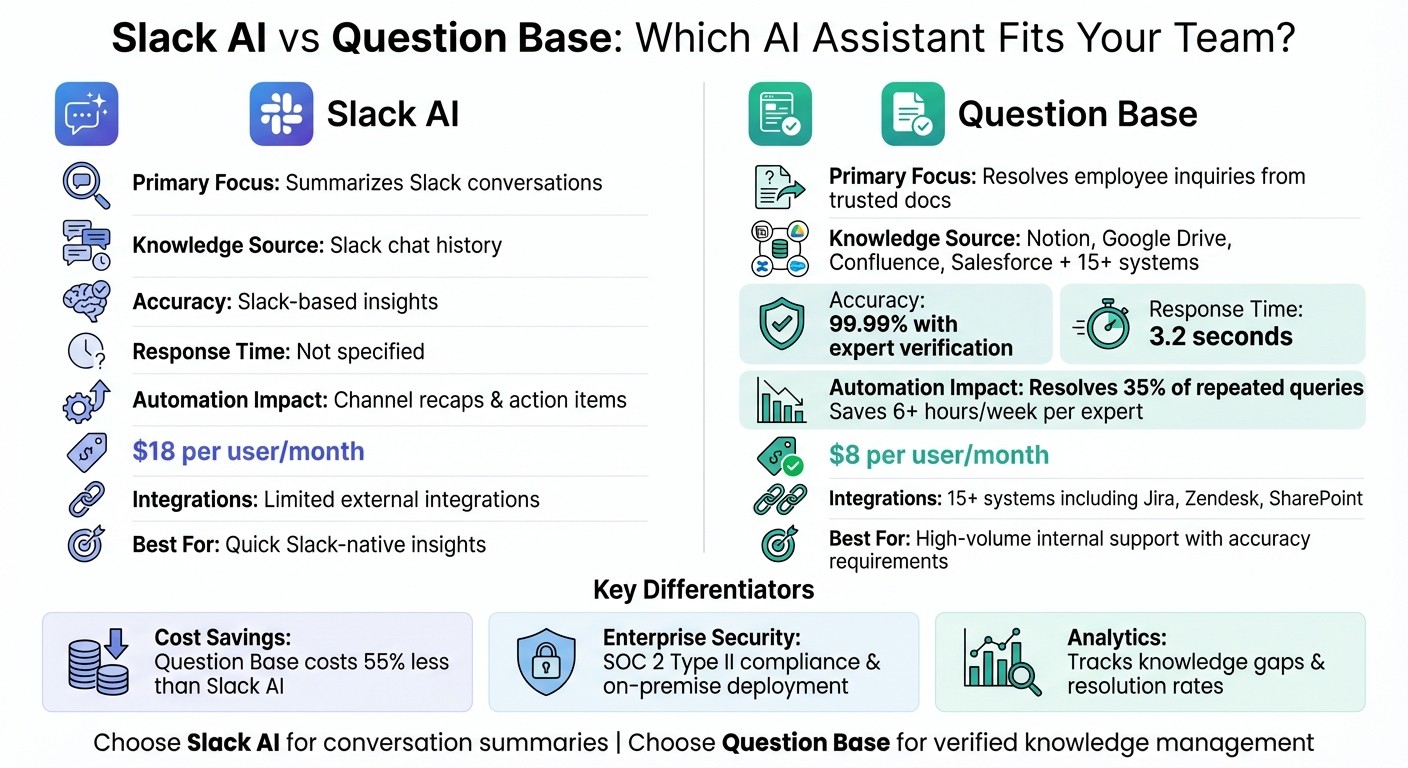
Slack AI vs Question Base: Feature Comparison for Enterprise Teams
Build a Slack AI Agent That Answers Questions (Step-by-Step Tutorial)
1. Slack GPT

Slack AI, often called "Slack GPT", is designed to enhance productivity by speeding up workflows, extracting key details, and minimizing the time spent searching for information. For organizations that already rely on Slack as their primary communication tool, these AI-powered features provide a way to improve efficiency without introducing additional software. Let’s break down its automation, knowledge management, and integration capabilities.
Automation Capabilities
Slack AI simplifies tasks by summarizing channel activity, capturing huddle insights, and drafting content - all directly within Slack. It even allows users to revise and refine content inside Slack canvases, eliminating the need to jump between apps to create polished documents.
With AI Search, team members can ask natural language questions and receive answers based on data stored in the Slack workspace. For example, someone could ask, "What's the PTO policy?" or "How do I reset my VPN?" and get answers pulled from relevant past conversations. Additional features like message translation for global teams and a hover-to-explain tool for acronyms and internal jargon further enhance daily workflows. However, it’s worth noting that these features depend on the data within Slack, which may limit their effectiveness for enterprises with more complex knowledge management needs.
Knowledge Management
Slack AI transforms everyday conversations into a searchable knowledge base, capturing insights from ongoing interactions. For instance, its AI profile summaries can help new hires quickly understand their team members' roles and expertise, making onboarding smoother and more efficient. AI can also simplify tool onboarding by providing instant answers to common setup questions.
Yet, there are some challenges for larger organizations. Slack AI primarily learns from Slack conversations, rather than pulling data from trusted external systems like Notion, Confluence, Google Drive, or Salesforce. While this makes it great for retrieving past discussions, it may not be sufficient for teams that need verified, expert-curated resources for compliance, policies, or technical documentation.
Enterprise Readiness
Slack AI fits seamlessly into Slack’s existing setup, which already supports millions of enterprise users. It integrates with platforms like Salesforce and HubSpot and comes bundled with Slack’s paid plans, such as Business+ and Enterprise Grid, making it accessible to organizations already using these tiers.
However, Slack AI is more of a general-purpose tool than a specialized solution for internal support or knowledge management. For example, it doesn’t include advanced features like case tracking, detecting repeated questions, or analytics for resolution rates - tools often found in dedicated support platforms. For companies managing high volumes of employee queries across HR, IT, or operations, these limitations could make a more tailored solution a better fit.
Integration Flexibility
While Slack AI connects with major enterprise platforms, its integration options are more restricted compared to standalone AI tools like ChatGPT, which offer robust APIs and a broader range of third-party plugins. Since Slack AI relies heavily on Slack messages as its primary data source, it falls short for teams that need a unified knowledge base spanning multiple trusted documentation systems. For such use cases, purpose-built alternatives may offer a more comprehensive solution.
2. Question Base

Question Base is designed specifically for internal support teams, HR, IT, and operations leaders who need reliable, accurate answers at scale. While Slack AI helps individuals catch up on conversations, Question Base ensures entire teams stay aligned and productive by directly connecting to your trusted documentation systems.
Automation Capabilities
Question Base eliminates repetitive questions by pulling answers from reliable sources like Notion, Confluence, Google Drive, Salesforce, and Zendesk, rather than just relying on Slack's chat history. On average, organizations report that 35% of repetitive questions are automatically answered, saving internal experts over 6 hours each week[1]. The AI Answer Agent responds within 3.2 seconds on Slack[1]. Plus, its human-in-the-loop feature allows experts to verify AI-generated answers, maintaining an impressive 99.99% accuracy rate[2].
"It's like having an extra person answering questions in Slack"[1]
Willem Bens, Manager of Sales North EMEA at DoIT International
In addition to automating responses, Question Base captures and organizes essential information for future use.
Knowledge Management
With Question Base, Slack transforms into a dynamic knowledge base. The platform saves valuable answers shared in Slack threads, organizing them for easy reuse. For a company with 1,000 employees, the cost of lost productivity from searching for information in Slack can exceed $2 million annually, especially when up to 40% of internal questions are repeats[1].
"Since we started using QB we haven't used our Google support docs. And if I go on vacation or sick leave, I feel comfortable that QB will just take over"[1]
Linn Stokke, Online Events & Marketing Specialist at Ticketbutler
Question Base also tracks unanswered questions and identifies knowledge gaps, providing analytics on resolution rates, automation performance, and areas where documentation needs improvement - capabilities that Slack AI does not offer. This helps knowledge managers keep their resources up to date and relevant.
Enterprise Readiness
Built with enterprise needs in mind, Question Base offers SOC 2 Type II compliance, encryption for data at rest and in transit, and optional on-premise deployment for organizations with strict security requirements. Teams can customize the AI's tone, control access to specific content sources, and set up workflows that escalate complex queries to human experts when necessary.
At just $8 per user per month, Question Base is significantly more affordable than Slack AI's $18 per user per month add-on pricing[1]. For HR, IT, and operations teams handling large volumes of employee questions, Question Base offers features like case tracking, duplicate question detection, and per-channel settings - tools specifically designed for internal support that generic solutions simply don't provide.
"We implemented Question Base to eliminate repetitive questions and to collate answers and information in one place for a growing team. Question Base has exceeded our expectations - it's easy to use, intuitive, and a massive time saver"[1]
Monica Limanto, CEO of Petsy
This combination of robust security, cost-effectiveness, and tailored features sets Question Base apart.
Integration Flexibility
While Slack AI primarily learns from Slack conversations, which can limit its scope, Question Base integrates with a wide range of documentation systems, including Google Drive, Confluence, Notion, Salesforce, Zendesk, Intercom, Freshdesk, HubSpot, OneDrive, Jira, SharePoint, Dropbox, and Box[1]. This ensures your team receives answers from verified, curated sources instead of AI-generated interpretations of past chats. Setup is quick and simple - install the app from the Slack App Marketplace, connect your documentation tools, and invite the bot to your channels.
Advantages and Limitations
Building on the strengths of each tool, this comparison highlights how they cater to enterprise support needs. Slack AI boosts productivity with features like channel recaps and action item extraction, while Question Base focuses on helping support teams handle high volumes of employee questions. It does this by offering tools like case tracking, duplicate detection, and analytics that pinpoint knowledge gaps.
Here's a quick breakdown of their key differences:
Category | Slack AI | Question Base |
|---|---|---|
Automation | Provides channel recaps, extracts action items, and drafts content in canvases | Automatically resolves 35% of repeated queries, saving experts over 6 hours per week [1] |
Knowledge Management | Includes AI search for Slack history, acronym definitions, and profile summaries | Connects with tools like Notion, Confluence, Salesforce, and Google Drive; tracks gaps and resolution rates [1] |
Accuracy | Relies on Slack messages for context | Delivers 99.99% accuracy with expert-verified answers from trusted sources [2] |
Enterprise Features | Offers meeting summaries, onboarding aids, and translations; available on Slack's paid plans | Includes SOC 2 Type II compliance, on-premise deployment, white-labeling, and per-channel settings [1] |
Integrations | Primarily works with Slack-native data and has limited external integrations | Supports 15+ integrations including Jira, Zendesk, Intercom, SharePoint, and Dropbox [1] |
Pricing | Available as an add-on to Slack's paid plans | $8 per user per month with a free Starter plan option [1] |
While Slack AI provides quick, chat-based insights, its functionality is more focused on summarizing conversations rather than managing structured knowledge. This makes it ideal for teams looking for immediate Slack-native solutions. On the other hand, Question Base takes a more comprehensive approach by pulling answers from verified sources and offering detailed analytics on your knowledge base's performance. For teams prioritizing accuracy, auditability, and knowledge ownership - especially in HR, IT, and operations - Question Base offers specialized tools that go beyond the capabilities of general-purpose AI solutions.
Conclusion
Slack AI and Question Base bring AI capabilities to Slack, but they serve distinct purposes. As outlined earlier, each tool addresses unique needs in productivity and knowledge management. Slack AI enhances everyday workflows by summarizing conversations, identifying action items, and providing recaps for missed discussions.
On the other hand, Question Base is tailored for internal support teams handling a high volume of employee inquiries. It’s ideal for HR, IT, and operations leaders who require verified answers rather than general chat interpretations. By connecting directly to platforms like Notion, Confluence, Salesforce, and Google Drive, Question Base ensures 99.99% accuracy in responses [2]. As Linn Stokke from Ticketbutler shared:
"Since we started using QB we haven't used our Google support docs. And if I go when key personnel are absent, I feel comfortable that QB will just take over" [1].
This distinction helps teams decide which tool aligns best with their priorities.
For teams prioritizing daily Slack interactions, Slack AI provides immediate assistance. In contrast, for organizations looking to automate internal questions, fragmented knowledge, or strict compliance needs, Question Base offers advanced features like case tracking, duplicate detection, and resolution analytics.
For enterprise teams where precision, knowledge control, and operational effectiveness are critical, Question Base extends Slack’s functionality into a reliable, verified knowledge base. Priced at $8 per user per month with a free Starter plan available [1], it’s designed to scale for large enterprises while ensuring SOC 2 Type II compliance and enterprise-grade security. This makes Question Base a powerful solution for transforming Slack into a dependable, enterprise-ready knowledge hub.
FAQs
How does Question Base compare to Slack AI?
Slack AI shines as a productivity tool, leveraging chat history to create AI-generated insights and summaries. It’s particularly useful for speeding up individual workflows by summarizing past conversations and offering basic usage statistics.
Question Base, however, is specifically designed for enterprise internal support teams. It goes beyond chat history by delivering expert-verified answers through direct connections to trusted platforms like Notion, Confluence, Salesforce, and OneDrive. This ensures accuracy and reliability. Additionally, it includes specialized tools such as case tracking, duplicate question detection, and AI-driven learning from knowledge gaps, making it a tailored solution for HR, IT, and Ops teams.
Where Slack AI focuses on general productivity, Question Base takes it further with advanced analytics - covering metrics like resolution rates and automation tracking - and is SOC 2 compliant. This makes it an excellent choice for enterprises that value security, customization, and control over their knowledge. With a simple, no-code setup and seamless Slack integration, Question Base keeps teams aligned and productive at scale.
How does Question Base deliver such high accuracy in its answers?
Question Base delivers 99.99% accuracy by pulling information directly from reliable, enterprise-grade platforms such as Notion, Confluence, Salesforce, and OneDrive. Unlike systems that depend on chat history, this approach ensures responses are grounded in verified knowledge. On top of that, every AI-generated reply is carefully reviewed by designated knowledge experts before it’s shared, guaranteeing both precision and dependability.
To uphold this high standard, Question Base employs real-time analytics to track key metrics like resolution rates and instances of unhelpful answers. This enables the system to pinpoint gaps and refine its performance continuously. By combining trusted data sources, expert oversight, and ongoing monitoring, Question Base sets the bar for accuracy in enterprise environments.
Why would a company choose Question Base over Slack AI for internal support?
Companies often turn to Question Base when they need a solution specifically crafted for internal support teams, emphasizing accuracy, auditability, and seamless integration with trusted knowledge sources. Unlike Slack AI, which primarily relies on chat history to generate answers, Question Base pulls verified information directly from platforms like Notion, Confluence, Salesforce, and OneDrive. This ensures responses are not only reliable but also backed by credible sources.
What sets Question Base apart is its enterprise-focused features. It includes tools like case tracking, duplicate detection, and analytics, which help teams monitor resolution rates and identify knowledge gaps. With SOC 2 Type II compliance and flexible customization options, Question Base is designed to meet the needs of HR, IT, and operations teams that require secure, scalable, and precise knowledge management. While Slack AI is an excellent tool for general productivity, Question Base stands out as the preferred choice for teams that demand operational accuracy and alignment.