∙
Cooper
∙
Reading time:
12 min

Slack helpdesk bots solve a common workplace problem: repetitive questions that slow down internal teams. Instead of experts spending hours each week answering the same queries - like "How do I reset my password?" or "Where’s the benefits form?" - these bots provide immediate answers directly in Slack. By connecting to trusted sources like Notion, Confluence, or Salesforce, they deliver accurate responses in seconds, while escalating complex issues when needed.
Here’s why they matter:
Save time and money: Automate up to 40% of repetitive questions, cutting down on wasted hours and saving millions in productivity costs for large teams.
Simplify knowledge access: Bots pull verified information from platforms your team already uses, eliminating the need to search across multiple tools.
Support 24/7: No matter the time zone, employees get instant answers, improving efficiency and reducing delays.
Unlike basic tools, advanced options like Question Base focus on accuracy by referencing expert-approved documentation. They also provide analytics to track performance and identify gaps in your knowledge base. For teams in industries like healthcare or finance, where precision is critical, these bots are becoming an essential tool for Slack-based workflows.
If your team struggles with repetitive questions or scattered knowledge, Slack helpdesk bots are a practical solution to keep everyone aligned and efficient.
How to build an AI Powered Slack Internal Helpdesk - Expense Policy Example
Benefits of Slack Helpdesk Bots
Helpdesk bots bring efficiency to your team by automating tasks, simplifying knowledge access, and providing support around the clock. Here’s how these advantages translate into everyday operations.
Automating Internal Support Tasks
Repetitive requests like password resets, benefits inquiries, Wi‑Fi credentials, and ticket creation can bog down internal teams. Helpdesk bots handle these routine tasks instantly, freeing up your experts to tackle more complex and strategic challenges.
They also enable self-service workflows for tasks like vacation requests, expense reports, and asset provisioning. Employees can initiate these processes directly within Slack, cutting down on delays and reducing the need for manual intervention.
Improving Knowledge Access
Helpdesk bots aren’t just about automation - they make finding information easier, too. In large organizations, knowledge is often scattered across platforms like Notion, Confluence, Salesforce, and Google Drive. Bots connect to these platforms and surface trusted answers directly in Slack, eliminating the frustration of searching across multiple tools.
For example, when an employee needs details about PTO policies or troubleshooting steps, the bot pulls the information from verified company sources. This approach avoids the back-and-forth of “support ping-pong” and can save employees up to 12 hours a week that would otherwise be spent hunting for answers[1].
Unlike general-purpose AI tools that rely on chat history to generate responses, purpose-built bots like Question Base prioritize accuracy by referencing human-verified documentation. This is especially critical in industries like healthcare and finance, where compliance and precision are non-negotiable. With integrations into tools like Zendesk, Freshdesk, and Confluence, these bots also learn from past interactions, continuously improving their ability to provide relevant responses.
"Before, we could easily spend 5–10 minutes searching in a very long document for the exact support case and procedure... Now, QB finds the relevant answers in a few seconds."
– Maria Jensen, UX Lead & Scrum Master, Ticketbutler
Enabling 24/7 Support
Helpdesk bots are always on, providing uninterrupted support across time zones. Whether it’s 3 p.m. or 3 a.m., global teams can get the answers they need without waiting for business hours.
In addition, bots can send proactive alerts for critical updates like service outages, security issues, or policy changes. This real-time communication keeps teams informed and ensures productivity isn’t disrupted. By eliminating delays and providing instant support, bots help create a smoother, more efficient employee experience.
Comparing Slack Helpdesk Bots
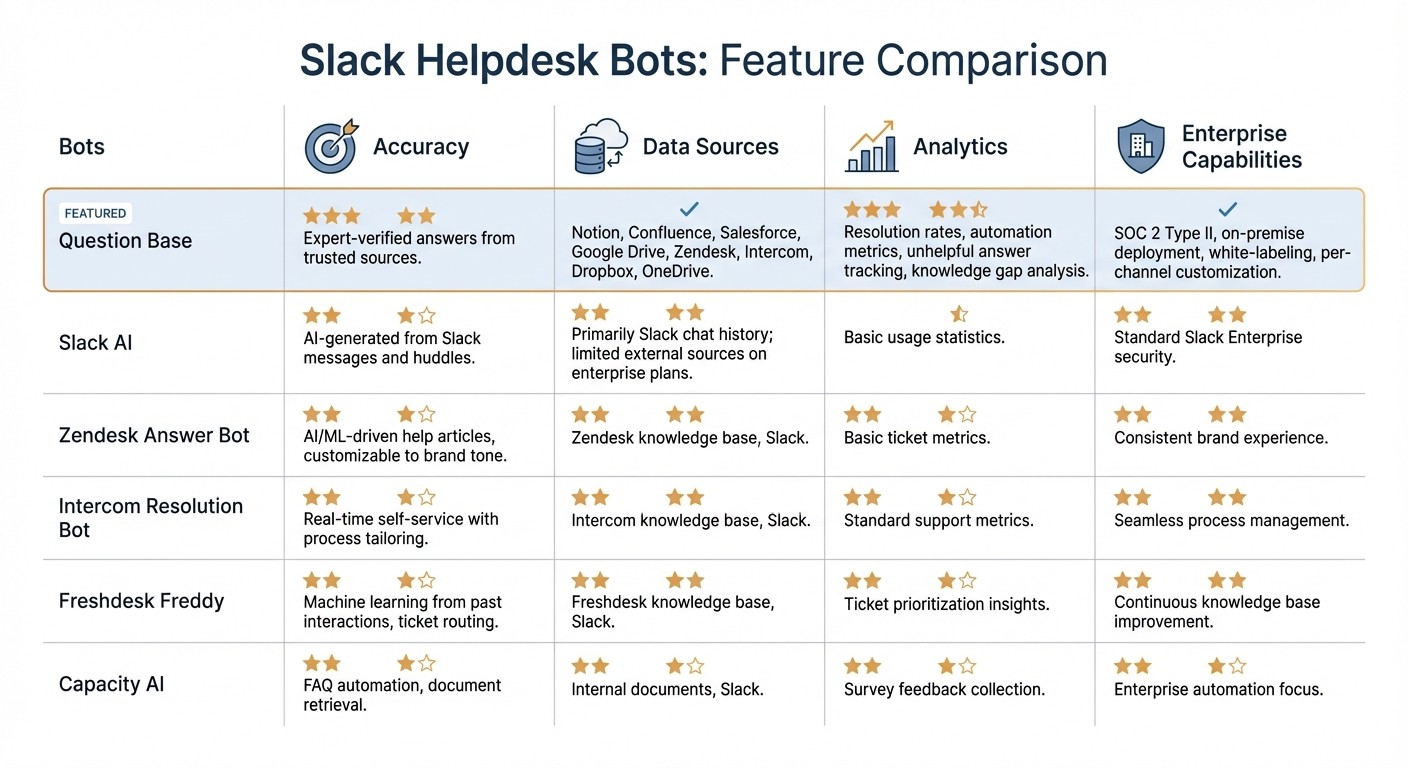
Slack Helpdesk Bots Feature Comparison: Question Base vs Competitors
Not all Slack helpdesk bots are created equal. While some aim to enhance general productivity, others are purpose-built for HR, IT, and operations teams that demand precise, enterprise-level support. Knowing these differences is key to selecting the right tool for your organization's unique needs.
Feature Comparison Table
Bot | Accuracy | Data Sources | Analytics | Enterprise Capabilities |
|---|---|---|---|---|
Question Base | Expert-verified answers from trusted sources | Notion, Confluence, Salesforce, Google Drive, Zendesk, Intercom, Dropbox, OneDrive | Resolution rates, automation metrics, unhelpful answer tracking, knowledge gap analysis | SOC 2 Type II, on-premise deployment, white-labeling, per-channel customization |
Slack AI | AI-generated from Slack messages and huddles | Primarily Slack chat history; limited external sources on enterprise plans | Basic usage statistics | Standard Slack Enterprise security |
Zendesk Answer Bot | AI/ML-driven help articles, customizable to brand tone | Zendesk knowledge base, Slack | Basic ticket metrics | Consistent brand experience |
Intercom Resolution Bot | Real-time self-service with process tailoring | Intercom knowledge base, Slack | Standard support metrics | Seamless process management |
Freshdesk Freddy | Machine learning from past interactions, ticket routing | Freshdesk knowledge base, Slack | Ticket prioritization insights | Continuous knowledge base improvement |
Capacity AI | FAQ automation, document retrieval | Internal documents, Slack | Survey feedback collection | Enterprise automation focus |
This breakdown highlights the varying strengths and focuses of each tool, setting the stage to explore what makes Question Base stand out.
What Makes Question Base Different

While Slack AI is great for improving general productivity - summarizing conversations and streamlining individual workflows - Question Base takes a more specialized path. It’s designed for teams that need verified, accurate knowledge delivered at scale.
Unlike Slack AI, which relies on interpreting Slack chat history, Question Base taps directly into trusted documentation sources like Notion, Confluence, Salesforce, and more. By pulling expert-verified answers, it avoids the pitfalls of AI-generated interpretations. This distinction is especially critical in industries like healthcare and finance, where compliance and precision are non-negotiable.
Beyond accuracy, Question Base offers robust tools to enhance internal support. It logs unanswered questions to identify gaps in documentation and provides analytics to track resolution rates, automation performance, and overall support trends. For example, in a 1,000-person company, the time wasted searching for answers in Slack can cost over $2 million annually[1]. These insights help teams measure and reduce that impact.
When it comes to enterprise-grade needs, Question Base delivers where it matters most. With SOC 2 Type II compliance, on-premise deployment options, and per-channel customization, it’s tailored for HR, IT, and operations teams that manage large-scale internal support. While Slack AI supports individual productivity, Question Base ensures entire teams stay aligned and operationally efficient.
How to Deploy Slack Helpdesk Bots
Setting up Slack helpdesk bots, like Question Base, is a straightforward process that can be tailored to fit your team's specific needs. Here's how to get started:
Installation and Integration
Begin by heading to the Slack App Directory, searching for your chosen bot (e.g., Question Base), and clicking "Add to Slack." This step authorizes the necessary permissions. Keep in mind, you'll need admin privileges and a paid Slack plan to access enterprise-level features. For Question Base, specifically, install it through the Slack Marketplace, then activate it in any channel by typing /invite @questionbase for instant access to answers.
After installation, connect the bot to your organized knowledge sources, such as Notion, Confluence, or Google Drive, using OAuth or API credentials. Question Base integrates with a wide range of platforms, including Zendesk, Intercom, Salesforce, Dropbox, and OneDrive. This ensures it pulls verified answers directly from your documentation, allowing employees to get accurate information quickly. By linking to reliable sources, Question Base ensures compliance and accuracy, which is especially crucial for enterprise teams.
Configuring Workflows
Workflow customization is where you can align the bot’s functionality with your team’s needs. Start by setting up triggers for common questions - like password resets in IT channels, benefits inquiries for HR, or policy lookups for operations. With Question Base, you can customize responses to reflect your brand's tone and configure settings for specific channels, ensuring teams only see relevant answers. For instance, you can restrict the bot’s access to sensitive HR channels via Slack permissions, maintaining data privacy.
You can also define escalation rules for unresolved queries. For example, the bot can automatically alert agents or create tickets if confidence scores drop below 80%. In operational contexts, unresolved issues can be escalated with full context, including conversation history, to the appropriate support channel. Question Base’s Case Tracker workflow simplifies this process: it auto-responds if an answer exists in your connected documents, tracks unanswered queries, and prompts experts to build a knowledge base from Slack conversations for future use. This ensures every question is addressed efficiently.
Once workflows are configured, the next step is to monitor how well the bot is performing.
Tracking Performance
Keeping an eye on performance metrics is essential to maximizing the bot's efficiency. Focus on key indicators like resolution rates (aiming for 80% or higher), average response times, escalation frequency, and user satisfaction scores from post-resolution surveys. Question Base provides detailed analytics, showing automation rates, resolution metrics, and areas where your documentation might need improvement. For example, if 20% of escalations are related to billing, it might signal the need to refine that section of your knowledge base.
Weekly performance digests can give you a clear picture of how the bot is doing, highlighting metrics like resolution rates, response times, and flagged "unhelpful" answers. Dive into these flagged cases to understand where the AI might be falling short and adjust your source data accordingly. Over time, this feedback loop allows the bot to handle more queries independently. Some platforms even report resolving up to 90% of inquiries without human intervention. For a company with 1,000 employees, where productivity losses from searching can cost over $2 million annually [1][2], these improvements lead to measurable cost savings and smoother operations.
Conclusion
Slack helpdesk bots are transforming workplace efficiency by automating support, reducing burnout, and providing instant, verified answers. By managing repetitive questions around the clock and escalating more complex issues with full context, these bots allow IT, HR, and operations teams to focus on higher-value tasks. For a company with 1,000 employees, the cost of lost productivity from searching for answers and repeating information can exceed $2 million each year [1].
While Slack AI vs Question Base comparisons show how Slack AI enhances general productivity, Question Base is specifically built for teams that require expert-approved answers at scale. Unlike Slack AI, which primarily relies on chat history, Question Base connects directly to trusted documentation sources like Notion, Confluence, Salesforce, and Google Drive. This means employees receive expert-verified responses in an average of just 3.2 seconds [1], rather than relying on interpretations of past conversations. With its Case Tracker workflow, every question is either answered instantly or escalated to the right expert, ensuring timely and reliable support. This tailored approach improves operational efficiency while maintaining trust in the accuracy of responses.
The benefits aren’t just theoretical - they’re backed by real-world results.
"Question Base has been a game-changer, allowing my team to shift from answering the same questions repeatedly to tackling strategic projects." - Ethan Laub, Principal Product Manager, OfficeRnD [3]
Organizations using Question Base report a 35% reduction in repetitive questions, save over six hours per week, and often achieve a 300%+ return on investment within six months [1] [3]. For teams in industries where accuracy, auditability, and knowledge ownership are critical - such as healthcare and finance - Question Base offers the security (SOC 2 Type II compliance and on-premise options), customization, and analytics needed to scale support operations with confidence.
If your team is ready to move past generic AI tools and create a verified knowledge layer directly within Slack, Question Base provides the enterprise-grade solution to make it happen.
FAQs
How do Slack helpdesk bots provide accurate answers?
Slack helpdesk bots prioritize accuracy by drawing from trusted, expert-approved sources instead of relying solely on chat history. Tools like Question Base seamlessly integrate with platforms such as Notion, Confluence, Google Drive, and Salesforce to ensure responses reflect your organization’s official knowledge and policies.
When a question has already been addressed, the Auto-Responder provides the pre-approved answer immediately. Meanwhile, the Case Tracker keeps a record of every interaction, flags unanswered questions, and highlights areas where knowledge might be lacking. With built-in analytics, teams can evaluate resolution rates, pinpoint unhelpful responses, and refine processes over time.
On the other hand, Slack AI generates answers based on chat history, which works well for quick overviews but doesn’t inherently link to verified documentation. By connecting directly to established knowledge bases and offering advanced tracking features, Slack helpdesk bots like Question Base ensure HR, IT, and operations teams receive consistent and dependable answers.
What makes Question Base better suited for enterprise support than general AI tools like Slack AI?
Question Base is crafted specifically for enterprise teams like HR, IT, and Operations, delivering expert-verified answers by integrating with trusted platforms such as Notion, Confluence, and Salesforce. Unlike Slack AI, which primarily leans on chat history, Question Base ensures greater precision and consistency by tapping directly into these established knowledge sources.
The platform also offers specialized features for internal support, including case tracking, duplicate detection, and AI-powered gap identification. These tools help teams systematically capture and reuse knowledge, reducing redundancies. On top of that, Question Base provides detailed analytics to measure resolution rates and assess the impact of automation - offering insights far beyond the basic metrics available with Slack AI.
Designed with enterprise priorities in mind, Question Base is SOC 2 Type II compliant, customizable, and simple to deploy without the need for complicated setups. These capabilities save time, minimize repetitive questions, and enhance operational efficiency, all while keeping your knowledge secure and fully auditable within Slack.
How do Slack helpdesk bots enhance team productivity and efficiency?
Slack helpdesk bots are a game-changer for team productivity, taking on repetitive questions so your experts can dedicate their time to more impactful tasks. By pulling verified answers from trusted platforms like Notion, Confluence, or Salesforce, these bots deliver instant responses directly within Slack. This eliminates the hassle of searching through wikis or juggling multiple apps. The result? Teams can save up to 35% of expert time and reclaim an average of 6 hours per week previously spent on repetitive support tasks.
Beyond just saving time, these bots help streamline workflows by reducing interruptions, consolidating scattered knowledge, and offering actionable analytics to refine support processes. With features like case tracking, automated handling of repeated queries, and lightning-fast response times (averaging just 3.2 seconds), teams can operate more efficiently. This not only boosts productivity but also helps reduce burnout while making knowledge more accessible across the board.