∙
Cooper
∙
Reading time:
14 min

Slackbot and Microsoft Copilot are reshaping workplace AI, but which one fits your team better? Slackbot focuses on real-time collaboration and workflow automation inside Slack, integrating deeply with Salesforce and other third-party tools. Microsoft Copilot, on the other hand, enhances productivity within the Microsoft 365 suite, excelling in document-heavy tasks like drafting, analysis, and meeting summaries.
Key Takeaways:
Slackbot: Best for teams needing conversational workflows, cross-platform coordination, and Salesforce integration. Comes included in Business+ ($15/user/month) and Enterprise+ plans.
Microsoft Copilot: Ideal for document-centric tasks within Microsoft 365 apps. Requires an additional $30/user/month add-on.
Quick Comparison:
Feature | Slackbot (Salesforce) | Microsoft Copilot (Microsoft 365) |
|---|---|---|
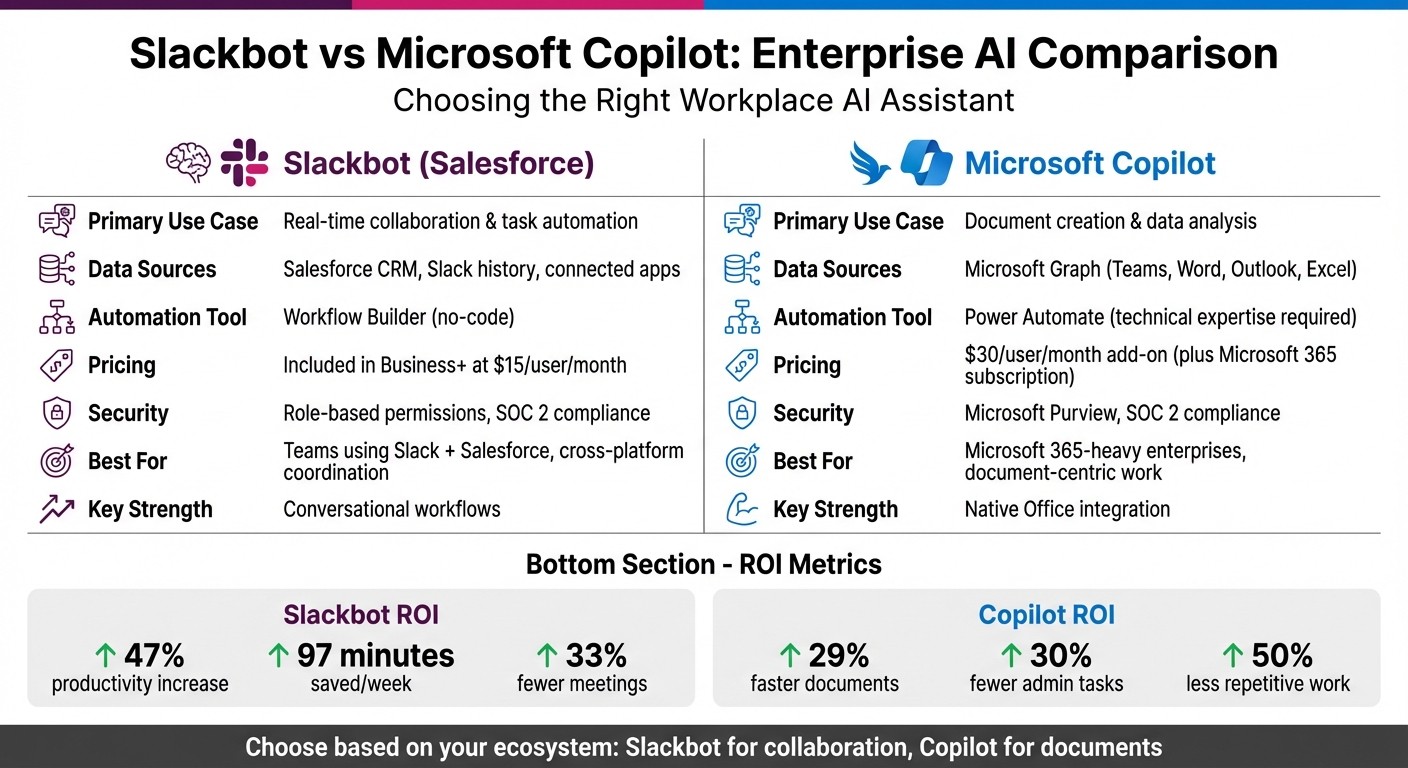
Primary Use Case | Real-time collaboration, task automation | Document creation, data analysis |
Data Sources | Salesforce, Slack history, connected apps | Microsoft Graph (Teams, Word, Outlook) |
Automation Tool | Power Automate (technical expertise) | |
Pricing | Included in Business+ ($15/user/month) | Add-on ($30/user/month) |
Security | Role-based permissions, SOC 2 compliance | Microsoft Purview, SOC 2 compliance |
Both tools offer strong AI capabilities, but Slackbot stands out for teams already using Slack and Salesforce, while Copilot fits enterprises entrenched in Microsoft’s ecosystem. For teams prioritizing knowledge management and verified answers, solutions like Question Base provide added benefits like case tracking, compliance, and expert-reviewed content.
Choosing the right tool depends on your workflows. Slackbot excels in collaboration, while Copilot is tailored for productivity within Office apps. For highly regulated industries or teams needing precise knowledge tracking, consider specialized tools like Question Base.
Slackbot vs Microsoft Copilot: Feature Comparison for Enterprise Teams
Slackbot evolves, BlackRock bets big, Copilot advances | Ep. 6
Slackbot's Enterprise Integration: Core Features
Slackbot has transformed from a simple reminder tool into a sophisticated AI-powered assistant within Slack. It enables employees to perform tasks and automate workflows using natural language commands. By tapping into company data - such as Salesforce records, Slack conversations, and connected files - it delivers relevant, context-aware insights, all without requiring users to switch between apps.
This evolution positions Slackbot as the entry point to what Salesforce calls the "Agentic Enterprise." Built on Salesforce's Agentforce 360 platform, Slackbot now handles tasks like approvals, status updates, meeting summaries, and workflow triggers across integrated systems.
Natural Language Workflow Automation
Slackbot takes automation to the next level by allowing teams to use conversational commands to streamline tasks. Whether it’s drafting content, organizing work, or automating processes, Slackbot simplifies the journey from idea to execution. For example, marketing teams can update campaigns, operations teams can assign tasks, and customer service teams can pull up client information - all within Slack.
Soon, Slackbot will also support meeting scheduling through conversational prompts. It can already summarize discussions, provide campaign insights, and trigger workflows across thousands of third-party tools available in Slack's App Directory, including Box, Zoom, Atlassian, and GitHub.
Salesforce Data Integration and Context
One of Slackbot's standout features is its ability to connect conversations with customer data. Unlike standalone AI tools that lack access to customer history or account details, Slackbot integrates Salesforce data in real time, combining it with Slack conversations and files to provide richer insights.
This integration ensures that Salesforce channel configurations, permissions, Agentforce integrations, OAuth connections, custom workflows, and record settings remain intact during migrations. The "Channel Expert" agent, available on Business+ and Enterprise plans, can answer questions based on channel-specific content while adhering to Salesforce's granular permissions tied to record ownership and editing rights.
Enterprise Controls and App Directory
Org Owners and Admins have robust control over Slackbot's features through role-based access settings, with the option to restrict access entirely until February 10, 2026. Enterprise controls include admin tools for feature management, integration with Admin Advisor for security recommendations (available on Pro and Business+ plans), and permission enforcement via identity providers like Okta.
Slackbot’s capabilities are further enhanced by Slack's App Directory, which enables seamless orchestration with thousands of third-party applications across various enterprise workflows. For organizations in regulated industries, Slackbot supports compliance needs through integrations like Question Base, which adds human oversight. This ensures automated responses are reviewed and approved by experts, meeting audit and compliance requirements effectively.
Microsoft Copilot: Capabilities in the Microsoft 365 Ecosystem
Microsoft 365 Copilot acts as a smart layer across Office apps, powered by "Work IQ" through Microsoft Graph. This real-time network connects your calendar, emails, chats, documents, and contacts to deliver context-aware assistance.
"Today marks a major step in evolving our work interactions and boosting productivity."
Satya Nadella, Chairman and CEO, Microsoft [1]
This interconnected foundation allows Copilot to integrate seamlessly across Microsoft 365 applications.
Integration Across Microsoft 365 Apps
Copilot brings tailored AI-driven features to various Microsoft tools:
Word: Assists with drafting and editing documents.
Excel: Simplifies data analysis and creates visualizations.
Teams: Generates meeting summaries and action items.
Outlook: Helps prioritize emails and craft responses.
PowerPoint: Builds presentations and provides speaker notes.
In late 2025, Microsoft enhanced Copilot by incorporating GPT-5, significantly improving its reasoning capabilities and making it more effective for work-related tasks [2].
Enterprise Governance and Security
Copilot adheres to Microsoft’s strict security, compliance, and privacy protocols. It operates under Microsoft Purview, respecting Conditional Access policies and Multi-Factor Authentication (MFA). This ensures that AI interactions follow the same stringent rules as other Microsoft 365 services. Importantly, customer data remains confined within the Microsoft 365 boundary, and prompts or responses are not used to train the underlying language models.
The AI's "grounding process" is designed to refine its output by first identifying relevant information from input files and Microsoft Graph data before generating a response. This approach ensures precision while maintaining data security and compliance.
General Productivity Focus
Microsoft 365 Copilot is built to tackle the everyday tasks that often dominate a worker's time - tasks that can account for up to 80% of their day [1]. By automating routine processes, it boosts efficiency within familiar Microsoft apps. However, its capabilities are focused on individual productivity rather than specialized enterprise needs like internal support automation or knowledge gap tracking.
For businesses seeking a more targeted solution for internal support, tools like Question Base can complement Copilot. These solutions provide a specialized layer for managing verified answers, tracking interdepartmental knowledge, and maintaining compliance - all while integrating seamlessly with existing knowledge systems. Together, they can address both general productivity and specific operational challenges.
Slackbot vs. Microsoft Copilot: Direct Comparison
Slackbot and Microsoft Copilot cater to different enterprise needs through AI-driven assistance. Slackbot thrives within Slack's open ecosystem, integrating seamlessly with tools like Salesforce CRM, Google Drive, and various third-party apps. Meanwhile, Microsoft Copilot operates within the Microsoft 365 environment, leveraging Microsoft Graph to pull data from emails, Teams chats, SharePoint documents, and calendar events.
On January 13, 2026, Salesforce introduced a revamped Slackbot powered by Anthropic's Claude, branding it as a "super agent" capable of executing multi-step tasks across connected applications. In contrast, Microsoft Copilot shines in document-centric workflows, excelling at creating Word documents, analyzing Excel data, and building PowerPoint presentations.
Accuracy, Data Sources, and Automation
Slackbot and Microsoft Copilot differ in how they access data and automate workflows:
Feature | Slackbot (Salesforce) | Microsoft Copilot |
|---|---|---|
Primary Data Source | Salesforce CRM, Slack history, and connected apps | Microsoft Graph (Teams, Word, Outlook, Excel, etc.) |
Automation Tool | Native Workflow Builder | Microsoft Power Automate |
Best Use Case | Real-time collaboration and cross-platform coordination | Document drafting and data analysis |
Security Model | Einstein Trust Layer with role-based permissions | Microsoft Purview with built-in M365 security |
Slack's Workflow Builder empowers non-technical users to automate tasks with ease, while Microsoft Copilot relies on Power Automate, which is better suited for advanced workflows requiring technical expertise.
For enterprises prioritizing verified answers, Question Base offers a distinct advantage. It integrates with trusted sources like Notion, Confluence, Salesforce, and Google Drive, ensuring expert-reviewed content. Unlike Slackbot, which primarily learns from Slack conversations, or Copilot, which focuses on Microsoft 365 files, Question Base delivers precise, verified responses while maintaining a conversational interface.
These differences highlight the varying strengths of each platform and set the stage for a deeper look into scalability and ROI.
Scalability, Usability, and ROI
When it comes to usability, Slack stands out. Over 2,382 users have praised Slack's intuitive, channel-based design, earning it a 4.5 out of 5 rating on G2. In comparison, Microsoft Teams holds a 4.3 rating, with users appreciating how Copilot integrates seamlessly into familiar Office applications.
Scalability, however, depends on the organization's structure and needs. Slack supports unlimited channels and integrates with thousands of apps, providing flexibility for large teams. On the other hand, Microsoft Teams caps channels at 1,000 per team. Additionally, Copilot's scalability is often constrained by its high licensing costs, which can escalate further with Azure consumption fees for custom agents and workflow automations.
"Becoming a 'Frontier Firm' may boost productivity, but it isn't a free pass to evolve. The benefits are real, but so are the costs."
Tim Banting, Head of Research and Business Intelligence, Techtelligence
ROI metrics reveal productivity gains for both platforms. Slack users report a 47% increase in productivity and 33% fewer meetings, while Copilot users experience 29% faster document tasks and 30% fewer administrative tasks. Slack AI saves an average of 97 minutes per week, whereas Copilot reduces repetitive task time by up to 50%.
Pricing strategies further differentiate the two. As of January 2026, Salesforce includes the upgraded Slackbot AI agent at no additional cost for Business+ (US$15 per user/month) and Enterprise+ customers. In contrast, Microsoft Copilot requires an add-on fee of US$30 per user/month on top of existing Microsoft 365 subscriptions. Beyond this, Copilot users often face an "Implementation Gap", with an additional 30–50% of licensing costs needed for training and change management to ensure successful adoption.
For teams seeking advanced knowledge management and analytics, Question Base fills gaps left by both Slackbot and Copilot. Features like case tracking, per-channel settings, duplicate detection, resolution rate monitoring, and automation analytics help internal support teams - especially in HR, IT, and operations - improve knowledge management. Question Base also upholds SOC 2 compliance and enterprise-grade security, making it a robust choice for organizations prioritizing accuracy and data governance.
Enterprise Knowledge Management: The Key Differentiator?
Enterprise knowledge management sets apart tools designed for general productivity from those tailored for internal support. While Slackbot and Microsoft Copilot both feature AI-powered assistance, their methods for accessing, organizing, and securing enterprise knowledge vary widely.
Knowledge Sources and Access
On January 13, 2026, Salesforce introduced a revamped Slackbot powered by Anthropic's Claude, branding it as a "super agent" capable of accessing enterprise data across Salesforce CRM, Google Drive, and Microsoft Teams[3]. Slackbot enables searches across these platforms, whereas Copilot retrieves information from emails, Teams chats, SharePoint documents, and calendar events through Microsoft Graph. However, teams relying on tools like Notion, Confluence, or Zendesk may find Copilot's capabilities somewhat restrictive.
Unlike Slackbot and Copilot, which primarily rely on in-app data, Question Base connects directly to trusted knowledge sources such as Notion, Confluence, Salesforce, Google Drive, and Zendesk. This connection ensures that internal support teams - whether in HR, IT, or operations - can access expert-verified, accurate, and auditable information without needing to switch platforms.
This broader data access forms the backbone of cross-platform workflow automation.
Automation and Workflow Efficiency
Slackbot's Workflow Builder makes automation straightforward for non-technical users, offering an easy-to-use setup for teams without dedicated IT resources. On the other hand, Microsoft Copilot utilizes Power Automate, which provides advanced functionalities but often requires technical expertise to configure more complex workflows.
For teams managing extensive internal support needs, Question Base stands out by offering specialized features. These include case tracking, per-channel settings, duplicate detection, and resolution rate monitoring. These tools help support teams identify knowledge gaps and refine automation continuously. Moreover, Question Base transforms Slack into a proactive knowledge assistant by capturing key insights from conversations and organizing them into structured, searchable documentation.
While general productivity tools often miss the nuances of internal support, Question Base focuses on targeted knowledge management to meet these specific demands.
Beyond automation, the level of security and compliance offered by these tools further sets them apart.
Security and Compliance
Both Slackbot and Microsoft Copilot deliver enterprise-grade security and meet SOC 2 compliance standards, making them viable for use in regulated industries. However, Question Base goes a step further. It not only meets SOC 2 Type II compliance standards but also provides encryption for data at rest and in transit, along with an option for on-premise deployment. Additionally, it offers customizable controls over content access, AI behavior, and escalation processes, giving internal support teams complete authority over their knowledge management and compliance efforts.
Conclusion: Can Slackbot Compete?
Slackbot's January 2026 relaunch, now powered by Anthropic's Claude, marks a step forward in enterprise AI. With its focus on Slack-native automation, Salesforce integration, and an open ecosystem built on existing partnerships, Slackbot is designed to enhance collaboration. For teams already invested in Slack and Salesforce, it offers conversational context and real-time collaboration at no extra cost for Business+ ($15/user/month) and Enterprise+ plans. In contrast, Microsoft Copilot requires an additional premium license starting at $30/user/month on top of Microsoft 365, excelling in document-heavy tasks across Word, Excel, and SharePoint.
Neither tool is a universal solution. Slackbot shines in managing conversational workflows and automating tasks across apps, while Copilot dominates in editing and managing native Office files. The choice depends on your team's specific workflows - Slackbot for collaboration and automation, Copilot for document creation and editing.
This comparison highlights the importance of specialized tools for operational teams. General productivity tools like Slackbot and Copilot can help streamline tasks, but they often fall short in areas like knowledge management. Challenges such as verifying information, tracking support cases, and ensuring resolution transparency require a more tailored approach. Question Base addresses these gaps by integrating directly with trusted systems like Notion, Confluence, Salesforce, and Zendesk, delivering verified answers with full audit trails and SOC 2 Type II compliance.
As you evaluate platforms, it's crucial to consider your existing tools and infrastructure. With 46% of enterprises identifying system integration as their top AI challenge [3], selecting a solution that seamlessly connects with your current stack is essential. Phased rollouts provide an opportunity to conduct security reviews and configure role-based permissions before full implementation.
Slackbot delivers value when used in the right context. For teams focused on accuracy, ownership of knowledge, and measurable ROI, specialized internal support solutions like Question Base provide the targeted impact that general productivity AI tools can't match.
FAQs
How does integrating Slackbot with Salesforce enhance its AI capabilities for enterprises?
Integrating Slackbot with Salesforce takes its functionality to the next level by connecting it to real-time data from Salesforce CRM and other tools like Google Drive and OneDrive. This integration allows Slackbot to deliver context-aware assistance and handle tasks such as updating CRM records, summarizing conversations, and preparing meeting briefs - all without requiring users to leave Slack.
With access to live organizational data, Slackbot simplifies workflows, supports better decision-making, and increases productivity. It’s a powerful solution for enterprises that depend on smooth knowledge sharing and automation to keep their teams efficient and aligned.
How do Slackbot and Microsoft Copilot differ in their use cases?
Slackbot and Microsoft Copilot cater to different needs, each tailored to its platform and use case. Slackbot shines in real-time collaboration within Slack, handling quick tasks like answering straightforward questions, automating repetitive processes, and improving workflows in Slack channels. It’s designed to work exclusively within Slack’s environment, leveraging chat history to provide conversational support.
Microsoft Copilot, by contrast, operates as a productivity assistant embedded in Microsoft 365 applications such as Word, Excel, and PowerPoint. Its capabilities include summarizing lengthy documents, analyzing datasets, drafting content, and automating more intricate tasks. Copilot serves businesses by streamlining document management and providing data-driven insights across the Microsoft ecosystem.
Each tool excels in its domain - Slackbot for conversational, real-time teamwork, and Microsoft Copilot for boosting productivity in structured, document-focused workflows.
Why would an enterprise choose Question Base instead of Slackbot or Microsoft Copilot?
Enterprises might opt for Question Base instead of Slackbot or Microsoft Copilot because it’s designed specifically to manage verified and accurate knowledge at scale - directly within Slack. While Slackbot is great for quick, informal responses pulled from chat history, Question Base goes a step further by connecting to trusted platforms like Notion, Confluence, and Salesforce. This ensures responses are not only fast but also reliable, auditable, and tailored to enterprise-level requirements.
On the other hand, Microsoft Copilot focuses on boosting productivity across Microsoft Office tools. In contrast, Question Base is purpose-built for HR, IT, and operations teams working within Slack. It offers specialized features such as duplicate detection, knowledge gap tracking, and detailed analytics. These tools are particularly useful for organizations that need to prioritize compliance, security, and operational efficiency. For teams looking for more than just AI-generated summaries, Question Base delivers a powerful way to streamline internal knowledge management and keep everyone on the same page.
Related Blog Posts
From Dreamforce keynote to deployments: What Slackbot GA means for enterprise AI
From Chatbot to Work Agent: Evaluating Slackbot’s GA Launch and Enterprise Impact
Slackbot’s Bold Rollout Strategy: What GA Means for Admins and Enterprise Teams
Slack’s Conversational OS Vision: From Messaging Tool to AI-Powered Work Platform