∙
Cooper
∙
Reading time:
14 min

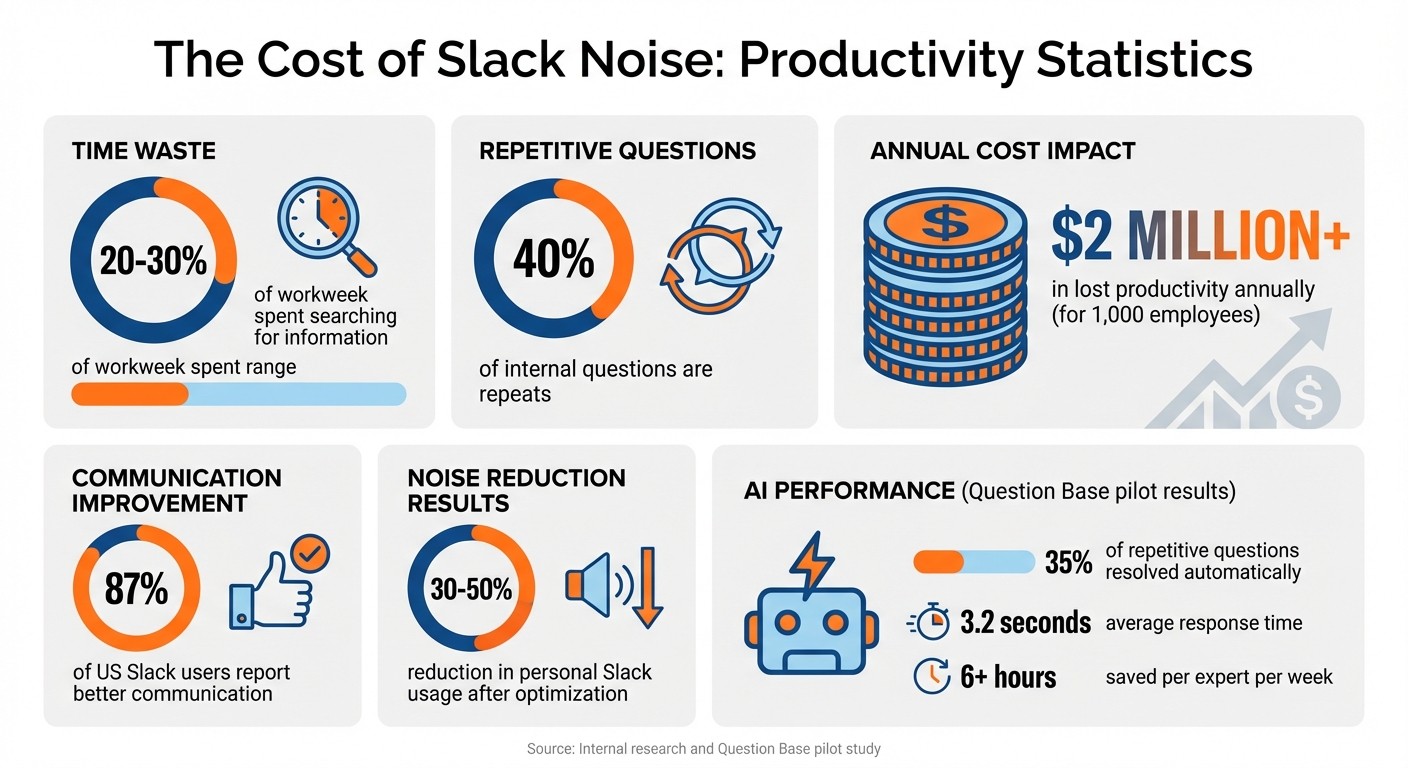
Repetitive Slack messages and notifications waste time and disrupt focus. On average, employees spend 20%-30% of their workweek searching for information, with 40% of internal questions being repeats, costing companies millions annually. The constant interruptions from notifications and scattered threads also lead to burnout and missed critical updates.
To fix this, combine Slack's built-in tools with AI-powered knowledge management to streamline communication and make information easy to find. Here's how:
Organize channels: Use clear naming conventions and separate updates from discussions.
Adjust notifications: Limit alerts to mentions and keywords, and mute non-essential channels.
Use Slack features: Pin important messages and master advanced search commands.
Automate answers with AI: Tools like Question Base resolve repetitive queries using verified sources like Notion or Confluence.
These steps reduce noise, improve productivity, and let your team focus on meaningful work.
The Cost of Slack Noise: Key Statistics on Workplace Communication Inefficiency
Common Sources of Noise in Slack
What Counts as 'Noise' in Slack?
Not every Slack notification or message contributes to productive work. Noise refers to those interruptions - messages or alerts - that pull attention away from important tasks without adding actionable value. This can include excessive @channel mentions that disrupt focus, or chaotic conversations where casual chats, urgent matters, and incomplete tasks all blend together, making it hard to prioritize [2][3].
Another common culprit is the overload of direct messages (DMs). These often bypass structured workflows, forcing leaders or team members to repeatedly address the same questions across scattered threads [2]. Adding to the chaos, channels often fail to differentiate between critical updates and casual remarks, leaving everything to appear equally urgent. Joydeep Sen Sarma, Founder of ClearFeed, summed it up well:
"Slack made group messaging the default modality… creating a new kind of political theater around looking busy." [2]
This type of noise doesn’t just clutter Slack - it actively undermines productivity, as explained below.
How Noise Reduces Productivity
The distractions caused by constant notifications and unstructured communication lead to inefficiencies across the board. Frequent interruptions fragment focus, pulling employees away from deep work and increasing stress levels. This makes it harder to juggle multiple projects effectively [2]. When urgent issues are buried in a flood of casual updates, teams often face decision paralysis, where conversations drag on without clear outcomes or next steps [3].
The result? A vicious cycle of wasted time. Employees spend hours searching for information, re-answering the same questions, and struggling to maintain focus - all of which drags down both individual and team performance. Over time, this inefficiency can ripple through the organization, impacting overall productivity and morale.
How to Measure Your Signal-to-Noise Ratio
To address these productivity drains, it’s essential to measure your workspace’s signal-to-noise ratio. Start by tracking metrics that reveal how noise impacts your team. For example:
Resolution rate: How many questions are resolved without requiring human input?
Search time: How much time is spent hunting for answers in channels or documents?
Repeat questions: What percentage of inquiries are being asked repeatedly, pointing to gaps in documentation?
Response delay: How long does it take to address critical requests?
In addition to metrics, conduct regular audits of your Slack channels. Look for signs of unstructured or off-topic conversations - channels where casual chatter buries urgent requests, or where the same questions keep popping up week after week. These patterns often indicate a need for better workflows and knowledge management tools to improve efficiency.
How to Minimize Slack Distractions and Maximize Productivity - Razi Alakhdar, Salsita Software
Using Slack's Built-In Features to Reduce Noise
Once you've pinpointed the main culprits behind Slack noise, it's time to put Slack's built-in tools to work. These features, when properly configured, can help you cut through the clutter and focus on what really matters.
Search and Pin Features
Slack's advanced search operators are a game-changer for tracking down important conversations. Commands like from:@username, in:#channel, or on:01/15/2026 let you narrow your search with precision. Combine them, like from:@sarah in:#product-launch after:01/01/2026, to find exactly what you need without wading through endless threads.
Pinned messages are another handy tool. Use them to highlight essential resources - onboarding guides, meeting schedules, or project briefs - right at the top of a channel. This simple step can cut down on repetitive questions like, "Where's the link to the design doc?" or "When's the deployment scheduled?"
Organizing Channels by Topic
Prevent channels from becoming overwhelming by giving each one a clear purpose. For instance, keep critical updates in a read-only channel like #product-announcements and reserve group discussions for a separate channel like #product-discussion [1].
You can also create a tiered channel structure to address different needs. For example:
Use
#team-engineeringfor department-wide updates.Create focused channels like
#proj-mobile-redesignfor specific projects.Set up
#help-itfor tech support requests.
Consistent naming conventions make it even easier for team members to figure out where to go for the information they need.
Customizing Notification Settings
Tame notification overload by adjusting your global settings. A good starting point is switching to "Direct messages, mentions & keywords" instead of "All new messages" [4][5].
Then, fine-tune notifications for individual channels:
Set critical project channels to "All messages."
Limit standard channels to "Mentions only."
Mute high-traffic channels like
#generalto keep them visible but silent unless you're @mentioned.
For even more focus, set up keyword alerts for important terms like project names or client accounts. This ensures you won't miss relevant updates, even in muted channels [4].
Lastly, make use of Slack's Do Not Disturb (DND) feature to block notifications during deep work or non-business hours. You can even customize profiles by device - keeping desktop alerts active during work hours while limiting mobile notifications to urgent mentions. This way, you stay in control of your attention, no matter where you are.
Using AI Tools for Knowledge Management
Building on Slack's built-in features, AI tools like Question Base take knowledge management a step further by automating the process of capturing and delivering information. Instead of employees wasting time sifting through Slack channels or repeatedly asking the same questions, these tools provide instant, verified answers.
Setting Up AI Answer Agents Like Question Base

AI answer agents, such as Question Base, integrate seamlessly into Slack to manage repetitive questions before they clog up conversations. While Slack AI primarily relies on chat history, Question Base goes a step further by pulling verified answers from established documentation sources like Notion, Confluence, and Salesforce.
In large organizations, repetitive questions can account for up to 40% of internal queries. These might include common topics like PTO policies or VPN password resets. During a 30-day pilot, Question Base averaged response times of just 3.2 seconds, resolving 35% of repetitive questions and saving experts over six hours of work each week [1].
"Since we started using QB we haven't used our Google support docs. And if I go on vacation or sick leave, I feel comfortable that QB will just take over."
– Linn Stokke, Online Events & Marketing Specialist, Ticketbutler [1]
Getting started is straightforward: install the app via Slack's App Marketplace, invite the bot to key channels, and link your primary knowledge sources. Once set up, the AI begins responding immediately, and you can fine-tune its answers over time to match your organization's tone and ensure accuracy.
Connecting External Knowledge Sources
After setting up your AI agent, expand its capabilities by linking it to essential knowledge management integrations. This step centralizes access to scattered knowledge, eliminating the need for employees to switch between platforms like Slack, Notion, Google Drive, Confluence, and Salesforce. Instead, everything is accessible directly through the AI agent.
Begin by connecting your most critical documentation - typically your HR policies, IT troubleshooting guides, and product manuals. Question Base supports integrations with tools such as Notion, Google Drive, Salesforce, Zendesk, Intercom, and Dropbox. Using Retrieval-Augmented Generation (RAG), the AI pulls answers directly from these verified sources, ensuring that responses are accurate and up-to-date [10]. For a company with 1,000 employees, the cost of lost productivity from searching and repeating answers in Slack can exceed $2 million annually [1].
To maintain security and accuracy, configure permissions so employees only access information they’re authorized to view. Additionally, establish regular update protocols to ensure the AI reflects the latest data and avoids spreading outdated or incorrect answers.
Escalation and Feedback Systems
Even with advanced AI capabilities, no system can answer every question. For those moments, effective escalation mechanisms are essential. When Question Base encounters a query it can’t confidently address, it automatically routes the question to the appropriate subject matter expert, ensuring every query gets resolved and avoiding the risk of incorrect information circulating.
The system also logs these escalated queries, creating a dashboard that identifies gaps in your documentation. This transforms your AI agent into a tool for diagnosing areas that need improvement. For instance, if the AI frequently escalates questions about a specific policy or process, it signals that the related documentation may need updating or expanding.
Employees can rate the quality of AI responses with simple thumbs-up or thumbs-down feedback. This input helps the AI improve over time. Subject matter experts should regularly review this feedback, refine AI responses, and update source documents as needed. This collaborative, human-in-the-loop approach ensures high accuracy while reserving expert time for more complex issues [8].
Maintaining Effective Knowledge Workflows
Even the most advanced AI tools need consistent updates to avoid outdated policies, conflicting information, or redundant data. Alongside AI tools, maintaining structured workflows is key to keeping your knowledge management system accurate and efficient.
Regular Knowledge Base Reviews
Outdated or conflicting content can bog down your system. Schedule quarterly audits where designated knowledge stewards review their assigned sections. These reviews should focus on archiving inactive content, removing contradictory information, and streamlining answers. When multiple responses exist for the same question, collaborate with subject matter experts to determine the most accurate answer. Archive or delete outdated versions to eliminate confusion. This approach saves employees from wasting time sorting through conflicting answers and protects the credibility of your system.
Regular reviews also have a measurable impact. By reducing unnecessary noise, personal Slack usage can drop by 30–50% [7]. Think of it like pruning a garden - cutting away the unnecessary to allow for healthier growth [6]. As Patrick Lencioni wisely said:
"If everything is important, then nothing is" [7].
Focus on keeping only verified, up-to-date information accessible. From there, use analytics to identify areas where your documentation could be improved.
Identifying Knowledge Gaps
Analytics provide a clear picture of where your documentation falls short. Question Base tracks key metrics such as unanswered questions, automation rates, and user satisfaction scores. These metrics highlight gaps in your knowledge base - areas where documentation is missing or insufficient. For instance, if the AI frequently escalates questions about a specific policy or process, it signals a documentation gap.
Recurring questions often point to unclear or hard-to-find answers. Assign a team member to review these patterns regularly and forward findings to the appropriate knowledge stewards. This process shifts your AI agent from being purely reactive to becoming a diagnostic tool that actively enhances your knowledge system.
Building Better Slack Habits
Following Slack knowledge base best practices and improving communication habits can significantly reduce noise in Slack, complementing technical solutions. Encourage employees to search for answers before asking questions, use threads to keep discussions organized [9], and mute channels with heavy automated activity [7]. Threads help isolate specific conversations, giving team members the option to opt out of discussions they don’t need to follow [9].
Promote concise messaging to save time. Use @channel mentions sparingly - only for true emergencies - and adjust sidebar preferences to "Mentions & Reactions only." Respect work hours when sending messages [7]. While 87% of US-based Slack users report better communication, excessive notifications can still hurt productivity [7]. Leadership plays a crucial role here; by modeling these behaviors, they can encourage a cultural shift that makes Slack more effective for the entire organization [7].
Conclusion
Minimizing Slack noise isn’t about cutting off communication - it’s about ensuring that every message has purpose and value. Start by using Slack’s built-in tools effectively: create clear channel naming conventions like #team- or #proj-, rely on threads to keep discussions organized, and adjust notification settings to maintain focus. These steps help establish a more structured workspace. However, structure alone won’t solve everything.
To truly streamline your Slack environment, integrate AI-powered tools for smarter knowledge management. Platforms like Question Base link directly to trusted documentation systems such as Notion, Confluence, and Salesforce, providing verified answers in seconds. This approach not only reduces repetitive questions but also lightens the load on your team’s subject matter experts [1]. While Slack AI is useful for summarizing past conversations, Question Base goes a step further by offering a scalable solution that pulls from reliable sources instead of relying on chat history alone.
Take it further by monitoring unanswered questions, assigning content owners to review and refine responses, and capturing Slack discussions as lasting, searchable knowledge. These ongoing improvements don’t just enhance productivity - they can also lead to meaningful cost savings for larger teams [1].
FAQs
How can AI tools like Question Base help reduce distractions and improve focus in Slack?
AI tools such as Question Base enhance the Slack experience by cutting through the clutter and delivering precise, actionable information. While Slack AI excels at summarizing chats and offering daily recaps, its insights are drawn mainly from chat history. Question Base goes a step further by providing expert-verified answers, pulling accurate information directly from trusted sources like Notion, Confluence, Salesforce, and OneDrive.
Where Slack AI aims to boost general productivity, Question Base is specifically designed for enterprise teams in HR, IT, and operations. It reduces interruptions by identifying duplicate questions, directing unresolved issues to the right experts, and highlighting important updates. On top of that, its analytics tools offer actionable insights, such as tracking resolution rates and pinpointing areas needing attention, helping teams stay organized and focused on their priorities.
What sets Question Base apart from Slack AI?
Slack AI and Question Base both bring AI into Slack, but their goals and strengths differ. Slack AI focuses on boosting individual productivity by summarizing conversations and creating answers based on chat history. This makes it a handy tool for tackling personal tasks. On the other hand, Question Base is tailored specifically for enterprise teams like HR, IT, and Ops. It delivers expert-verified answers from reliable platforms such as Notion, Confluence, and Salesforce, rather than pulling solely from Slack messages.
In addition, Question Base comes packed with advanced tools for knowledge management and analytics. Features like case tracking, duplicate detection, and detailed metrics (e.g., resolution rates) set it apart. It’s also SOC 2 compliant, ensuring secure and auditable knowledge sharing, all without requiring complicated setup. While Slack AI shines in summarizing and assisting individuals, Question Base is all about providing precise, scalable answers and equipping support teams with actionable data to improve performance.
How can I track the impact of reducing noise in Slack?
To gauge how well you're reducing noise in Slack, start by setting some baseline metrics. Begin by tracking the number of repetitive questions - like “How do I request PTO?” - before introducing an AI-powered tool. Solutions like Question Base can significantly cut down these repetitive queries by delivering accurate answers automatically.
Next, focus on resolution time (how quickly questions are answered) and resolution rate (the percentage of questions resolved without needing human input). With Question Base, you can use real-time analytics to observe progress in these areas as your knowledge base expands. Another key metric to monitor is the automation rate, which shows the percentage of inquiries fully handled by AI. A higher automation rate means fewer distractions are making their way to your team’s experts.
Don’t overlook knowledge gaps, either - unanswered or flagged responses that may need improvement. Question Base helps pinpoint these gaps, making it easier to address missing or unclear information. By comparing metrics like repetitive question volume, resolution times, and automation rates from before and after implementation, you’ll have solid evidence of reduced Slack noise and a boost in productivity.