∙
Cooper
∙
Reading time:
16 min

Slack AI is a built-in tool within Slack that uses generative AI to streamline workflows, reduce time spent searching for information, and summarize conversations. Designed for enterprise teams, it tackles challenges like information overload and repetitive tasks by offering features such as:
AI-Powered Search: Use natural language to find answers from Slack messages, files, and transcripts.
Conversation Summaries: Quickly catch up on long threads or channel activity with one-click summaries.
Automated Meeting Notes: Capture key takeaways, action items, and transcripts during live huddles.
AI Workflow Builder: Automate tasks in Slack with simple prompts.
Enterprise Search Integrations: Access data from tools like Google Drive, Salesforce, and more (Enterprise+ plan only).
While Slack AI helps teams save time and stay productive, it primarily relies on Slack’s internal data. For teams needing verified answers from external systems like Notion or Confluence, specialized tools like Question Base offer more precise knowledge management solutions.
Quick Comparison:
Feature | Slack AI | Question Base |
|---|---|---|
Primary Data Source | Slack messages, files, transcripts | External systems (Notion, Zendesk, etc.) |
Integrations | Limited to Enterprise+ plan | Broader integrations included |
Knowledge Management | Summarization, FAQs | Verified answers, gap tracking |
Best For | General productivity | HR, IT, and operations teams |
Slack AI is best for summarizing and searching Slack data, while Question Base excels at delivering accurate, structured answers from trusted documentation.
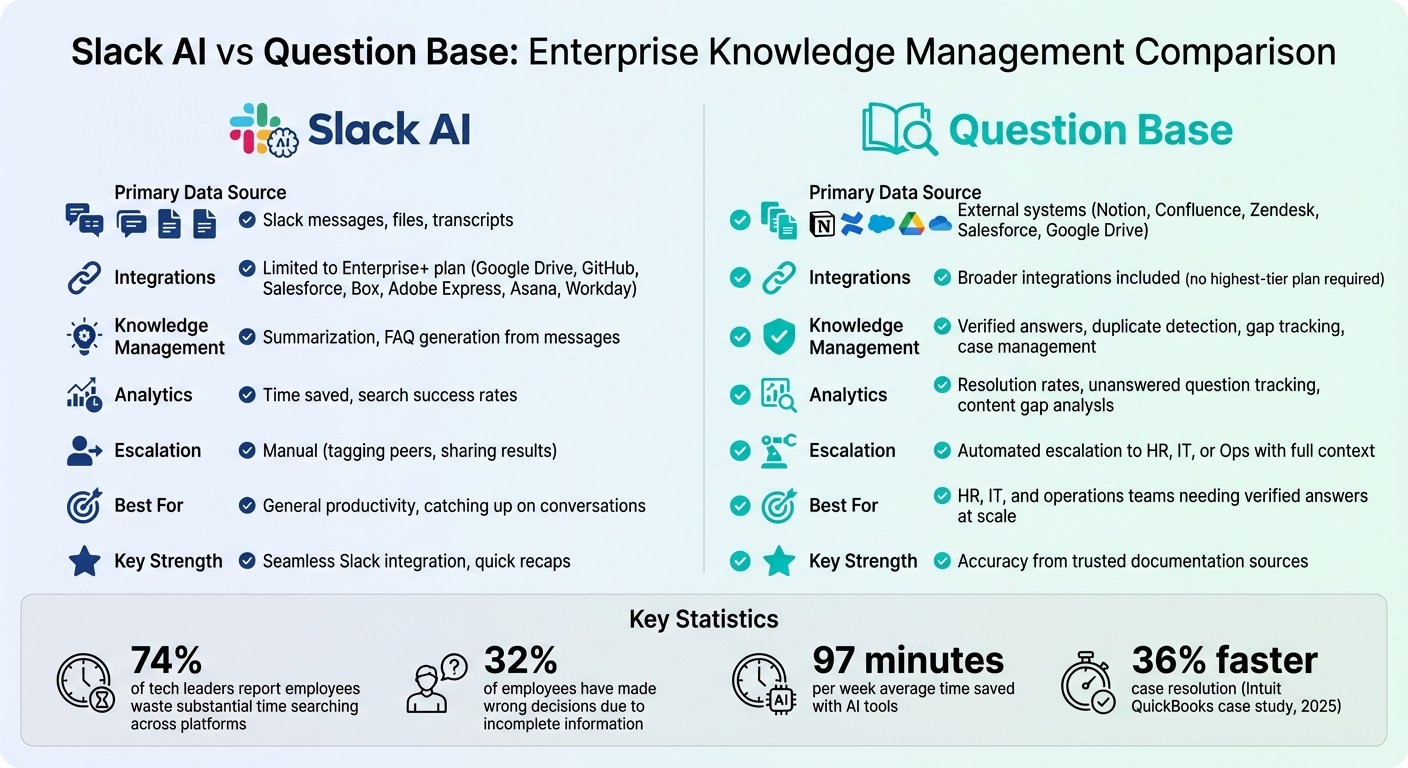
Slack AI vs Question Base: Feature Comparison for Enterprise Teams
Core Slack AI Features
AI-Powered Search
Slack AI transforms how you search by enabling natural language queries instead of relying on exact keywords. For instance, instead of typing "Project X update", you can simply ask, "What are the latest updates on Project X?" The AI will provide a conversational summary, complete with clickable citations linking back to the original messages[5].
This capability is powered by Retrieval-Augmented Generation (RAG), which interprets the intent of your query and pulls answers directly from your organization's data[7]. Beyond messages, the search extends to canvases, clip transcripts, and shared files, including PDFs and images[2].
Another standout feature is permission-aware search results - the AI ensures you only see information you’re authorized to access[7].
And that's not all. Slack AI simplifies keeping up with lengthy discussions by offering instant summaries.
Channel and Thread Summaries
Navigating long threads or active channels can feel overwhelming, often leading to information overload. Slack AI solves this with one-click summaries, condensing key points from unread messages, the past seven days, or a custom date range[1].
These summaries are especially helpful for new team members jumping into ongoing projects or for support engineers managing incidents. Instead of wading through hundreds of messages, users can quickly get up to speed with summaries that include direct citations for context[6]. For high-traffic channels, teams can even opt for daily recaps, reducing the need for constant notifications[8].
During live huddles, Slack AI takes it a step further by automatically capturing key takeaways, action items, and transcripts. These are then compiled into a shared reference canvas for the team to access later[4].
Building on these search and summary tools, Slack AI offers an automation feature to handle repetitive tasks.
AI Workflow Builder
The AI Workflow Builder vs. AI agents comparison shows how Slack simplifies processes with natural language commands. For example, typing "Remind my team to send project updates every Monday" can set up a recurring workflow in seconds[6].
Another handy automation is the "summarize channel" step, which posts weekly project updates directly to leadership channels[6]. This tool integrates seamlessly with Slack's existing automation features, making it easier to manage repetitive tasks across teams.
Feature | Pro Plan | Business+ Plan | Enterprise+ Plan |
|---|---|---|---|
Thread & Channel Summaries | Yes | Yes | Yes |
AI Search for Answers | No | Yes | Yes |
AI Workflow Builder | No | Yes | Yes |
Huddle Notes | Yes | Yes | Yes |
Enterprise Search (3rd Party Apps) | No | No | Yes |
Advanced Features for Enterprise Teams
Enterprise Search Integrations
Slack AI seamlessly connects with tools like Google Drive, GitHub, Salesforce, Box, Adobe Express, Asana, and Workday, with SharePoint, OneDrive, and Jira integrations on the horizon[9][10][12]. This unified search feature allows users to locate conversations, files, and third-party content through a single search bar, simplifying workflows.
The federated search capability enables Slack AI to pull real-time data from external systems, ensuring results are always up-to-date and respect user permissions[7][11]. For instance, if you ask, "What’s the status of the Project Phoenix launch?" Slack AI uses natural language processing to interpret the question and compiles a summary by pulling data from multiple sources[10][11]. Importantly, users only see information they are authorized to access. According to Slack’s research, 74% of tech leaders report that employees waste substantial time searching across platforms[11]. By centralizing enterprise knowledge, Slack AI transforms Slack into a unified interface for organizational data.
"Enterprise search in Slack... allows you to access organizational knowledge instantly and maintain your flow without leaving your workspace." - Slack[11]
Integration Status | Supported Applications |
|---|---|
Currently Supported | Google Drive, GitHub, Salesforce, Box, Adobe Express, Asana, Cohere, Workday[9][10][12] |
Coming Soon | SharePoint, OneDrive, Jira[10] |
Core Capabilities | PDFs, DOCX, Slack Messages, Canvases, Huddle Transcripts[9][12] |
This feature is available with the Enterprise+ plan, costing an additional $10 per user, per month[12]. For teams needing integrations with tools like Notion, Confluence, or Zendesk - systems not yet supported by Slack AI - Question Base provides direct integrations without requiring the highest-tier plan.
AI-Assisted Translations and Content Creation
Slack AI further supports global teams with its translation and content creation capabilities. For multilingual collaboration, users can translate messages into their preferred language by selecting "Translate message" from the menu. Translations appear privately, and the feature also extends to file summaries, translating content from PDFs, Word documents, PowerPoint slides, and Excel files into the user’s default language.
On the content creation side, Slack Canvas offers AI-powered assistance for drafting project briefs, summarizing threads, and rewriting content for onboarding guides or FAQs. This makes it easier to create clear, actionable documents directly within Slack.
However, Slack AI’s capabilities are largely limited to internal Slack data. It cannot translate or access information stored in external tools unless connected through advanced Enterprise Search integrations[6][14]. For teams requiring insights from tools like Notion, Confluence, or Zendesk, Question Base bridges the gap, offering verified and translated knowledge from these external sources.
Action Item Generation and Message Explanations
To keep enterprise workflows efficient, Slack AI automates task tracking and simplifies communication. It identifies tasks, follow-ups, and deadlines from conversations, threads, and huddles, automatically capturing decisions and next steps[15][17]. These action items are displayed in the Activity view, making it easy to prioritize tasks[15][16].
Slack AI also helps demystify internal jargon. By hovering over a message, users can instantly see explanations for acronyms, project names, or unfamiliar terms like "Acme Horizon" or "Q4 sprint goals." This feature pulls context from workspace history, making onboarding smoother and improving cross-team collaboration[15][16][17].
"Slack AI is not only a huge productivity boost - it's easy to use, right where we already work in Slack. Our team loves how quickly they can find answers, which translates to faster decision-making." - SpotOn[1]
While Slack AI is excellent at identifying action items and explaining messages based on Slack’s history, it doesn’t track resolution rates, highlight knowledge gaps, or analyze unanswered questions. For these needs, Question Base steps in, offering features like case tracking, duplicate detection, and resolution rate analytics. Together, these tools provide a more comprehensive solution for teams aiming to optimize their knowledge management and workflows.
Slack AI | AI that works where you do
Slack AI vs. Question Base

This comparison dives into how Slack AI and Question Base address enterprise knowledge management in distinct ways. While Slack AI enhances individual productivity by summarizing conversations and surfacing past discussions, Question Base goes further by structuring and streamlining enterprise knowledge at scale. Slack AI is great for catching up on missed chats, but Question Base is designed to deliver verified answers directly from trusted documentation sources like Notion, Confluence, Salesforce, Zendesk, and Google Drive. Instead of relying on AI interpretations of past conversations, it ensures accuracy by pulling from expert-approved materials. Let’s explore how each tool stacks up in terms of data accuracy, management features, and best use cases.
Data Sources and Accuracy
Slack AI primarily pulls information from messages, canvases, huddle transcripts, and shared files within Slack. While the Enterprise+ plan adds integrations with tools like Google Drive and Salesforce, it doesn’t yet support key platforms such as Notion, Confluence, or Zendesk[6]. This means Slack AI excels at retrieving Slack-based content but may fall short when accessing detailed, structured documentation stored outside the platform.
Question Base, on the other hand, integrates with your organization's trusted knowledge systems from the start. It directly connects to these sources, ensuring responses are always based on verified, up-to-date documentation rather than reconstructed chat logs. For example, in 2025, Intuit QuickBooks implemented a custom AI knowledge base in Slack for its support teams. This move led to a 36% faster case resolution time and boosted both Net Promoter Score (NPS) and team confidence[3]. For teams managing HR policies, IT troubleshooting, or compliance documentation, where precision and auditability are non-negotiable, this level of accuracy makes all the difference.
Knowledge Management and Analytics
How each tool handles and analyzes knowledge reveals another key difference. Slack AI focuses on productivity metrics like time saved per search and search success rates. It can generate FAQs or onboarding guides from existing messages, but it doesn’t proactively identify missing documentation or track unanswered questions[10].
Question Base takes a more comprehensive approach to knowledge management. It actively detects duplicate questions, tracks content gaps to highlight areas needing documentation, and provides resolution rate analytics to measure how well the knowledge base serves employees. When it can’t confidently answer a query, it automatically escalates the issue to the right team - HR, IT, or operations - while preserving the full conversation context[18]. These features shift support from being reactive to proactive, offering leaders clear insights into how to improve documentation and reduce repetitive questions.
"In technical environments, an answer without a source is just a suggestion. Every response needs clickable citations so engineers can verify accuracy."
– Inkeep Team[18]
Best Fit Scenarios
Here’s how to decide which tool aligns with your team’s needs. Slack AI is ideal for summarizing channels, catching up on missed conversations, and searching through Slack’s history. It’s available as a paid add-on across all Slack plans (Pro, Business+, and Enterprise+), with its most advanced features - like Enterprise Search across third-party connectors - offered in the highest-tier plan[2][13]. For general productivity and helping individuals work more efficiently, Slack AI is a strong choice.
Question Base, however, is tailored for HR, IT, and operations teams that handle a high volume of questions and require precise, verified answers. If your team frequently says, "It’s in Notion - go look it up", or struggles with repeated inquiries, Question Base transforms that knowledge into actionable responses delivered directly in Slack. It’s designed for enterprises needing SOC 2 compliance, customizable escalation workflows, and analytics that pinpoint documentation gaps. While Slack AI helps individuals stay productive, Question Base ensures entire teams remain aligned and unblocked - without requiring the most expensive Slack plan for critical integrations.
Feature | Slack AI | Question Base |
|---|---|---|
Primary Data Source | Slack chat history, canvases, connected files | Notion, Confluence, Salesforce, Zendesk, Google Drive |
Knowledge Management | FAQ generation from messages | Duplicate detection, gap tracking, case management |
Analytics | Time saved, search success rates | Resolution rates, unanswered question tracking, content gaps |
Escalation | Manual (tagging peers, sharing results) | Automated escalation to HR, IT, or Ops with full context |
Best For | General productivity, catching up on messages | HR, IT, Ops teams needing verified answers at scale |
Limitations and Best Practices for Using Slack AI
Limitations of Slack AI
While Slack AI is a helpful tool for boosting individual productivity, it does come with some notable constraints, especially for large-scale enterprise knowledge management. Its primary strength lies in leveraging internal Slack data, which is great for catching up on missed conversations. However, this creates a closed data environment, leaving external documentation out of reach unless you're using the Enterprise+ plan. That plan unlocks integrations with tools like Google Drive and GitHub, but without it, external resources remain siloed.
Another limitation is its reliance on the quality of Slack's chat history. If the history isn’t well-maintained, Slack AI may provide outdated or incorrect answers. This is no small issue, as 32% of employees have reported making wrong decisions due to incomplete or inaccurate information [1]. While Slack AI includes citations to help verify its sources, it doesn’t proactively highlight outdated content or identify knowledge gaps - capabilities that specialized tools often offer.
Slack AI is also limited in its ability to interact with external systems. It’s designed for summarizing and reporting rather than executing tasks. For example, it can’t escalate a support case or perform actions in external platforms with full context. This makes it less suitable for high-volume support teams that rely on workflow automation. Additionally, it lacks detailed controls for tone, escalation paths, or human oversight, which are critical in situations where accuracy and accountability are key. These limitations highlight where Slack AI falls short and why enterprises often turn to more specialized tools for complex needs.
Best Practices for Enterprise Teams
To make the most of Slack AI, it’s important to focus on tasks where it excels. For instance, it’s highly effective at summarizing channel activity, defining jargon, and helping team members catch up on missed conversations. These features can save users an average of 97 minutes per week [1], allowing for quicker decision-making in everyday work. However, always verify information by checking the source citations Slack AI provides. This extra step ensures accuracy and builds trust in the tool’s outputs.
For more complex, high-stakes scenarios, consider pairing Slack AI with specialized knowledge management tools. If your team frequently redirects colleagues to platforms like Notion or Confluence for detailed answers, a tool like Question Base can streamline this process by delivering verified responses directly in Slack - no Enterprise+ plan required. This approach not only fills Slack AI’s gaps but also speeds up case resolution for enterprise teams.
Before rolling out any AI solution, take time to audit your existing documentation. Identify outdated, duplicate, or missing content, and organize materials using tags and metadata. This makes it easier for AI tools to surface accurate information when needed [3]. Feedback loops are another key strategy - encourage users to rate AI responses so the system can improve over time. If you're on Pro or Business+ plans, evaluate whether upgrading to Enterprise+ is worth the investment, or if a specialized tool might deliver better results for your team’s specific needs.
Conclusion: Choosing the Right AI Tools for Your Enterprise
Key Takeaways
When it comes to simplifying enterprise knowledge management, Slack AI offers a practical boost to productivity. It helps teams quickly catch up on conversations, summarize lengthy threads, and search workspace messages with ease. Its seamless integration into Slack ensures teams can start benefiting immediately, with no additional setup or training required.
That said, when your focus shifts to accuracy, verification, and structured knowledge management, specialized tools like Question Base address these needs more effectively. While Slack AI is great for surfacing past conversations, Question Base connects directly to trusted documentation sources like Notion, Confluence, Google Drive, and Salesforce. It delivers verified answers with context, making it an ideal choice for teams that need to operationalize knowledge rather than just summarize it.
The distinction lies in how each tool manages enterprise knowledge. Slack AI is perfect for speeding up individual workflows with quick recaps and conversational search. On the other hand, Question Base ensures the entire team stays aligned by identifying knowledge gaps, tracking unanswered questions, and providing analytics on resolution rates and automation efficiency. For teams in HR, IT, and operations - where managing high volumes of questions is the norm - this difference can have a big impact.
Final Recommendations
Choosing the right tool starts with understanding your team’s specific challenges. If catching up on missed conversations or accessing past discussions quickly is your main pain point, Slack AI’s summarization features can provide immediate relief. However, if your team frequently needs to reference external documentation, a specialized tool like Question Base will offer better long-term results.
A hybrid approach may be the most effective strategy. Use Slack AI for quick recaps and conversational insights, while relying on Question Base for verified, context-rich answers. This way, you can leverage the strengths of both tools without overburdening one to do tasks it wasn’t designed for. Regularly audit your documentation, pinpoint gaps, and track metrics like resolution time and automation efficiency to refine your knowledge management strategy over time.
FAQs
How does Slack AI protect user data and ensure privacy?
Slack AI prioritizes enterprise-grade security and privacy. It works exclusively with data that users are already authorized to access and does not use customer content to train generative models unless customers explicitly choose to opt in. To protect information, Slack relies on methods like de-identified data, workspace isolation, and strong technical safeguards.
These protocols ensure sensitive information stays protected, with stringent measures in place to prevent employee access to underlying content. By adhering to Slack’s established trust and compliance standards, teams can feel assured about the privacy of their data.
How does Question Base compare to Slack AI?
Slack AI focuses on boosting overall productivity by summarizing discussions, answering search queries, and assisting with writing tasks. It gathers information primarily from Slack messages and connected apps, catering to enterprise users looking for general support.
In contrast, Question Base is specifically tailored for internal support teams, such as HR, IT, and operations. It delivers expert-verified answers sourced from trusted platforms like Notion, Confluence, Salesforce, and OneDrive, ensuring both accuracy and dependability. Beyond that, Question Base offers advanced tools for knowledge management, including case tracking, duplicate detection, and detailed analytics - making it a solid choice for teams that require scalable, auditable solutions.
For quick insights within Slack, Slack AI works well. However, if your team relies on precise, verified answers and needs robust tools for managing knowledge, Question Base is purpose-built to handle those demands.
Can Slack AI connect to tools like Notion or Confluence?
Slack AI has the ability to connect with external tools such as Notion and Confluence through Slack’s integration ecosystem. These connections allow you to seamlessly link Slack with the platforms your team depends on, making it easier to collaborate and access essential resources.
That said, Slack AI primarily focuses on analyzing Slack messages for its AI-driven features. If your team requires verified answers pulled directly from trusted sources like Notion or Confluence, specialized tools like Question Base might be a more suitable solution.