∙
Cooper
∙
Reading time:
15 min

Repetitive questions in Slack drain productivity. Employees waste hours searching for answers or waiting for responses, while internal experts spend up to 8 hours weekly addressing the same queries. The result? For a 1,000-person company, inefficiencies can cost over $2 million annually.
AI Slackbots solve this by automating answers to common questions directly in Slack. Modern bots like Question Base connect to trusted documentation tools (e.g., Notion, Confluence, Salesforce) to deliver accurate, cited responses in seconds. Unlike Slack AI, which relies on chat history, Question Base ensures reliability by pulling from verified sources and offering a human-review option for compliance-critical industries.
Key Benefits:
Automates 90%+ of FAQs, saving teams over 6 hours weekly.
Delivers answers in 3.2 seconds on average.
Transforms Slack into a knowledge hub, centralizing institutional information.
With integrations into HR, IT, and ops workflows, these bots not only answer questions but also streamline processes, reduce interruptions, and improve team efficiency. Whether you're onboarding new hires, resolving IT issues, or managing internal policies, AI Slackbots bridge the gap between where questions are asked and where answers reside.
Quick Comparison:
Feature | Question Base | Slack AI |
|---|---|---|
Primary Focus | Enterprise support, verified answers | Productivity, chat insights |
Data Sources | Notion, Confluence, Salesforce, etc. | Slack chat history |
Accuracy | Expert-verified (99.99%) | Unverified summaries |
Response Time | 3.2 seconds | Real-time |
Automation Rate | 90%+ FAQs | N/A |
Build a Slack AI Agent That Answers Questions (Step-by-Step Tutorial)
How Enterprises Use AI Slackbots
Large organizations are turning to AI Slackbots to handle three primary tasks: automating repetitive queries, capturing institutional knowledge, and delivering real-time answers. These bots operate directly within Slack, where teams already collaborate, reducing interruptions for subject matter experts and streamlining workflows. Let’s break down how each of these functions improves efficiency in practice.
Automating Repetitive Questions
AI Slackbots are a game-changer for managing routine IT, HR, and operations inquiries. By connecting to knowledge bases filled with policies, procedures, and troubleshooting guides, these bots deliver instant responses to questions asked in Slack channels[4]. Whether it’s a new hire looking up company policies, a support agent accessing customer details, or an IT team retrieving troubleshooting steps, everything happens seamlessly - no need to switch apps[4].
Question Base users report saving over 6 hours per week by automating FAQs, achieving automation rates above 90%, with an average response time of just 3.2 seconds[1][2].
"It's like having an extra person answering questions in Slack." – Willem Bens, Manager of Sales North EMEA, DoIT International[2]
While Slack AI offers basic features like thread summarization and chat history search[8][10], Question Base goes further by integrating with verified sources such as Notion, Confluence, and Salesforce[1][4]. This ensures responses are based on trusted documentation rather than informal conversations. For industries with strict compliance requirements, Question Base includes a "human-in-the-loop" process, allowing experts to review AI-generated answers before they’re delivered[1][3].
Capturing and Organizing Knowledge
AI Slackbots aren’t just about answering questions - they’re also adept at capturing valuable insights shared in Slack and organizing them into structured knowledge bases for future use[8][10]. When a bot encounters a question it can’t answer, team members can tag the expert’s response with an emoji or reaction. The system then indexes that Q&A pair into a searchable database[7]. This process transforms fleeting Slack conversations into a lasting resource.
These bots monitor specific channels, indexing questions and expert responses into vector databases alongside existing documentation from platforms like SharePoint, Google Drive, or Confluence. They’re also configured to cite sources when providing answers, ensuring transparency and reliability[4][7].
"Since we started using QB, we haven’t touched our Google support docs. And when I’m on vacation or out sick, I know QB will handle things seamlessly." – Linn Stokke, Online Events & Marketing Specialist, Ticketbutler[2]
This systematic organization makes it easier for teams to access accurate information and keeps the knowledge base evolving as the organization grows.
Providing Real-Time Answers
Modern AI Slackbots excel at delivering quick, accurate answers. They use semantic searches on indexed knowledge bases, evaluate relevance with advanced language models, and respond in Slack with citations to trusted sources - all in real time[4][6][7]. Whether handling public queries in shared channels or addressing sensitive topics in private DMs, these bots adapt to privacy needs with secure hosting options[4][6].
One standout example is the Slackbot rolled out to 70,000 Salesforce employees in late 2024. This bot acts as a conversational partner, learning user preferences over time to improve interactions[10]. Advanced integrations with tools like PagerDuty, Jira, and GitHub allow users to query incident updates or modify tickets directly from Slack, further enhancing productivity[8][11].
"Question Base has exceeded our expectations - it’s easy to use, intuitive, and saves us a ton of time. Our staff no longer have to wait on busy managers for answers." – Monica Limanto, CEO, Petsy[2]
Comparing AI Slackbots
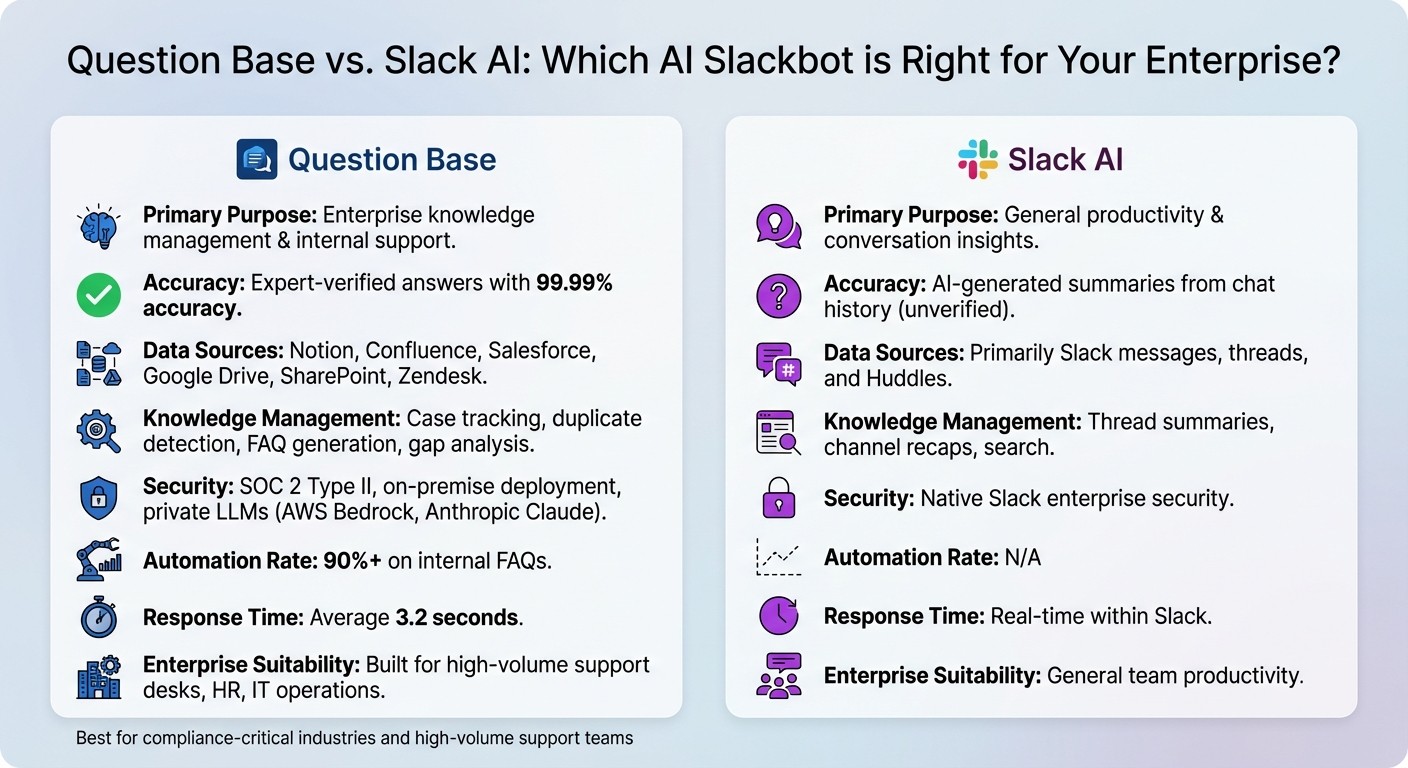
Question Base vs Slack AI: Feature Comparison for Enterprise Teams
AI Slackbots cater to various needs, from general productivity tasks like summarizing conversations to handling enterprise-level internal support, where precision, verified knowledge, and compliance are critical. Recognizing these distinctions is essential to selecting the right tool for your team’s operations. Here's a comparison of Question Base and Slack AI, followed by a look at other notable options.
Question Base vs. Slack AI

Slack AI is designed to enhance individual productivity. It excels at summarizing conversations, offering daily briefings, and enabling users to search their message history using natural language. These features are available on select plans and integrate with key CRM tools[8][10].
Question Base, on the other hand, focuses on enterprise support. It delivers verified answers for HR, IT, and operations by connecting directly to trusted sources like Notion, Confluence, Salesforce, Google Drive, and SharePoint[1][4]. Unlike Slack AI, which relies on chat history, Question Base ensures accuracy through a human-in-the-loop verification process, achieving 99.99% accuracy[3]. This makes it particularly suited for industries with strict compliance needs or teams managing large volumes of policy, procedure, and troubleshooting queries.
Feature | Question Base | Slack AI |
|---|---|---|
Primary Purpose | Enterprise knowledge management & internal support | General productivity & conversation insights |
Accuracy | Expert-verified answers with 99.99% accuracy[3] | AI-generated summaries from chat history (unverified) |
Data Sources | Notion, Confluence, Salesforce, Google Drive, SharePoint, Zendesk | Primarily Slack messages, threads, and Huddles |
Knowledge Management | Case tracking, duplicate detection, FAQ generation, gap analysis | Thread summaries, channel recaps, search |
Security | SOC 2 Type II, on-premise deployment, private LLMs (AWS Bedrock, Anthropic Claude)[4] | Native Slack enterprise security |
Automation Rate | 90%+ on internal FAQs[1] | N/A |
Response Time | Average 3.2 seconds[2] | Real-time within Slack |
Enterprise Suitability | Built for high-volume support desks, HR, IT operations | General team productivity |
While Slack AI simplifies individual tasks, Question Base transforms how teams manage and access verified knowledge. For example, if your team frequently says, "It’s in Notion - go find it", Question Base automates that process by routing queries to verified sources and escalating unanswered ones to experts[1][3]. These capabilities make it a standout choice for enterprise environments. But there are other tools worth considering as well.
Other Options: Dashworks, Guru, and Slite
In addition to Question Base and Slack AI, other tools bring unique AI-driven features to Slack workflows. Guru offers manually verified knowledge cards tailored for sales and support teams[7]. Dashworks focuses on conversational search, enabling teams to access insights from scattered internal documents[5][12]. Slite specializes in AI-assisted note-taking and wiki-style documentation for collaborative projects[4][13].
While these tools serve distinct purposes, Question Base sets itself apart for enterprise-level operations. With features like PII encryption, private LLM deployment, and a RAG (Retrieval-Augmented Generation) architecture, it’s built to handle the demands of high-volume support teams[4][11]. Although the alternatives offer valuable functionality, they may not meet the stringent requirements of large-scale internal support as effectively as Question Base.
Setting Up Your AI Slackbot
Installation and Integration
To get started, install Question Base directly from the Slack App Marketplace. Once installed, invite the bot to your active channels by typing /invite @questionbase in Slack.
After installation, connect your existing knowledge sources. Question Base integrates seamlessly with platforms like Notion, Confluence, Google Drive, Salesforce, Zendesk, Intercom, Dropbox, OneDrive, and SharePoint using secure OAuth connections[4]. This means all your documentation - whether it's policies, troubleshooting guides, or historical Q&A - becomes instantly accessible within Slack. Rest assured, the platform is SOC 2 Type II compliant and offers private LLM deployment for added security[4].
Once you've followed a checklist for setting up permissions, it’s time to tailor the bot to fit your team’s unique workflows.
Customizing for Your Organization
With Question Base, customization is straightforward. Use plain English instructions to adjust the bot’s tone, personality, and escalation rules[4][9]. You can, for instance, configure it to respond politely and concisely, always include citations, or route unanswered questions to specific team members automatically.
To safeguard sensitive data, enable role-based access controls. For example, HR teams can restrict access to payroll documents, while IT can make troubleshooting guides available to everyone[3]. Additionally, you can build a centralized company glossary to teach the bot your organization’s internal acronyms and terminology, ensuring it provides accurate answers to company-specific questions[3]. These customizations allow the bot to automate over 90% of FAQs, saving your team’s experts more than six hours each week[1][2].
Once your bot is fully tailored, focus on strategies to encourage team adoption and maximize its benefits.
Best Practices for Team Adoption
Start with a pilot program to ease your team into using the bot. Test it in one department for 30 days to track resolution rates and accuracy, then roll it out across the company based on the results[2][3]. Encourage teams to use public channel mentions for shared knowledge and private messages for sensitive or confidential queries[4].
Set clear expectations about what the bot can and cannot do. Make it transparent when the bot provides instant answers and when it escalates questions to humans. Linn Stokke, Online Events & Marketing Specialist at Ticketbutler, shared her experience:
"Since we started using QB we haven't used our Google support docs. And if I go on vacation or sick leave, I feel comfortable that QB will just take over"[2].
Regularly review the bot’s performance. Identify which types of questions it handles well and which require human intervention, and refine your knowledge base accordingly to improve results[7].
Measuring and Improving Performance
Metrics to Track
To determine if your AI Slackbot is delivering meaningful results, focus on metrics that highlight both efficiency and the quality of responses. Start with resolution rate, which measures the percentage of questions your bot successfully answers on the first try. This serves as a key indicator of how effective the bot is at resolving user queries[14]. Another critical metric is the automation rate, which tracks how many queries the bot handles without requiring human help. For context, Question Base customers often automate over 80% of routine questions[4].
Pay attention to the answer acceptance rate, reflecting user engagement through actions like clicking citations, copying text, or marking answers as helpful[12]. If you notice a high rate of follow-up questions, it might suggest that the initial responses are missing important details or context[12]. Additionally, monitor the escalation rate, which shows how often conversations are passed to a human. This metric also ensures that complete conversation histories are preserved for a seamless handoff[12][15].
For enterprise teams, response time is crucial. Users expect answers in under a second, typically between 0.1 to 1 second[14]. Unlike Slack AI’s basic usage stats, Question Base provides a comprehensive analytics dashboard that tracks all these metrics in real time. This gives you the tools to evaluate ROI and make a strong case for your investment. Use these insights to refine your bot’s performance and keep improving its capabilities.
Using Data to Improve Results
Tracking metrics is just the beginning. Use the data to fine-tune your knowledge base accuracy and close existing gaps. Question Base makes this easier by identifying unanswered questions and routing them to the appropriate teams. For example, content-related issues can go to documentation owners, technical questions to engineering, and behavioral challenges to product teams[12]. As the Inkeep team wisely notes:
"The best AI support systems don't just answer today's questions - they systematically eliminate tomorrow's."[12]
Make it a habit to hold weekly reviews of knowledge gaps with a dedicated owner, such as your DevEx lead or knowledge manager. These reviews help you quickly address and update your knowledge base[12]. Use thumbs up/down ratings to pinpoint recurring failures in specific areas, such as billing or authentication[12][15]. Question Base’s analytics can highlight exactly which topics need attention, helping you prioritize updates across tools like Notion, Confluence, or other connected platforms.
To ensure consistent quality, consider using LLM-as-a-Judge methods, where models like GPT-4 evaluate responses at scale[16]. Focus automation efforts on questions with standardized answers - password resets, policy lookups, and high-frequency FAQs are excellent starting points[15]. By leveraging these insights and tools, you can build a smarter, more reliable support system.
Conclusion
AI-driven Slackbots have reshaped how enterprises manage internal support and knowledge sharing. Gone are the days of hunting through scattered files or waiting endlessly for answers. These bots now provide instant, precise responses right within Slack, achieving automation rates of over 90% for frequently asked questions[1].
What sets tools apart is how they handle accuracy and knowledge management. While Slack AI is great for summarizing chats and helping individuals catch up on conversations, Question Base is designed specifically for teams that need reliable, verified answers at scale. By connecting directly to trusted sources like Notion, Confluence, Salesforce, and Google Drive, and routing AI-generated responses through expert validation, Question Base ensures every answer aligns with your compliance standards and improves team alignment. This seamless integration with your core knowledge repositories is what drives its effectiveness and makes it stand out.
For large organizations, inefficiencies in handling repetitive questions can translate into millions of dollars in lost productivity each year. Purpose-built AI Slackbots eliminate this by bridging the gap between where employees naturally ask questions (Slack) and where official answers reside.
Beyond just delivering quick answers, these tools revolutionize support by turning it into a proactive knowledge-sharing process. They identify knowledge gaps, track unresolved queries, and help you build a dynamic knowledge base that grows with your organization. With analytics that reveal resolution rates, automation success, and content gaps, you gain actionable insights to continually refine your internal support systems.
FAQs
How does Question Base ensure accurate answers compared to Slack AI?
Question Base stands out by basing its responses on trusted, external knowledge sources like Notion, Confluence, Salesforce, and Google Drive. Instead of pulling from Slack chat history, it taps into these verified repositories, ensuring that the information it delivers is both accurate and current. Additionally, every response is expert-reviewed and auditable, with content being approved by designated knowledge owners before it’s shared within Slack.
On the other hand, Slack AI primarily relies on Slack message history to generate answers. This approach can lead to issues with outdated or informal information, as it lacks expert verification. By combining reliable integrations, human oversight, and analytics-driven enhancements, Question Base offers a dependable solution tailored for HR, IT, and operations teams who require robust, enterprise-level knowledge management.
How is Question Base better suited for enterprise use than Slack AI?
Question Base is designed specifically for enterprise teams in HR, IT, and operations, providing expert-verified answers sourced directly from trusted platforms like Notion, Confluence, and Salesforce. Unlike Slack AI, which primarily pulls from Slack message history, Question Base prioritizes accuracy and compliance by delivering source-cited responses tailored to enterprise standards.
The platform also offers robust knowledge management tools, including features like case tracking, duplicate question detection, and expert feedback integration. These capabilities give organizations greater control and transparency over their knowledge base. On top of that, its enterprise analytics - covering metrics like resolution rates and unhelpful-answer tracking - empower teams to measure performance and make continuous improvements.
With SOC 2 compliance, encryption, and the ability to scale for large organizations, Question Base ensures the security and operational dependability enterprises demand. In contrast, Slack AI is better suited for general productivity tasks, such as summarizing conversations.
How do AI-powered Slackbots help manage and organize company knowledge?
AI-powered Slackbots are changing the game for how teams handle knowledge by turning everyday Slack conversations into a centralized, searchable knowledge hub. These bots can spot questions in Slack threads, fetch accurate answers from trusted platforms like Notion, Confluence, Salesforce, or Google Drive, and deliver them directly within the conversation. What’s more, they store these answers for future reference, ensuring that valuable information is always at your fingertips.
Beyond just answering questions, these bots identify gaps in existing documentation, flag low-quality or unanswered queries, and provide analytics on how well issues are being resolved and automated. The outcome? A well-organized, always-current knowledge base that cuts down on repetitive questions, breaks down information silos, and keeps everyone on the same page - all without stepping outside Slack.