∙
Cooper
∙
Reading time:
17 min

Distributed teams face a common challenge: how to automate Slack workflows effectively. The choice often boils down to Slack’s built-in tools - like Workflow Builder and Web API - or custom API workflows, which offer greater flexibility for complex needs. Here’s a quick breakdown of the key differences:
Slack API simplifies automation with no-code and low-code options, making it ideal for quick setups and non-technical teams.
Custom API workflows provide deeper control over business logic, integrations, and security but require coding expertise and, in some cases, self-hosting.
Key Stats to Consider:
Slack Workflow Builder vs. AI Agents has powered over 1.5M workflows, with 200M+ launches by non-developers.
Teams using Slack automation report a 29% time savings and 30% higher engagement rates for integrated apps.
Custom workflows are better suited for enterprise-grade systems, proprietary tools, or strict compliance needs (e.g., GDPR, HIPAA).
Quick Overview
Slack API: Best for teams needing fast, straightforward automation with pre-built connectors.
Custom API Workflows: Ideal for advanced logic, proprietary systems, and compliance-heavy environments.
The right choice depends on your team’s resources, technical skills, and workflow complexity. Let’s dive into the details.
Become a Slack workflow automation superhero!
What Is Slack API?
The Slack API expands Slack's capabilities by enabling automation, seamless integrations with tools like Salesforce and Jira, and real-time workflow triggers. As described in Slack's developer documentation, "A Slack app is a tool or integration that extends the functionality of Slack: it adds new features, automates tasks, integrates with external services, or enhances the user experience" [9].
At its core, the Slack API is built on several essential components. The Web API provides hundreds of methods for tasks like posting messages, creating channels, and managing files. The Events API allows apps to receive real-time updates when specific events occur, such as a new message or an emoji reaction. Socket Mode uses WebSocket connections for private communication endpoints [5]. Authentication is handled through OAuth 2.0, with access tokens requiring exchange within 10 minutes to remain valid [5].
For distributed teams, Slack's integration library is a game-changer. It includes pre-built connectors for tools like Google, Jira, and Salesforce, enabling non-developers to integrate external systems into workflows without writing code [5][2]. Developers tackling more advanced needs can choose between the Bolt framework (available in JavaScript, Python, and Java) for self-hosted apps or the Deno Slack SDK (TypeScript only) for Slack-managed hosting [11][2]. With this foundation, we can now dive into the API's standout features and how they help teams streamline their work.
Core Features of Slack API
The Slack API offers a range of tools that make it a powerful platform for building and automating workflows. One standout feature is Block Kit, a UI framework with stackable components like buttons, modals, and forms, which make apps both interactive and visually intuitive [9]. Other interactivity options include slash commands (triggered by typing "/command") and shortcuts for quick access to apps. Apps can appear in various "surfaces" within Slack, such as messages, modals, the App Home tab, or canvases, creating centralized spaces for interaction [1].
Workflows built using the API can include up to 100 steps, with specific limits such as a 60-second timeout for deployed functions and a 10-second cap for interactive payloads like button clicks [10][6]. These features are designed to help distributed teams stay productive and organized.
Another exciting capability is the ability to create AI agents and intelligent apps that perform autonomous actions directly within Slack. This reflects the growing emphasis on context-aware automation [1]. On the development side, the Slack CLI simplifies app creation, deployment, and management, while the Bolt framework takes care of repetitive tasks like token rotation and rate limiting, allowing developers to focus on functionality [9].
Benefits of Slack API
The Slack API doesn't just offer robust technical features - it also delivers practical advantages that boost team efficiency. One key benefit is quick deployment. Many core features, including the Web API, Events API, and Bolt-based apps, are available on Slack's Free plan, making it easy for teams to start automating without upfront costs [2]. Paid plans unlock additional tools like Workflow Builder, Slack-hosted apps, and premium third-party connectors. For developers, the Slack Developer Program provides free sandbox environments with access to paid features for testing [5][6].
Another major advantage is ease of use. Slack's Workflow Builder requires no coding, allowing teams to automate straightforward tasks using a visual interface. For example, teams can set up workflows to automatically create channels, send scheduled messages, or route requests based on form submissions. This no-code tool has seen widespread adoption, with over 1.5 million workflows created through it [7].
The API's real-time capabilities are particularly valuable for remote teams. When updates occur in external systems, such as a ticket status change or a document approval, Slack can instantly notify the relevant channel. This ensures that distributed teams stay aligned without the need for constant manual follow-ups [1][2]. With this detailed look at the Slack API, we’re ready to explore how it compares to custom API workflows in the next section.
What Are Custom API Workflows?
Custom API workflows go beyond Slack's built-in tools by enabling developers to create coded workflow steps that execute specific business logic or connect with external systems. While Slack's no-code Workflow Builder provides standard actions like chat.postMessage, custom workflows are modular functions that can be effortlessly integrated into workflows using a drag-and-drop approach [3][11].
These workflows fill the gap between basic automation and more intricate business processes. They’re particularly useful for tasks like data processing, third-party integrations (e.g., JIRA or Salesforce), or accessing internal databases [2]. Even though they allow for greater complexity, custom workflows still adhere to Slack’s limits of 100 steps and 60 seconds per execution, maintaining consistency with its native tools [10][6].
To build custom Slack workflows, specific frameworks are required. Slack-hosted apps use the Deno Slack SDK, while self-hosted applications rely on the Bolt framework, available in Python, JavaScript, or Java [3][11]. This flexibility lets teams choose infrastructure that aligns with their compliance and security needs. By leveraging these workflows, organizations can connect Slack more deeply with their enterprise systems.
How Custom API Workflows Work
Custom workflows act as bridges between various applications, allowing data and services to flow seamlessly across a company’s digital ecosystem [14]. Unlike Slack’s native tools, which focus on simplicity, custom workflows offer the detailed control necessary for complex integrations. They support advanced features like multi-branching through Routers and data merging via Aggregators - options unavailable in native linear workflows [13][15].
Their technical design enables sophisticated data handling, employing custom JavaScript or Python code for unique logic, formatting, or calculations [15]. This is especially valuable for teams working with proprietary or legacy systems, such as mainframes or on-premise ERPs, which lack prebuilt Slack apps [14][16]. For organizations with strict compliance requirements like HIPAA or GDPR, custom workflows can be self-hosted to ensure data stays within private networks [12][13].
It’s worth noting that apps with custom workflow steps are not eligible for listing on the Slack Marketplace or public distribution. They are designed for internal use within organizations and require a paid Slack plan (Pro, Business+, or Enterprise) for full deployment [2][6][4][11].
Benefits of Custom API Workflows
Custom workflows stand out because they deliver tailored solutions for complex business challenges. They can handle intricate decision-making processes, loops, and advanced error management, going well beyond the capabilities of Slack’s native tools [17]. When it comes to data processing, these workflows excel at restructuring nested arrays, objects, and performing complex JSON transformations - areas where native automation tools often fall short [17].
Scalability is another key advantage. Some automation platforms now integrate with over 8,000 applications, far surpassing the native integration options of most SaaS tools [13]. This is crucial, as businesses typically rely on an average of 112 SaaS applications, with employees spending nearly four hours each week switching between them. By consolidating workflows into Slack, API integrations can significantly reduce this inefficiency [14][17].
"This innovation now empowers our community to connect their business processes to over 1,000 apps, so the possibilities are completely endless from setting-up triggers, to kicking-off processes with data from other apps." - Gerard Newman, CTO, FlowForma [15]
For teams with high-security demands, custom workflows provide full control over encryption, authentication, and access management [17]. The Bolt framework supports self-hosting to meet corporate compliance requirements, while the Deno SDK offers Slack-managed infrastructure with built-in Datastore for teams seeking less operational complexity [11]. Functions must respond to interactive payloads within 10 seconds, and locally-run functions during development have a 15-second timeout [6].
Slack API vs. Custom API Workflows: Key Differences
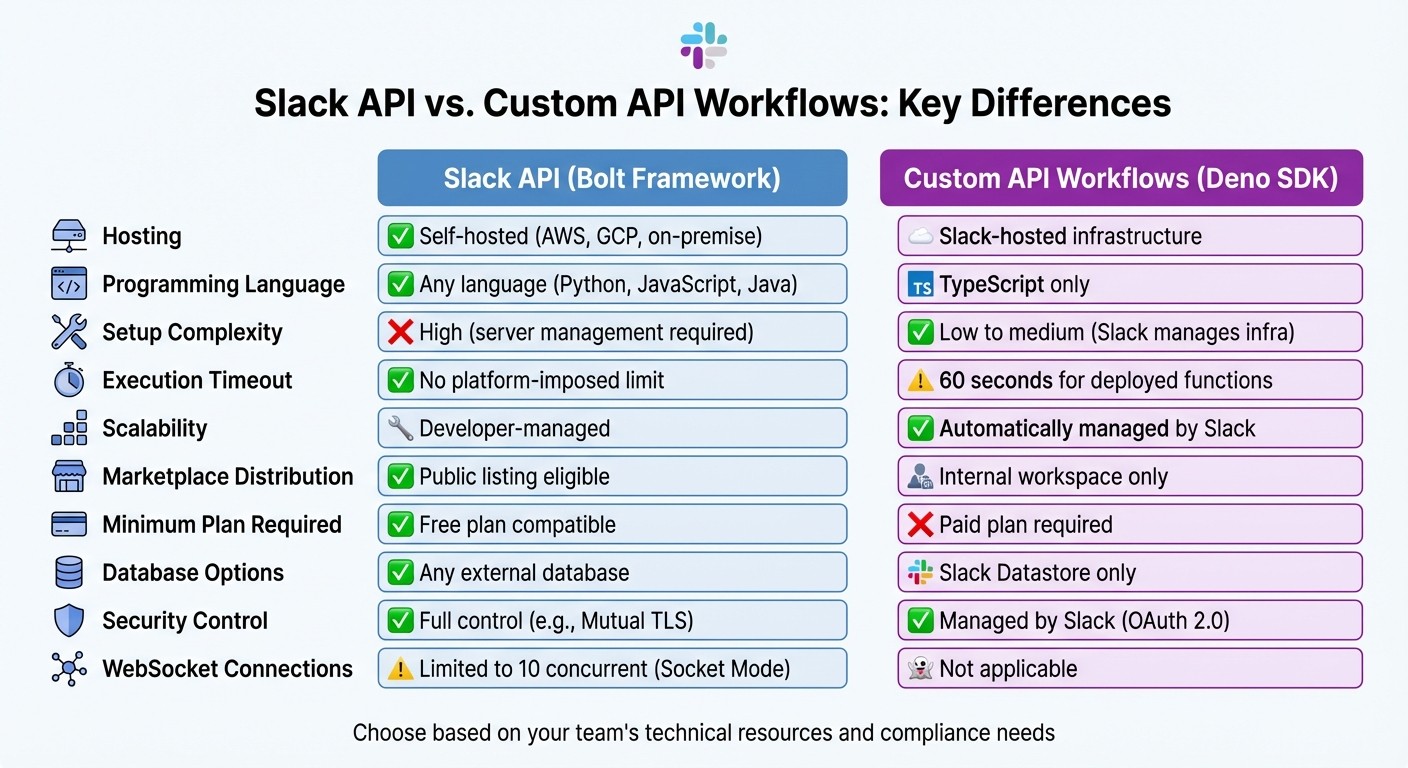
Slack API vs Custom API Workflows: Feature Comparison Chart
Understanding the differences between Slack API and custom API workflows is essential when deciding which approach fits your team's needs. Here's a breakdown of the key distinctions.
Control and Infrastructure: Slack API apps built with the Bolt framework require self-hosting (often utilizing webhooks to automate notifications), meaning you’re responsible for managing servers, databases, and scaling. On the other hand, custom workflows using the Deno Slack SDK are hosted by Slack, so the platform takes care of the infrastructure automatically [3][2].
Programming Language Support: With Slack API, you can use any HTTP-enabled programming language, such as Python, JavaScript, or Java. Custom workflows, however, are limited to TypeScript, running on Slack’s Deno runtime [5][2]. This can impact teams with diverse codebases or specialized language preferences.
Deployment and Accessibility: Slack API apps can be publicly listed in the Slack App Marketplace, making them ideal for external-facing solutions. In contrast, custom workflows are restricted to internal use within your Slack workspace [5][2]. For external product distribution, Slack API remains the go-to option.
Timeouts and Performance: Custom workflows come with strict timeouts - 60 seconds for deployed functions, 15 seconds in local development, and 10 seconds for interactive payloads [6][19]. Slack API apps don’t have platform-imposed time limits, but timely responses are still critical for maintaining performance.
Comparison Table
Feature | Slack API (Bolt Framework) | Custom API Workflows (Deno SDK) |
|---|---|---|
Hosting | Slack-hosted infrastructure [3] | |
Programming Language | Any language (Python, JavaScript) | |
Setup Complexity | High (server management required) | Low to medium (Slack manages infra) |
Execution Timeout | No platform-imposed limit | 60 seconds for deployed functions [6] |
Scalability | Developer-managed | Automatically managed by Slack |
Marketplace Distribution | Public listing eligible [2] | Internal workspace only [5] |
Minimum Plan Required | Free plan compatible [2] | |
Database Options | Any external database | Slack Datastore only [2] |
Security Control | Full control (e.g., Mutual TLS) | |
WebSocket Connections | Limited to 10 concurrent (Socket Mode) [18] | Not applicable |
For teams with compliance and data residency requirements, self-hosted Slack API apps offer the flexibility and control needed. On the flip side, teams looking to streamline deployment and avoid infrastructure management will find Slack-hosted custom workflows appealing, though these require a paid Slack plan [2][6]. This comparison should help you evaluate which approach aligns better with your team's priorities and technical constraints.
Which Approach Is Right for Your Distributed Team?
To find the best fit for your distributed team, it’s important to match your operational needs with the right tools. Let’s break down the options based on team resources, technical requirements, and workflow complexity.
For teams without engineering resources, Workflow Builder is a great starting point. This no-code tool simplifies routine task automation, making it accessible to non-technical users. However, its step limit can pose challenges for handling more intricate processes.
If your team includes developers but you want to avoid the hassle of managing infrastructure, the Deno Slack SDK is a solid choice. It runs on Slack's managed infrastructure and uses TypeScript, offering more customization than Workflow Builder. Keep in mind, though, that functions deployed with this approach have a 60-second timeout, so time-sensitive tasks need careful planning [2][6].
For teams that need full control - whether for specific language preferences, strict compliance requirements, or public app distribution - the Bolt framework is the way to go. Self-hosted Bolt apps unlock advanced APIs like Admin, SCIM, and Audit Logs [2], making them ideal for large teams handling complex security protocols or user provisioning tasks.
When to Use Slack API
The Slack API is ideal for teams working on tight deadlines or those without dedicated engineering resources. Its pre-built connectors and frameworks speed up deployment, making it a practical choice for building external-facing solutions designed for the Slack App Marketplace. It’s also a good fit for teams on Slack’s Free plan aiming to create basic apps. However, advanced features like Audit Logs require an Enterprise Grid plan.
When to Use Custom API Workflows
Custom workflows shine when you need to integrate proprietary systems, legacy databases, or internal tools that don’t have pre-built connectors. These workflows are particularly useful for distributed teams that must comply with regulations like GDPR, HIPAA, or SOC 2. They allow you to implement tailored security measures and maintain full control over data handling.
Custom workflows also excel in scenarios requiring complex automation logic - think branching, conditional statements, or orchestrating tasks across multiple systems. For example, starting in July 2025, conditional logic will be available for workflows on Business+ or Enterprise plans [5]. This feature is critical for advanced use cases like coordinating customer onboarding across CRM, billing, and support platforms.
How Question Base Enhances Slack Integrations

Whether you're relying on Slack API or custom workflows, both often fall short when it comes to delivering accurate, context-aware knowledge. Question Base bridges this gap by transforming Slack into a responsive knowledge assistant - no engineering expertise required.
Question Base for Distributed Teams
For distributed teams, a recurring issue is the fragmentation of critical information. Key details are often buried in trusted documentation tools, while employees repeatedly ask the same questions in Slack. Question Base solves this by directly connecting to your documentation sources and providing instant, AI-powered answers in Slack channels. This seamless integration simplifies access to information and ensures a smooth setup process.
To get started, install the app from the Slack App Marketplace, link your documentation tools, and invite the bot using /invite @questionbase. From there, the AI identifies questions and delivers verified, policy-compliant answers directly from your system of record. Unlike Slack AI, which depends on potentially outdated chat history, Question Base ensures responses are always accurate and up-to-date.
With a human-in-the-loop verification process, teams can review and refine AI-generated answers, maintaining both accuracy and compliance. This feature is particularly valuable for distributed teams that need a balance of automation and dependability. Additionally, Question Base tracks unanswered questions, helping you spot gaps in your documentation and prioritize updates. All this comes at a cost of $8 per user per month - less than half of Slack AI's $18 monthly fee [20] - while offering enterprise-grade security, including SOC 2 Type II compliance and optional on-premise deployment.
Combining API Workflows with Knowledge Management
When it comes to unstructured knowledge, Question Base works hand-in-hand with custom workflows. API workflows are great for automating structured tasks like approvals, assignments, and data syncing, but they often fall short when handling unstructured knowledge requests. Question Base fills this gap by adding a conversational AI layer that delivers verified information alongside your automated processes.
Feature | Custom API Workflows | Question Base |
|---|---|---|
Primary Purpose | Automate structured processes (tasks/approvals) | Provide AI-powered conversational knowledge |
Data Source | Triggers, forms, and third-party app actions | Trusted documentation (Notion, Confluence, etc.) |
Logic Type | Rule-based (If This, Then That) | Conversational AI (Natural Language Processing) |
Setup | Requires workflow design or custom coding | Plug-and-play installation |
Knowledge Handling | Static; requires manual updates | Dynamic; identifies gaps and updates living FAQs |
For example, while a custom workflow might manage IT tickets through multiple stages, Question Base can simultaneously address common questions like password resets or VPN access - reducing ticket volume before workflows are even activated. It also captures valuable insights from Slack discussions with a single click, converting informal conversations into structured, searchable documentation that evolves with your team. This synergy between automated workflows and dynamic knowledge management keeps distributed teams aligned and productive.
Conclusion
Deciding between Slack API and custom API workflows isn't about picking one over the other - it’s about tailoring the tools to fit your team’s needs. For simpler, repetitive tasks, Slack Workflow Builder is a great option, especially if coding isn’t your team’s strong suit. On the other hand, for more sophisticated logic and deeply integrated solutions, custom development using Bolt or Deno SDK might be the better path [8][23].
Before you dive in, take a step back and evaluate your current tools and infrastructure. Do a thorough inventory of your CRMs, documentation platforms, and support systems to check if Slack’s native connectors can handle your needs or if custom API development is necessary [21]. Don’t overlook hosting preferences either - Deno SDK apps are hosted by Slack, while Bolt apps require self-hosting, which could influence your decisions about security and infrastructure [3]. Hosting impacts both reliability and scalability, so weigh these factors carefully against your team’s technical requirements.
That said, the bigger challenge often goes beyond automation itself - it’s about managing the unstructured knowledge that flows through your workflows. While API workflows are excellent for structured tasks like ticket routing or approvals, they often fall short when it comes to handling conversational knowledge requests. This is where Question Base steps up. Unlike other tools, it focuses on delivering verified answers directly from your trusted documentation sources, avoiding AI-generated interpretations of chat history. At just $8 per user per month - less than half the cost of Slack AI’s $18 monthly fee - Question Base not only provides accurate answers but also identifies gaps in your documentation and transforms informal Slack conversations into searchable knowledge.
No matter which workflow strategy you choose - Slack API, custom workflows, or a mix of both - it’s crucial to keep your implementation in check. Conduct quarterly audits of app permissions and content lifecycles to avoid unnecessary sprawl and maintain security compliance [22]. As Slack continues to evolve as “the operating system for work,” the real key lies in blending automation with intelligent knowledge management to keep your team aligned, efficient, and productive [23].
FAQs
Which option is best for my team: Workflow Builder, Slack API, or custom workflows?
The right option hinges on your team’s technical requirements and how much customization you’re aiming for. Workflow Builder is perfect for non-technical users, offering a no-code way to automate straightforward tasks. Slack API, on the other hand, provides developers with the freedom to craft highly tailored solutions. If you’re looking for something in between, custom workflows combine advanced logic and integrations within Slack’s native setup, though they do demand some development effort. Your choice should align with your team’s complexity and available resources.
What are the biggest limits and timeouts I should plan for?
When working with Slack APIs, there are a couple of critical constraints to keep in mind: rate limits and timeouts.
Rate limits depend on the specific API method, workspace, and app in use. Most Web API methods typically allow between 20 and 30 requests per minute. If you exceed these limits, Slack may throttle your requests, temporarily blocking further calls.
Timeouts can happen if a request takes too long to process, often due to network delays or long-running operations.
To minimize problems:
Keep an eye on rate limit headers provided in API responses to track your usage.
Streamline how you handle requests to reduce unnecessary calls.
Implement retries with a backoff strategy to gracefully handle rate limit errors and avoid overwhelming the system.
These steps can help you navigate Slack API constraints more efficiently.
How do I handle secure, verified knowledge answers inside Slack?
To keep knowledge secure and verified within Slack, tools like Question Base offer enterprise-level accuracy and protection. Unlike Slack AI, which primarily pulls from chat history, Question Base integrates with trusted platforms like Notion and Salesforce. It provides features such as SOC 2 Type II compliance, robust encryption, and the option for on-premise deployment, ensuring responses are both reliable and backed by credible sources. This makes it a perfect fit for teams in HR, IT, and operations that handle sensitive information daily.